

Key takeaways
- Compare the best 5-bay DAS enclosures with RAID 5 support for photo, video and backup libraries. Three diskless models, checked against Amazon listings.
A five-bay direct attached storage enclosure with RAID 5 support solves a very specific problem: you want a large volume of local storage that keeps working when one drive fails, without running a network server or paying for a subscription. With five drives in a RAID 5 array, parity data is spread across every disk, so a single failed drive can be replaced and the array rebuilt from the surviving drives. That balance of usable capacity and protection is exactly why photographers, video editors and home archivists keep coming back to this format.
This guide covers three diskless enclosures that fit photographers building a photo library, video editors working from a single desk, and households or small offices consolidating backups onto one local volume. Every model below was chosen from its Amazon listing name and specifications, and each one supports RAID 5 across five 2.5-inch or 3.5-inch SATA drives.
Quick Picks
As an Amazon Associate we earn from qualifying purchases.
| Product | Best for | Key spec from title |
|---|---|---|
| ORICO 5-Bay RAID Enclosure 9958RU3 | Widest RAID mode choice | Up to 5x 22TB, RAID 0/1/3/5/10/JBOD/Clone |
| Yottamaster 5 Bay RAID Enclosure FS5RU3 | Largest stated capacity | Support 120TB (5x24TB), RAID 1/5/10/JBOD/CLONE |
| Syba 5 Bay RAID Enclosure SY-ENC50122 | Dual USB 3.0 and eSATA hosts | Support 120TB, RAID 0/1/5/10/JBOD |
How to Choose
RAID 5 Implementation and Rebuild Behaviour
RAID 5 is the reason to buy a five-bay enclosure rather than a simple multi-bay dock, so confirm how the enclosure builds the array. Some enclosures use a hardware switch on the rear panel, where you set the RAID mode with DIP switches and the controller handles parity. Others rely on bundled management software that runs on the host computer, which means the array depends on that software being installed and supported on your operating system. Either approach works, but a hardware switch keeps the array independent of any single computer. Also plan for rebuilds: with large modern drives, rebuilding an array after a drive failure takes many hours, and the array runs with no redundancy until the rebuild finishes.
Host Connection and Throughput
Every enclosure in this guide connects over USB, but the connector and the transfer ceiling shape what the array feels like in daily use. USB 3.0 links top out at 5 Gbps on paper, and a single mechanical hard drive array typically delivers well under that in practice, which is ample for photo libraries, backups and playback. Video editors moving large camera files will notice the difference between a 5 Gbps link and a faster one, so check the stated transfer figure in the listing and match it to the largest files you move regularly. Also look at the cable in the box: a Type-A connector suits older desktops, while a Type-C connector suits modern laptops.
Drive Compatibility and Capacity Ceiling
All three enclosures accept both 2.5-inch and 3.5-inch SATA drives, which matters because many buyers mix older laptop SSDs with large desktop hard drives when they first fill the bays. The capacity ceiling is the more important number, though, since it decides how long the enclosure stays useful. Two of the models below support up to 120TB in total, while the third supports up to 110TB, and those totals assume the largest drive size the listing allows in every bay. Buying drives of the same model and capacity is the practical rule for RAID 5: mismatched drives waste the extra space on the larger disks, because the array sizes every drive to match the smallest one.
Cooling, Power and Everyday Reliability
Five spinning drives in a compact metal box generate real heat, so cooling and power deserve as much attention as the RAID modes. Look for at least one built-in fan, and prefer designs where fan speed responds to temperature rather than running at a single fixed speed. The Syba model below includes an 80 mm fan with a built-in temperature sensor that controls fan speed. Power matters too: a 150W supply gives five drives enough headroom to spin up together, while a weaker adapter can cause dropouts when the array is under load. Aluminium housings help shed heat and damp vibration, and a locking tray reduces the chance of a drive being pulled out by accident.
The 3 Best Options
ORICO 5-Bay RAID Enclosure 9958RU3

The ORICO 9958RU3 is the most flexible enclosure in this guide, offering eight RAID modes where most rivals offer five or six. Its listing covers RAID 0, 1, 3, 5, 10, JBOD, Clone and ClearMode, so the same box can serve as a protected RAID 5 volume today and be reconfigured for a different layout later without buying new hardware. The aluminium housing, USB 3.0 Type-A link and 150W power supply suit a desktop that stays in one place, and the stated transfer figure of 235 MB/s keeps large photo and video imports moving at a sensible pace for a mechanical drive array.
Specs
- 5 bays for 2.5-inch and 3.5-inch SATA HDDs and SSDs
- Up to 22TB per drive, 110TB total capacity
- RAID 0, 1, 3, 5, 10, JBOD, Clone and ClearMode
- USB 3.0 Type-A interface, 235 MB/s data transfer
- Aluminium housing with 150W power supply
- 2-year warranty stated in the Amazon listing
- Compatible with desktop, laptop and tablet hosts
Best for: Buyers who want the widest choice of RAID modes in a single five-bay box.
Watch out for: The USB 3.0 Type-A link is the slowest host connection in this guide, so editors moving very large video files should weigh that against the extra RAID modes.
Yottamaster 5 Bay RAID Enclosure FS5RU3
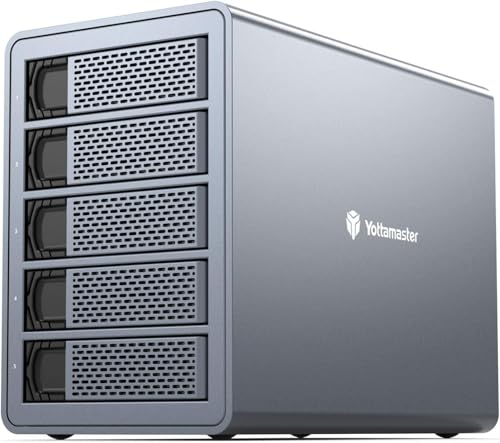
The Yottamaster FS5RU3 stands out for capacity, with its listing stating support for 120TB across five bays at 24TB per drive. That is the largest stated ceiling in this guide, which makes it the natural pick for a library that grows steadily, from a photo archive to a video collection. Its 150W aluminium design matches the ORICO on power headroom, and the RAID 1, 5, 10, JBOD and CLONE modes cover the layouts most home and studio buyers actually use. The USB 3.0 link keeps setup simple on any computer, and the direct attached storage design means the array appears as local storage with no network configuration.
Specs
- 5 bays for 3.5-inch and 2.5-inch SATA HDDs and SSDs
- Support for 120TB total, 5x24TB
- RAID 1, 5, 10, JBOD and CLONE modes
- USB 3.0 interface
- 150W aluminium enclosure
- Direct attached storage, diskless design
Best for: Growing libraries where the largest stated capacity ceiling matters most.
Watch out for: The listing names RAID 1, 5, 10, JBOD and CLONE only, so buyers who specifically want RAID 0 or RAID 3 should choose a different model in this guide.
Syba 5 Bay RAID Enclosure SY-ENC50122
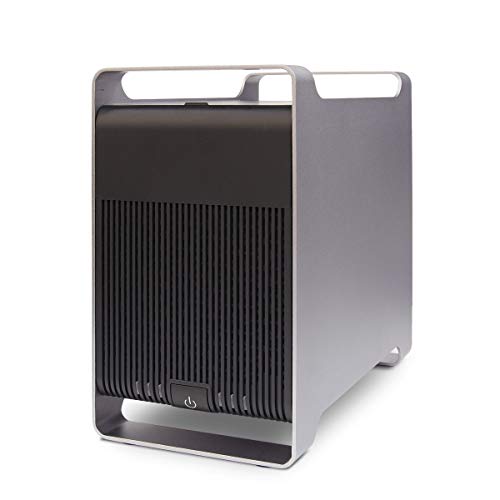
The Syba SY-ENC50122 is the only enclosure in this guide with both USB 3.0 and eSATA host connections, which gives it a useful second way to attach to a desktop that already has an eSATA port. Its listing supports RAID 0, 1, 5, 10 and JBOD, with a 120TB capacity ceiling that matches the Yottamaster, and it works across Linux, Mac and PC hosts. Cooling is a genuine highlight: a silent 80 mm fan with a built-in temperature sensor adjusts its speed to the temperature inside the box, keeping five drives cool without constant fan noise.
Specs
- 5 bays for 2.5-inch and 3.5-inch SATA drives
- Support for 120TB total capacity
- RAID 0, 1, 5, 10 and JBOD modes
- USB 3.0 and eSATA interfaces, 5 Gbps transfer
- Silent 80 mm cooling fan with built-in temperature sensor
- Compatible with Linux, Mac and PC hosts
- Brand IO CREST, manufacturer Syba
Best for: Desktop owners who want eSATA as well as USB, plus temperature-controlled cooling.
Watch out for: The enclosure is listed under the IO CREST brand with Syba as the manufacturer, so confirm the SY-ENC50122 model number on the listing before ordering.
Which One Fits Your Situation
A Photo Library That Keeps Growing
Choose the Yottamaster FS5RU3 when the library grows every month and you want the largest stated capacity ceiling in this guide. Its 120TB total, at 24TB per drive, gives a photo archive room to expand without replacing the enclosure, and RAID 5 keeps the collection available if one drive fails. Start with three matched drives in RAID 5 and add the remaining two later as the library grows.
A Video Editing Desk With One Host Computer
Choose the ORICO 9958RU3 when a single desktop handles the editing and you want the most RAID modes to experiment with. RAID 5 protects the working media, while the extra modes let you reconfigure the same box for a fast striped volume or a cloned pair if a project demands it. The 235 MB/s stated transfer figure suits mechanical drive editing, and the 150W supply keeps five drives stable during long imports.
A Home Backup Archive Shared Across Systems
Choose the Syba SY-ENC50122 when the archive serves more than one computer or operating system. Its USB 3.0 and eSATA links cover different hosts, and its Linux, Mac and PC compatibility means the same box can back up a Windows desktop and a Mac laptop without extra hardware. The temperature-sensing 80 mm fan also suits an enclosure that runs quietly in a living room or home office.
A First RAID Enclosure for a Small Office
Choose the ORICO 9958RU3 when the office is buying its first RAID enclosure and wants room to change its mind. The eight RAID modes cover every layout a small office is likely to need, from protected RAID 5 storage to simple JBOD expansion, and the 2-year warranty stated in the listing adds reassurance. Buy matched drives, set up RAID 5 from the start, and keep a spare drive on the shelf for the day one fails.
Common Mistakes
- Mixing drive brands, models or capacities in a RAID 5 array, which wastes the extra space on larger drives because the array sizes every drive to the smallest one.
- Treating RAID 5 as a backup, when it only protects against one failed drive and does nothing for deleted files, ransomware or a second failure during a rebuild.
- Filling all five bays with the largest drives available before checking the per-bay maximum in the listing, which can leave new drives unrecognised.
- Ignoring cooling and power, then wondering why an enclosure drops drives under load when five disks spin up on a weak adapter in a hot room.
- Buying an enclosure that only supports RAID 0 and RAID 1, then discovering it cannot build the RAID 5 array that the whole purchase was meant for.
Frequently Asked Questions
How many drives can fail in a RAID 5 array before data is lost?
One drive can fail in a RAID 5 array without losing data, because parity information spread across the surviving drives rebuilds the missing drive. A second failure before the rebuild finishes will lose the array, so replace a failed drive promptly and keep a separate backup of anything irreplaceable.
Do these enclosures come with hard drives included?
No, all three enclosures in this guide are sold diskless, which means you buy the drives separately. That lets you choose the drive size and model that fits your library, but it also means the enclosure alone stores nothing until you install at least three matched drives for RAID 5.
Can I use SSDs instead of hard drives in a five-bay RAID enclosure?
Yes, all three enclosures accept 2.5-inch SATA SSDs as well as 3.5-inch SATA hard drives. SSDs make the array faster and quieter, while hard drives give far more capacity for the same outlay, so many buyers use hard drives for the RAID 5 volume and keep SSDs for active projects.
What happens if I outgrow a five-bay RAID 5 enclosure?
You can replace the drives with larger ones, one at a time, rebuilding the array after each swap, though the usable capacity only grows once the smallest drive is gone. If the enclosure itself is the limit, move the array to a larger enclosure or add a second five-bay unit rather than forcing oversized drives into bays that cannot support them.
More from Amazon
Programs that pair well with the guide above. Offers and eligibility are set by Amazon and may change.
Free shipping on eligible items, Prime Video and more. Eligible new members can start with a free trial.
Start a Prime free trialAudiobooks and podcasts to listen to on the go. Eligible new members can start with a free trial.
Try Audible freeAd-free music streaming. Eligible new subscribers can start with a free trial.
Try Music Unlimited freeA free business account with business pricing and bulk-buying tools for work, shop or home office.
Create a business accountAs an Amazon Associate we earn from qualifying purchases.

Write Your Review
No reviews yet. Be the first to share your experience!