

Key takeaways
- Find the best 17-inch creator laptops with 64gb ram for video editing, photo work, and 3D projects, with large displays and roomy memory for heavy multitasking.
Introduction
A 17-inch laptop gives a creator something a smaller machine cannot: a full-size canvas. Timelines stretch out, photo libraries show more thumbnails at once, and 3D viewports leave room for tool panels without constant zooming and scrolling. When that large display is paired with 64GB of RAM, the machine can also hold big projects in memory — long 4K timelines, layered photo files, complex 3D scenes, and several heavy applications running side by side.
Memory matters because creative work is rarely a single application. An editor may have a video timeline open next to a color grading panel and a web browser full of reference material. A photographer may run a catalog application, a raw processor, and a retouching tool at the same time. A 3D artist may keep a modeling application, a texturing tool, and a render preview open together. With 64GB of memory, switching between those applications stays smooth, and large files load without constant swapping to storage.
This guide focuses on 17-inch laptops configured with 64GB of RAM. Every machine below has a 17-inch-class display and a 64GB memory configuration listed on Amazon. Because many laptop listings sell several memory configurations under one product page, confirm the 64GB configuration is selected before ordering. The picks below cover different creator needs: a dedicated creator workstation with a discrete graphics card, an AI-focused laptop with a neural processing unit, a gaming laptop whose graphics hardware also suits GPU-heavy creative work, and a memory-rich machine built around integrated graphics for lighter visual tasks.
At a Glance
| Laptop | Display | Processor | Graphics | Memory | Storage |
|---|---|---|---|---|---|
| HIDevolution 2024 MSI Creator Z17 HX Studio A14VGT | 17-inch QHD+ 165Hz touch | Intel Core i9-14900HX | NVIDIA GeForce RTX 4070 | 64GB DDR5 | 4TB SSD |
| NIMO 17.3-Inch AI Laptop | 17.3-inch FHD 144Hz | AMD Ryzen AI 9 HX 370 | AMD Radeon 890M | 64GB DDR5 | 2TB SSD |
| HP OMEN 17.3-Inch Laptop | 17.3-inch FHD IPS 144Hz | AMD Ryzen AI 9 365 | NVIDIA GeForce RTX 5060 | 64GB DDR5 | 2TB SSD |
| NIMO 17.3-Inch N177 Laptop | 17.3-inch FHD IPS | AMD Ryzen 7 8745HS | AMD Radeon 780M | 64GB DDR5 | 2TB SSD |
1. HIDevolution 2024 MSI Creator Z17 HX Studio A14VGT

View on Amazon: https://www.amazon.com/dp/B0DLCL553T
The MSI Creator Z17 HX Studio is the most clearly creator-focused machine in this group. MSI built the Creator Z17 line for content creation, and this HIDevolution configuration pairs a 17-inch QHD+ touch display with a high-refresh 165Hz panel, so timeline scrubbing and canvas work feel fluid. The QHD+ resolution gives more workspace than a standard full HD panel, which helps when editing panels, layers, and timelines share the screen.
Under the hood, the Intel Core i9-14900HX processor carries 24 cores, giving video encoding, 3D rendering, and photo batch processing plenty of parallel headroom. The NVIDIA GeForce RTX 4070 laptop graphics card adds hardware acceleration for video effects, 3D viewport work, and AI-assisted features in creative applications. Memory is 64GB of DDR5 running at 5600MHz in a two-module configuration, and storage is a roomy 4TB PCIe NVMe SSD, so large media libraries and project archives can live on the machine itself rather than on external drives.
HIDevolution is an authorized MSI build-to-order dealer, and this configuration ships with Windows 11 Pro and a three-year warranty through HIDevolution, which is a longer coverage period than the standard terms on many laptops. That matters for a machine that will serve as a daily workstation.
Considerations: this is a full-size 17-inch workstation, so it is heavier and larger than thin-and-light laptops, and its charger is sized for a high-performance machine. The touch display is a useful bonus for creators who sketch or scrub timelines by hand, but touch support varies by application, so check that the software you rely on makes good use of it. As with every machine in this guide, confirm the 64GB memory configuration is the one selected on the product page.
2. NIMO 17.3-Inch AI Laptop with Ryzen AI 9 HX 370
View on Amazon: https://www.amazon.com/dp/B0H7RXVCSM
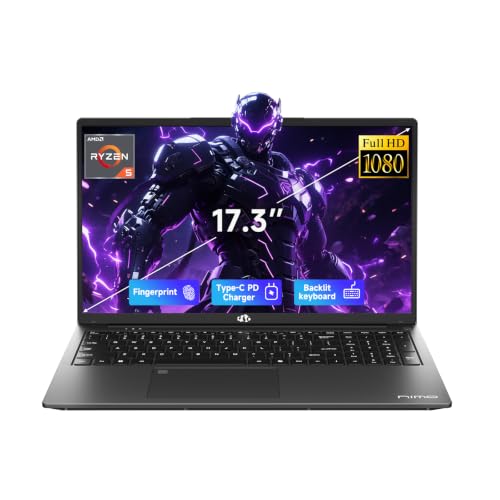
The NIMO 17.3-inch AI laptop is built around the AMD Ryzen AI 9 HX 370 processor, a 12-core chip with a dedicated neural processing unit rated at 50 TOPS. That NPU handles on-device AI features in Windows 11 and in creative applications that use local AI acceleration, such as background removal, noise reduction, and generative fill tools, without leaning entirely on the main processor or graphics chip.
The display is a 17.3-inch full HD panel with a 144Hz refresh rate, giving smooth motion for video preview and a large workspace for editing layouts. Memory is 64GB of DDR5 at 5600MHz, and storage is a 2TB SSD, a combination that suits creators who juggle large photo catalogs, long video projects, and several applications at once. Graphics come from the integrated AMD Radeon 890M, which handles photo editing, lighter video work, and general creative tasks, while keeping the chassis lighter and quieter than machines with discrete graphics.
Practical details suit a mobile workstation: a 100W USB-C PD charger, a fingerprint reader built into the touchpad, a backlit keyboard, Wi-Fi 6E, and a 75Wh battery. The laptop weighs about 4.6 pounds, which is on the lighter side for a 17.3-inch machine and makes it easier to move between a desk, a studio, and a client site.
Considerations: integrated graphics keep this laptop slim and light, but creators who rely on heavy GPU rendering or complex 3D scenes will get more from a machine with a discrete graphics card, such as the MSI Creator Z17 or the HP OMEN 17 below. The full HD resolution is also a step below QHD+ or 4K panels for pixel-level photo work, so creators who judge fine detail on screen may want an external monitor for final inspection. NIMO includes a two-year manufacturer warranty and a 90-day return window.
3. HP OMEN 17.3-Inch Laptop with RTX 5060

View on Amazon: https://www.amazon.com/dp/B0FH2T853S
HP sells the OMEN 17 as a gaming laptop, and its hardware also lines up well with creator workloads. The NVIDIA GeForce RTX 5060 laptop graphics card accelerates video effects, 3D rendering, and AI features in creative software, while the AMD Ryzen AI 9 365 processor provides 10 cores for encoding, batch exports, and multitasking. The 17.3-inch full HD IPS display runs at 144Hz, and the panel is listed with full sRGB coverage, which helps colors stay consistent when editing photos and video for the web.
Memory is 64GB of DDR5 at 5600MHz, and storage is a 2TB SSD, so large projects and media libraries fit comfortably alongside the applications themselves. The machine runs Windows 11 Pro and includes an RGB backlit keyboard, four USB 3.0 ports, and Wi-Fi 6. The listing also includes an external SSD in the bundle, giving extra portable storage for project backups and file transfers.
Considerations: at about 6.5 pounds, this is the heaviest machine in this guide, so it works best as a desk-based workstation that moves occasionally rather than a daily travel companion. Gaming laptops also tend to run their fans more audibly under sustained load, so creators who record audio in the same room should plan for that. The full HD resolution is adequate for editing, but creators who need finer on-screen detail should pair it with a higher-resolution external display for final color and detail checks.
4. NIMO 17.3-Inch N177 Laptop with Ryzen 7 8745HS

View on Amazon: https://www.amazon.com/dp/B0GN2768YD
The NIMO N177 is the most straightforward machine in this group: a 17.3-inch laptop with 64GB of DDR5 memory, a 2TB SSD, and an 8-core AMD Ryzen 7 8745HS processor. Its integrated AMD Radeon 780M graphics handle photo editing, writing, design work, and lighter video tasks, while the large memory pool keeps dozens of browser tabs, documents, and applications open without slowdowns. For creators whose work is mostly photo editing, writing, layout, and light video, integrated graphics are often enough, and the simpler hardware keeps the machine lighter and quieter.
The display is a 17.3-inch full HD IPS panel, and the laptop weighs about 4.6 pounds. Connectivity is generous: five USB ports in total, including USB4 and USB Type-C with power delivery and display output, an HDMI 2.1 port, and a microSD card reader for moving photos from a camera. A fingerprint reader is built into the touchpad, the keyboard is backlit, and the 75Wh battery supports long work sessions away from an outlet. The listing states a two-year manufacturer warranty and a 90-day return window, and the machine runs Windows 11 Home.
One useful detail for future planning is that the N177 lists two memory slots with a maximum supported memory of 256GB, so the memory can be expanded later if projects grow. That kind of upgrade path is worth noting, since many thin laptops have memory soldered in place with no way to add more.
Considerations: the Radeon 780M is integrated graphics, so heavy 3D rendering, complex effects work, and high-resolution video timelines will run more slowly than on the discrete-graphics machines above. The full HD panel is practical for general editing but not ideal for judging fine detail, so an external monitor helps for critical photo and video work. As with the other listings here, make sure the 64GB memory configuration is selected, since this model is also sold in smaller memory configurations.
How to Choose a 17-Inch Creator Laptop with 64GB RAM
Start with the display. Resolution and color coverage shape everything a creator sees. A QHD+ panel shows more timeline and more detail than a full HD panel, and a display with full sRGB coverage keeps colors consistent for web delivery. If the work ends up in print or in HDR video, look for wider color gamut support and consider an external monitor for final checks.
Next, weigh the graphics hardware. A discrete graphics card, such as the RTX 4070 or RTX 5060 in the machines above, accelerates video effects, 3D rendering, and AI features. Integrated graphics, such as the Radeon 890M or 780M, handle photo editing, design, and lighter video work while keeping the laptop lighter, quieter, and cooler. Match the graphics to the heaviest task in the workflow rather than to the lightest.
Processor cores matter for encoding and rendering. More cores shorten export times and keep the machine responsive while background tasks run. Memory speed also plays a role: the DDR5-5600MHz memory in several machines here moves data faster than older DDR4, which helps when scrubbing large timelines.
Storage should fit the working set. A 2TB SSD holds a healthy library of projects and media, while a 4TB SSD, as in the MSI Creator Z17, leaves more room before external drives become necessary. Fast NVMe storage also shortens load times for large files.
Ports decide how the laptop fits into a desk setup. Look for USB-C with display output, HDMI, and a card reader that matches the camera being used. A microSD or full-size SD reader saves carrying a separate adapter. Wi-Fi 6 or 6E keeps large file transfers to network storage moving.
Finally, check the memory configuration on the product page. Many 17-inch laptops are sold in 16GB, 32GB, and 64GB versions under a single listing, and the wrong configuration is an easy mistake. Confirm the listing shows 64GB before ordering, and check whether the memory is upgradeable later. The NIMO N177, for example, lists two memory slots and a 256GB maximum, while other machines may have memory soldered in place.
Fit and Installation Considerations
A 17-inch laptop needs a desk that fits it. Measure the workspace before ordering: these machines are roughly 15.6 inches wide and 10 inches deep, and the power brick adds to the footprint. A laptop stand or riser lifts the screen to eye level and leaves room for an external keyboard, which helps during long editing sessions. Good airflow matters too, so leave space around the vents and avoid placing the machine on soft surfaces that block intake grilles.
Setting up the machine takes a few steps. Install the creative applications first, then move project files and media libraries onto the internal SSD, keeping the fastest storage for active projects and external drives for archives. Calibrate the display if color accuracy matters for the work, and set the power plan so the machine favors sustained output while plugged in. For a dual-display setup, connect an external monitor through USB-C or HDMI and set the laptop display as the secondary screen or the tool panel, depending on the workflow.
For creators who move between locations, a padded sleeve sized for 17-inch laptops protects the machine in a bag, and a second charger kept at the main desk avoids daily cable wrangling. Keep the original packaging for the first weeks in case the machine needs to be returned, and register the warranty promptly, since coverage periods vary by brand and by seller.
Frequently Asked Questions
Is 64GB of RAM more than a creator needs?
It depends on the work. Photo editing, writing, and light video work run well on smaller memory configurations. 64GB helps when timelines grow long, photo catalogs grow large, 3D scenes grow complex, or several heavy applications run at the same time. It also leaves headroom for future projects and for software updates that use more memory over time.
Do I need a discrete graphics card for creative work?
Not always. Integrated graphics handle photo editing, design, and lighter video editing. A discrete graphics card helps with GPU-accelerated video effects, 3D rendering, and AI features in creative applications. Creators who render often or work with effects-heavy timelines will notice the difference, while creators focused on stills and documents may not.
Can I add more memory to a 17-inch creator laptop later?
It depends on the model. Some laptops have two memory slots and support upgrades, such as the NIMO N177, which lists a maximum supported memory of 256GB. Others have memory soldered to the main board, which cannot be changed after purchase. Check the memory section of the listing and the manufacturer’s specifications before deciding.
Is a 17-inch laptop practical to carry every day?
A 17-inch laptop works well as a portable workstation that moves between a desk, a studio, and a client site, especially the lighter models around 4.6 pounds. Heavier models, such as the HP OMEN 17 at about 6.5 pounds, suit a mostly desk-based setup. A padded sleeve and a bag with a dedicated laptop compartment make transport easier.
Conclusion
The best 17-inch creator laptops with 64gb ram pair a large workspace with enough memory for demanding projects. The HIDevolution MSI Creator Z17 HX Studio leads for heavy creative work, with a QHD+ touch display, a 24-core processor, discrete RTX graphics, and 4TB of storage. The NIMO 17.3-inch AI laptop suits creators who want on-device AI acceleration and a lighter chassis, while the HP OMEN 17 brings discrete RTX graphics and a color-accurate panel to GPU-heavy editing. The NIMO N177 covers memory-heavy multitasking and photo work without the weight and heat of a discrete graphics card.
Whichever machine fits the workflow, confirm the 64GB memory configuration on the product page before ordering, and check the display, graphics, and port layout against the work that will fill most days. A 17-inch laptop with 64GB of RAM is a long-term workstation, so matching it to the actual workload matters more than any single specification.
As an Amazon Associate, we earn from qualifying purchases.
More from Amazon
Programs that pair well with the guide above. Offers and eligibility are set by Amazon and may change.
Free shipping on eligible items, Prime Video and more. Eligible new members can start with a free trial.
Start a Prime free trialAudiobooks and podcasts to listen to on the go. Eligible new members can start with a free trial.
Try Audible freeAd-free music streaming. Eligible new subscribers can start with a free trial.
Try Music Unlimited freeA free business account with business pricing and bulk-buying tools for work, shop or home office.
Create a business accountAs an Amazon Associate we earn from qualifying purchases.


Write Your Review
No reviews yet. Be the first to share your experience!