

Key takeaways
- Beginner: Look for adjustable levels, take-back functions, hints, and an adaptive mode. A computer that can make occasional plausible mistakes is more useful than an engine that crushes every game.
- Improving player: Prioritise move-history display, legal-move assistance, opening setup, and the ability to save or export games.
- Club player: Seek adjustable engine time, analysis after the game, a large board, reliable piece detection, and software that supports PGN files.
- Advanced player: Engine strength is rarely the limiting factor. Choose hardware with accurate sensors, low-latency connectivity, stable software, and configurable time controls.
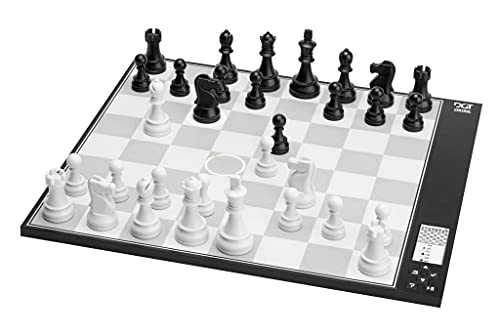
The best chess computers for 2026 are the DGT Centaur for simple adaptive training, the Millennium ChessGenius Exclusive for a traditional standalone board, and the Chessnut Air+ for players who want physical-board sensors and access to modern chess software.
Your choice depends less on the maximum advertised rating than on how you train. Beginners usually benefit from adjustable opposition, hints, and a forgiving response time. Experienced players tend to value accurate piece detection, a larger tournament-size board, engine choice, and the ability to analyse games after playing.
Our top picks


As an Amazon Associate we earn from qualifying purchases at no extra cost to you. Ratings are shown as listed on Amazon.
Best chess computers at a glance
| Model or type | Best for | Board and sensing | Playing-strength range | Typical 2026 market range |
|---|---|---|---|---|
| DGT Centaur | Beginners and relaxed solo play | Approx. 40 cm board; pressure-sensitive piece recognition; integrated display | Adjustable adaptive engine, from beginner-friendly to strong club level | About $350–$500 |
| Millennium ChessGenius Exclusive | Standalone training without a phone | Approx. 40 × 40 cm wooden board; piece recognition; LCD menu | Multiple levels, including very strong computer opposition | About $300–$450 |
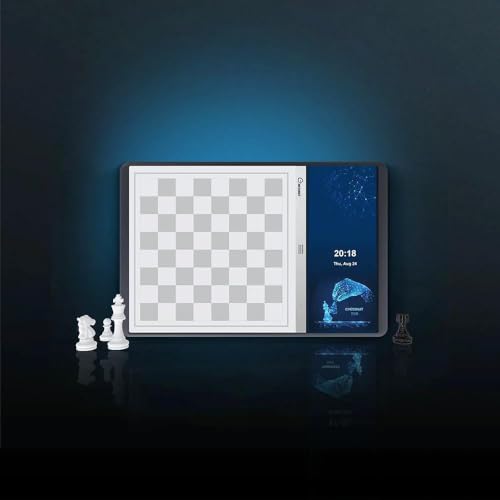
| Chessnut Air+ | Portable sensor-board training | Approx. 33 cm board; magnetic piece recognition; Bluetooth connectivity | Depends on the connected app or engine | About $300–$400 |
| Chessnut Pro | Large-board online and engine practice | Approx. 43 cm board; electronic piece recognition; rechargeable battery | Depends on software; suitable for serious club practice | About $600–$800 |
| Electronic travel computer | Low-cost occasional practice | Usually 20–30 cm plastic board; pressure or magnetic sensors | Often beginner to intermediate strength | About $50–$180 |
Prices are broad market ranges rather than fixed recommendations. Regional taxes, wood finishes, included pieces, software subscriptions, and promotions can change the final price considerably.
Our picks by playing situation
Best for a beginner: DGT Centaur
The DGT Centaur is the easiest recommendation for a new player who wants the computer to adjust its challenge rather than simply select a numbered difficulty level. Its adaptive system aims to provide a competitive game without immediately producing engine-like tactics that are far beyond a beginner’s understanding.
The integrated display keeps the position, move information, and menus on the board, so there is no requirement to manage a phone or tablet while learning. That matters for players who want chess to feel like a physical activity rather than an app session. The main limitation is software flexibility: this is an appliance-like training board, not an open platform for installing every modern engine.
Choose it if you want quick setup, quiet solo games, and a difficulty curve that can grow with a casual player. Choose something else if online play and engine experimentation are priorities.
Best standalone chess computer: Millennium ChessGenius Exclusive
The ChessGenius Exclusive suits players who want a conventional wooden electronic board with no dependence on a mobile device. It provides selectable playing levels and a familiar computer-chess interface, making it useful for openings, tactical repetition, and endgame drills.
Its advantage over many inexpensive travel computers is the larger board and more serious construction. The wooden playing surface is more pleasant for long sessions, while the piece-recognition system lets you move physical pieces instead of pressing coordinates on a keypad. It is also a good choice for a shared home board because another person can sit down and play without learning an app.
Its coaching is functional rather than course-like. You should not expect the same interactive lessons, cloud analysis, or online ecosystem found in a connected sensor board. Buy it for dependable solo games, not for a feature-heavy digital platform.
Best for connected training: Chessnut Air+
The Chessnut Air+ is a strong fit for players who want a real board while using software on a phone, tablet, or computer. Physical piece recognition transfers moves to compatible chess applications, allowing the board to serve as an interface for engine games, online play, game imports, and analysis.
Its roughly 33 cm footprint makes it easier to store than a full-size board, and the rechargeable design is practical for moving between rooms or taking to a club. The trade-off is that the coaching experience depends on the connected software. The board itself detects moves; it does not automatically turn every game into a structured lesson.
Before buying, confirm compatibility with the exact operating system and chess service you use. Bluetooth pairing, app permissions, and online-platform support can matter more than the board’s sensor accuracy.
Best for a serious club player: Chessnut Pro
The Chessnut Pro is aimed at players who prefer a larger playing surface and want a sensor board for regular training. The extra board area makes long games more comfortable, especially for adults who find travel-size squares cramped. It is also better suited to displaying a physical game for another person to follow.
Because it is primarily a connected board, its effective strength is determined by the engine or service running on the attached device. That can be a major advantage: an advanced player can use a moderate sparring level for practical training, then switch to a stronger engine for analysis. The added size and electronics also mean greater cost and more storage space than a simple standalone unit.
Playing strength: do not buy by rating alone
Chess-computer ratings are difficult to compare across manufacturers. A level labelled “2000” on one device may not correspond to a 2000 rating on another platform. Some levels deliberately weaken the engine by slowing calculation, making inaccurate moves, or adding human-style mistakes.
- Beginner: Look for adjustable levels, take-back functions, hints, and an adaptive mode. A computer that can make occasional plausible mistakes is more useful than an engine that crushes every game.
- Improving player: Prioritise move-history display, legal-move assistance, opening setup, and the ability to save or export games.
- Club player: Seek adjustable engine time, analysis after the game, a large board, reliable piece detection, and software that supports PGN files.
- Advanced player: Engine strength is rarely the limiting factor. Choose hardware with accurate sensors, low-latency connectivity, stable software, and configurable time controls.
Decision matrix before you buy
| Your situation | Most suitable choice | Why | What to avoid |
|---|---|---|---|
| Under $180, occasional use, limited space | Electronic travel computer | Low cost, compact storage, no app setup | Paying for premium wood when sessions are infrequent |
| Beginner, daily home practice, no phone wanted | DGT Centaur | Adaptive difficulty and integrated controls | Complex connected boards with several apps to configure |
| Adult learner, wants a traditional board | ChessGenius Exclusive | Large wooden surface and standalone operation | Small plastic units with cramped squares |
| Online play several times a week | Chessnut Air+ or Chessnut Pro | Physical pieces with connected-platform support | Standalone computers with no game export |
| Advanced player analysing many games | Large connected sensor board | Engine choice, PGN workflows, and post-game analysis | Boards whose software ecosystem is closed or unsupported |
Board sensors and coaching features that matter
Pressure-sensitive boards detect a piece when it is placed on a square, while magnetic or electronic identification systems determine which piece moved. The latter is more useful for reliable game recording, but no sensor system eliminates the need to place pieces neatly in the centre of each square.
For coaching, check whether the computer offers legal-move warnings, hints, takebacks, blunder alerts, opening positions, and an explanation after the game. These features are different from simply having a strong engine. A very powerful engine may show the best move without explaining the strategic reason it works.
Connected boards also introduce practical questions: Is the companion app still supported? Can games be exported as PGN? Does the board reconnect automatically? Can it play offline? Those answers often determine long-term value more than a small difference in sensor technology.
Ownership, battery, and maintenance
A physical chess computer takes more room than its headline dimensions suggest. Allow at least 10 cm of clear space around the board for captured pieces, a power cable, and comfortable hand movement. A 40 cm board with pieces can occupy roughly 60 × 50 cm during play.
For a simple cost-per-use comparison, a $400 board used four times a week for three years provides about 624 sessions. The hardware cost is approximately $0.64 per session before electricity and software fees. A $120 travel computer used once a week for the same three years provides about 156 sessions, or approximately $0.77 per session. The more expensive board can therefore be better value when it is used consistently.
Keep boards away from drinks, direct heat, and heavy sunlight. Wipe pieces with a dry or barely damp soft cloth; do not spray cleaner into squares, buttons, ports, or seams. Rechargeable batteries eventually lose capacity, and replacement availability should be checked before purchase. The parts most likely to cause frustration are usually charging cables, worn buttons, loose piece labels, and software pairing—not the chess engine itself.
Final verdict
Buy the DGT Centaur for beginner-friendly adaptive play, the Millennium ChessGenius Exclusive for a polished standalone wooden board, the Chessnut Air+ for portable connected training, and the Chessnut Pro when a larger sensor board and serious software workflow justify the extra cost. The best chess computers are the ones whose difficulty, feedback, and setup match how often you will actually sit down and play.

Write Your Review
No reviews yet. Be the first to share your experience!