

Key takeaways
- Three flight simulation yokes for combat flight simulation compared on yoke travel, switch panels, throttle quadrants, trim controls and platform fit.
A yoke is a different commitment from a stick, and that difference matters most in combat flight simulation. A stick suits fast jets and tight formation work, while a yoke suits the heavier aircraft that fill many combat campaigns: bombers, transports, patrol aircraft, and propeller-driven fighters flown with two hands on the controls. The real decision is not which yoke looks most like a cockpit, but which one gives you steady pitch and roll control, enough switches for engine and system management, and a throttle setup that stays usable during long sorties.
This guide is for combat flight sim pilots who fly yoke-controlled aircraft in DCS World, IL-2 Sturmovik, and Microsoft Flight Simulator combat scenarios, for newcomers moving from a gamepad or a basic stick, and for returning sim pilots rebuilding a desk setup around a yoke. The picks below were chosen from Amazon product titles and listing details, with yoke travel, switch panels, throttle quadrants, trim controls, and platform compatibility checked against each listing.
Quick Picks
As an Amazon Associate we earn from qualifying purchases.
| Product | Best for | Key spec from title |
|---|---|---|
| Honeycomb Aeronautical Alpha Flight Controls Yoke and Switch Panel | Combat sim pilots who want a switch panel built into the yoke base | Yoke and switch panel for PC flight simulation |
| Logitech G PRO Flight Yoke System | New combat sim pilots who want a yoke and throttle quadrant in one box | 3 modes, 75 programmable controls, steel shaft, USB, PC |
| Turtle Beach VelocityOne Flight Universal Control System | Xbox and Windows combat sim pilots who want a yoke, throttle, trim wheel, and display in one unit | Yoke handle, throttle quadrant, trim wheel, and rudder controls for Xbox and Windows PCs |
How to Choose
Yoke travel and centring
Yoke travel decides how much physical movement you have for pitch and roll, and that range matters during combat manoeuvres. A yoke with a wide rotation lets you hold a shallow bank or a gentle climb without sitting near the end of its travel, while a short throw can make fine aiming and formation flying feel twitchy. Centring matters just as much: a yoke that returns to neutral helps you release pressure after a turn and settle back onto a heading. Check the rotation figure in the listing, think about how much desk space the yoke needs at full deflection, and favour a solid shaft and a smooth mechanism over a light, loose feel.
Switches and programmable controls
Combat flying is a systems exercise as much as a handling exercise, so the switches on and around the yoke carry real work. Engine start, magnetos, lights, flaps, gear, trim, and weapon-related commands all need homes that you can reach without looking away from the screen. A built-in switch panel keeps those functions in one place, while a yoke with many programmable controls lets you map commands across modes for different aircraft. Count the controls in the listing, not just the buttons on the grips, and check whether the panel uses labelled toggle switches or unlabelled buttons. Labelled switches are easier to learn by touch during a sortie.
Throttle, trim, and rudder control
A yoke alone does not fly a combat aircraft. You also need a throttle you can hold at a precise setting, a trim control that takes the strain out of a long climb or descent, and a way to coordinate rudder during turns, takeoffs, and landings. Some yokes in this guide include a throttle quadrant in the box, while others put a trim wheel and rudder controls on the yoke unit itself. Decide before you buy whether you already own a separate throttle or rudder pedals, and whether the yoke you choose leaves room for them on your desk. A built-in trim wheel is useful for bomber and transport sorties.
Platform and desk fit
Platform compatibility is the easiest detail to get wrong, so check it in the listing before you order. One yoke in this guide is listed for Windows and Mac, one is listed for Windows on PC, and one is listed for Xbox consoles and Windows PCs. A yoke that works on your console will not help if your combat sim runs on a different system, and a PC-only yoke will not help an Xbox pilot. Desk fit is the second check: measure the depth of your desk, confirm that the clamps suit its thickness and edge shape, and leave space for the yoke to move through its full travel without hitting nearby desk items.
The 3 Best Options
Honeycomb Aeronautical Alpha Flight Controls Yoke and Switch Panel

The Honeycomb Alpha suits combat sim pilots who fly heavier aircraft and want engine and system switches within reach of the yoke, rather than spread across a keyboard. Its full rotation gives you room for gentle, deliberate control inputs during bombing runs, patrol legs, and formation flying, and the integrated switch panel keeps start, lighting, and system functions in one labelled place. This is the pick for a pilot who values a calm, procedural cockpit and is building a desk setup around a yoke, with a separate throttle or rudder pedals added alongside it.
Specs
- Full 180-degree rotation yoke
- Solid steel shaft with dual ball bearings
- Integrated LED-backlit switch panel
- Platform listed as Windows, Mac OS X, and Windows 7
- Brand Honeycomb Aeronautical, model name Alpha, model number AER-HONEY
Best for: Combat sim pilots flying bombers, transports, and propeller-driven aircraft who want a built-in switch panel.
Watch out for: Confirm that your desk edge suits the mounting system and that you have a separate throttle plan, since the listing centres on the yoke and switch panel.
Logitech G PRO Flight Yoke System
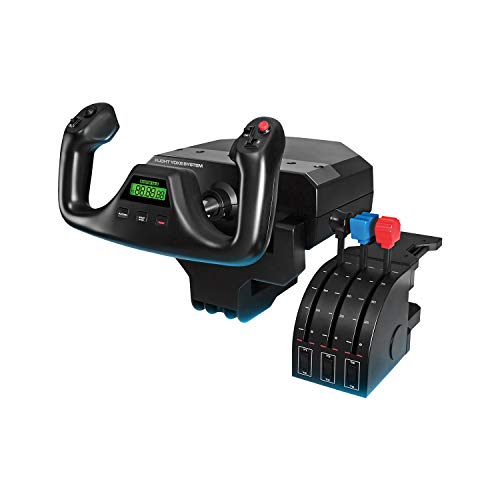
The Logitech G PRO Flight Yoke System suits a newcomer to combat flight simulation who wants a complete starting point in one box, with a yoke and a throttle quadrant included. Its three modes and 75 programmable controls give you room to map engine, flap, gear, trim, and view commands across different aircraft, and the steel shaft gives the yoke a firm, steady feel during longer sorties. The included throttle quadrant is a practical advantage for combat flying, where throttle changes, mixture, and propeller control often need separate levers within easy reach of your left hand.
Specs
- Professional simulation yoke and throttle quadrant
- 3 modes and 75 programmable controls
- Configurable knobs and steel shaft
- USB connection, platform listed as Windows, PC
- Item model number 945-000067, dimensions 18.9 x 15.8 x 9.1 inches
Best for: New combat sim pilots who want a yoke and throttle quadrant together for a first desk setup.
Watch out for: Check the desk clamp fit and the space the throttle quadrant needs beside the yoke before you order.
Turtle Beach VelocityOne Flight Universal Control System
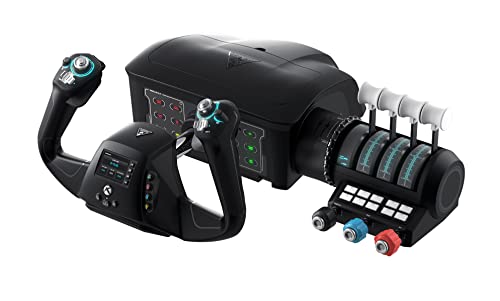
The Turtle Beach VelocityOne Flight suits a combat sim pilot who plays on Xbox as well as Windows, and who wants a single unit that covers yoke, throttle, trim, and rudder control without adding separate panels. Its full-colour Flight Management Display gives you a central place to check settings and configure the system, while the modular throttle quadrant and integrated trim wheel keep the controls you use most during a sortie close at hand. This is the most self-contained pick in this guide, and it fits a pilot who wants one connected unit rather than a collection of separate controllers.
Specs
- Yoke handle, throttle quadrant, trim wheel, and rudder controls
- Realistic 180-degree yoke with a non-contact hall-effect sensor
- Modular throttle quadrant with customizable lever handles
- Full-colour Flight Management Display
- Listed for Xbox Series X and Xbox Series S, Xbox One, and Windows 10 and 11 PCs
Best for: Xbox and Windows combat sim pilots who want yoke, throttle, trim, and rudder control in one system.
Watch out for: Confirm that your combat sim and platform match the listing, and check that the unit fits your desk with room for full yoke travel.
Which One Fits Your Situation
You fly bombers and transports most of the time
Choose the Honeycomb Aeronautical Alpha Flight Controls Yoke and Switch Panel. Its wide rotation and integrated switch panel suit long, procedural sorties in heavier aircraft, where steady handling and labelled engine and system switches matter more than rapid stick movements. Add a throttle quadrant and rudder pedals beside it to complete the setup.
You are starting combat flight simulation from scratch
Choose the Logitech G PRO Flight Yoke System. The yoke and throttle quadrant arrive together, the three modes and 75 programmable controls give you room to grow as you learn new aircraft, and the USB connection for Windows PC keeps the first setup simple. Spend your first weeks learning one aircraft well before adding more hardware.
You fly on Xbox and Windows
Choose the Turtle Beach VelocityOne Flight Universal Control System. It is the only pick in this guide listed for Xbox Series X and Xbox Series S, Xbox One, and Windows PCs, so it covers a pilot who moves between console and PC combat sims. The built-in trim wheel, throttle quadrant, and Flight Management Display also reduce the number of separate units on your desk.
You want one self-contained unit on a small desk
Choose the Turtle Beach VelocityOne Flight Universal Control System. Its yoke, throttle quadrant, trim wheel, and rudder controls sit in one system, which suits a smaller desk where a separate switch panel and throttle quadrant would crowd the space. Measure the unit against your desk depth first, and keep the area in front of it clear for full yoke travel.
Common Mistakes
- Buying a yoke for a fast-jet campaign that is really built around a stick, then finding the control style fights the aircraft.
- Ignoring platform compatibility and ordering a PC-only yoke for an Xbox setup, or the reverse.
- Forgetting the throttle, trim, and rudder plan, and ending up with a yoke but no comfortable way to manage power or coordination.
- Clamping a yoke to a thin or rounded desk edge without checking the clamp fit, then finding it slips during a sortie.
- Mapping every command at once instead of learning the essential engine, trim, flap, and gear controls first, then adding the rest.
Frequently Asked Questions
Is a yoke better than a stick for combat flight simulation?
It depends on the aircraft you fly. A yoke suits bombers, transports, patrol aircraft, and many propeller-driven fighters, where two-handed control and steady inputs fit the flight model. A stick suits fast jets and aerobatic combat aircraft, where rapid roll and pitch changes matter more. Choose the controller that matches the aircraft in your campaign, not the one that looks most impressive on a desk.
Do I need rudder pedals with a flight simulation yoke?
You need some form of rudder control, but it does not have to be pedals at first. The Turtle Beach VelocityOne Flight lists integrated rudder controls, while the other picks in this guide pair with a separate throttle quadrant or pedals. Pedals give finer coordination during takeoffs, landings, and turns, so add them when your flying moves beyond straight-and-level sorties.
Can I use these yokes with DCS World and IL-2 Sturmovik?
Yokes in this guide are controllers that send axis and button inputs to your sim, so the sim and the platform matter more than the yoke brand. Check that your sim runs on the platform listed for the yoke, then map the axes and buttons inside the sim. Spend time calibrating the yoke so the aircraft holds a steady heading.
What should I check before I buy a flight simulation yoke?
Check platform compatibility, yoke rotation, the number and type of switches, and whether a throttle quadrant is included or must be bought separately. Measure your desk depth and edge thickness for the clamps, and leave room for full yoke travel. Finally, confirm the listing still shows a buyable offer on Amazon before you order, since stock and sellers change over time.
More from Amazon
Programs that pair well with the guide above. Offers and eligibility are set by Amazon and may change.
Free shipping on eligible items, Prime Video and more. Eligible new members can start with a free trial.
Start a Prime free trialAudiobooks and podcasts to listen to on the go. Eligible new members can start with a free trial.
Try Audible freeAd-free music streaming. Eligible new subscribers can start with a free trial.
Try Music Unlimited freeA free business account with business pricing and bulk-buying tools for work, shop or home office.
Create a business accountAs an Amazon Associate we earn from qualifying purchases.





Write Your Review
No reviews yet. Be the first to share your experience!