

Key takeaways
- Compare four 4TB portable SSDs for moving footage and photo archives, judged on interface speed, sustained offloads, sealing and pocket-friendly size.
A shuttle drive earns its place in a media kit only if it swallows a full day of cards without slowing to a crawl halfway through, then survives being tossed into a bag for the trip home. Headline speed alone does not settle that choice, because the port on your laptop, the length of the copy job and the shell around the flash all change the result in the field.
This shortlist serves location photographers and videographers offloading on set, editors carrying projects between rooms or studios, and archivists moving whole libraries by hand. Every pick is the 4TB variant of its line, chosen from the names and specification fields published on its Amazon product page, so the capacities and speeds below are the ones attached to each listing.
Quick Picks
As an Amazon Associate we earn from qualifying purchases
| Product | Best for | Key spec from title |
|---|---|---|
| Samsung T9 Portable SSD 4TB | Fastest transfers between Gen 2×2 workstations | USB 3.2 Gen 2×2, sequential read up to 2,000 MB/s |
| SanDisk Extreme PRO Portable SSD 4TB | Card offloads on rough locations | USB 3.2 Gen 2×2, up to 2,000 MB/s read and write, IP65 |
| Crucial X10 Pro Portable SSD 4TB | A full archive carried in a jacket pocket | Up to 2,100 MB/s read and 2,000 MB/s write |
| Samsung T7 Shield Portable SSD 4TB | Mixed Mac and Windows kits on Gen 2 ports | USB 3.2 Gen 2, up to 1,050 MB/s, rugged water and dust resistance |
How to Choose
Match the interface generation to the ports you actually own
The fastest drives here speak USB 3.2 Gen 2×2, a 20 Gb/s mode that many laptops never shipped with. Current Macs are the big example: their USB-C ports top out at Gen 2 speeds, so a Gen 2×2 drive plugged into a MacBook behaves like a Gen 2 drive no matter what the box promises. Before paying for the higher tier, check the port specification of every machine the drive will visit, including the ageing workstation at the studio. If even one regular stop lacks Gen 2×2, a strong Gen 2 drive can be the more honest purchase.
Think about the whole copy job, not the first ten seconds
Media transport means long, unbroken writes: a 512 GB card dumped in one go, or a project folder with hundreds of gigabytes moving at the end of a shoot day. Short benchmark bursts flatter almost every drive, while sustained transfers expose how a model behaves once its cache is exhausted and the housing warms up. For offload duty, weigh the published write figure as heavily as the read figure, and favour drives whose listings quote both. A shuttle that holds its pace for forty minutes beats a sprinter that fades while the crew waits.
Decide how much sealing and armour the route demands
A drive that lives on a desk needs less protection than one riding in a camera bag through rain, dust and the occasional drop onto concrete. Published ingress ratings give a comparable scale: IP65, quoted on two picks below, means dust-tight construction and resistance to water jets. Rubberised shells and stated drop heights, such as the T9’s resistance to falls of up to three metres, matter when the drive travels loose among lenses and batteries. Match the armour to the journey rather than buying the toughest shell by default.
Weigh size, weight and the cable in the bag
Four terabytes of flash now fits in a housing smaller than a deck of cards, yet the small print still shapes daily use. Tiny drives like the X10 Pro disappear into a pocket but ship with short cables that can leave the unit dangling from a laptop port on a crowded desk. Check the listed dimensions and what cable sits in the box, and consider whether a lanyard loop or a flat base suits how you work. A drive that is awkward to plug in on location gets left behind, and a drive left behind moves nothing.
The 4 Best Options
Samsung T9 Portable SSD 4TB

The T9 is the straightforward flagship choice for crews whose machines can feed it. Its Gen 2×2 interface and sequential read figure of up to 2,000 MB/s suit back-to-back card offloads and whole-project moves between editing stations, and the textured rubberised shell is built to be gripped and dropped rather than babied. Samsung quotes drop resistance up to three metres, which fits a drive that rides in a working bag. For a Windows-based pipeline with the right ports, this is the pick that asks the fewest compromises on pace.
Specs
- Capacity: 4TB
- Model: MU-PG4T0B/AM
- Interface: USB 3.2 Gen 2×2 (20 Gb/s)
- Sequential read: up to 2,000 MB/s
- Drop resistance: up to 3 metres
- Colour: Black
Best for: Editors and DITs moving large footage volumes between Gen 2×2-equipped workstations.
Watch out for: Confirm your computers have USB 3.2 Gen 2×2 ports; on Macs and Gen 2 machines the drive runs at Gen 2 speeds, and confirm the listing shows a live offer before ordering.
ASIN: B0CHFSZX9W
SanDisk Extreme PRO Portable SSD 4TB
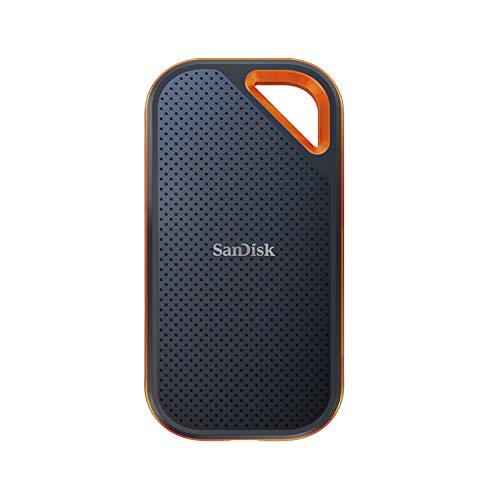
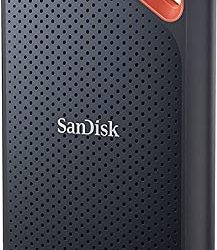
SanDisk aims this line squarely at photographers and filmmakers working away from shelter, and the listing backs that up with an IP65 rating for water and dust resistance inside a forged aluminium chassis. Unusually, the published figures quote up to 2,000 MB/s for both reading and writing, which is the balance card-offload work actually needs. The title of the current listing also flags updated firmware, a detail worth noting on a drive that will hold the only copy of a shoot during the ride back. For location work in poor weather, this is the most convincing package here.
Specs
- Capacity: 4TB
- Model: SDSSDE81-4T00-G25
- Interface: USB-C, USB 3.2 Gen 2×2
- Read speed: up to 2,000 MB/s
- Write speed: up to 2,000 MB/s
- Resistance: IP65 water and dust resistance
- Security: hardware encryption listed among special features
Best for: Location photographers and videographers offloading cards outdoors or in dusty venues.
Watch out for: The listing highlights updated firmware, so check for firmware updates after purchase; older listings of this model quoted IP55, so verify the page you buy from states IP65.
ASIN: B08RX3343D
Crucial X10 Pro Portable SSD 4TB
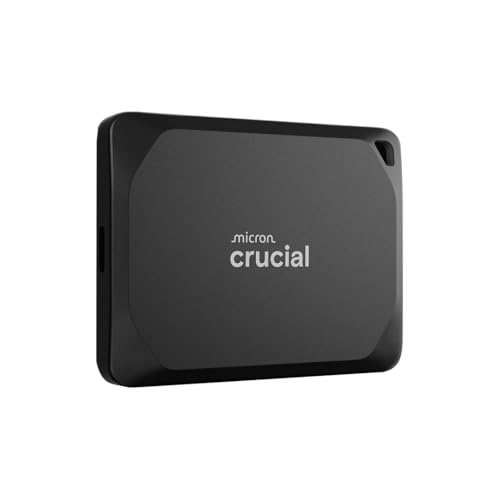
The X10 Pro is the drive for people who carry their archive on their person. Crucial’s listing quotes the highest read figure in this group, up to 2,100 MB/s, with writes at up to 2,000 MB/s, from a housing small enough to vanish into a jeans pocket or a camera bag’s smallest pouch. That combination suits couriers moving a finished project across town and shooters who keep a rolling backup on them at all times. Crucial also markets dust and water resistance for the line, so the compact shell is not a fragile one.
Specs
- Capacity: 4TB
- Model: CT4000X10PROSSD902
- Interface: USB 3.2 USB-C
- Read speed: up to 2,100 MB/s
- Write speed: up to 2,000 MB/s
- Colour: Black
Best for: Carrying a complete project archive or rolling backup in a pocket-sized drive.
Watch out for: The compact body ships with a short cable, so check it reaches comfortably in your setup; full speed also needs a Gen 2×2 host port, so confirm your machine’s port specification.
ASIN: B0C9WJQ9GP
Samsung T7 Shield Portable SSD 4TB
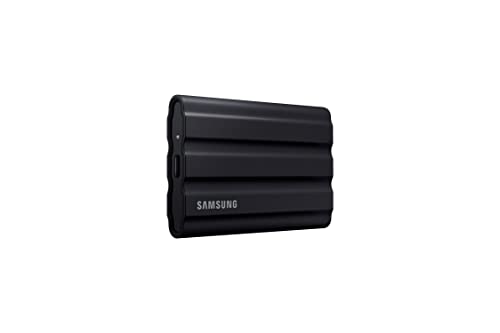
The T7 Shield trades headline pace for universal fit. Its Gen 2 interface tops out at a listed 1,050 MB/s, which is exactly what Macs and older Windows machines can deliver anyway, so nothing is wasted on ports the drive will never meet. The ribbed rubber armour, water and dust resistance, and a shape that sits flat and grippy on a location table make it the natural shuttle for mixed fleets of computers. When a drive must work at full tilt on every machine in the building, this older interface stops being a limitation and becomes the point.
Specs
- Capacity: 4TB
- Model: MU-PE4T0S/AM
- Interface: USB 3.2 Gen 2
- Transfer speed: up to 1,050 MB/s
- Resistance: rugged, water and dust resistant
- Colour: Black
Best for: Mixed Mac and Windows kits, and anyone whose machines only offer Gen 2 ports.
Watch out for: Check that the capacity selected on the listing is the 4TB variant (MU-PE4T0S/AM); smaller capacities share the same page, and its peak speed is roughly half that of the Gen 2×2 picks.
ASIN: B0BHZQGN26
Which One Fits Your Situation
You offload cards outdoors, in whatever weather the shoot gives you
Take the SanDisk Extreme PRO. Its IP65 sealing shrugs off dust and rain at the location, the aluminium chassis tolerates knocks in a working bag, and the matched read and write figures keep big card dumps moving. Register it and apply any firmware update before the first job, then it can serve as the primary shuttle for a location kit.
Your whole pipeline runs on Macs
Choose the Samsung T7 Shield. Apple machines do not offer Gen 2×2, so the faster drives in this list would fall back to Gen 2 behaviour anyway; the Shield simply delivers its full listed speed on the ports you own. Its flat, grippy shell also sits securely on a desk or location table while cards copy across.
You carry the project archive on you between sites
The Crucial X10 Pro fits this pattern. It packs the joint-highest write figure and the fastest read figure here into the smallest housing, so a complete archive travels in a pocket rather than a case. Add a longer cable if your desk setup needs one, and the drive doubles as a fast home base for current work.
You shuttle footage between two Windows workstations
Pick the Samsung T9, provided both machines carry Gen 2×2 ports. Its 2,000 MB/s read ceiling and drop-resistant shell suit a daily routine of filling the drive at one desk and emptying it at another. If one of the two computers turns out to be Gen 2 only, expect transfers at that end to run at the slower rate.
Common Mistakes
- Buying a Gen 2×2 drive for a Mac-only workflow and expecting the full headline speed, when Apple ports cap USB transfers at Gen 2 rates.
- Ordering from a shared listing page without checking the selected capacity, and receiving a 1TB or 2TB variant instead of the 4TB model intended.
- Formatting the shuttle in a file system one machine cannot write to, instead of choosing exFAT for drives that move between Mac and Windows.
- Treating the portable drive as the only copy of a shoot during transport, with no second backup left at the location or studio.
- Judging a transport drive by its read figure alone when the real job is writing full cards to it, which is a write-heavy task.
Frequently Asked Questions
Will a USB 3.2 Gen 2×2 drive work with a Mac?
Yes, it connects and works normally, but at reduced speed. Macs do not implement the Gen 2×2 mode, so the drive falls back to USB 3.2 Gen 2 behaviour and transfers run near that interface’s ceiling rather than the 2,000 MB/s class figures on the box. For a Mac-only kit, a good Gen 2 drive loses nothing.
Can I edit video directly from a 4TB portable SSD?
For most timelines, yes. These drives connect over USB-C with enough throughput for multi-stream editing of typical camera formats, and the 4TB capacity holds active projects alongside their media. Keep the project backed up elsewhere as well, because a drive that travels daily faces more loss and damage risk than one that stays on a desk.
Which file system should a media shuttle drive use?
Choose exFAT when the drive moves between Mac and Windows machines, since both systems read and write it natively and it handles the large files video work produces. Use APFS for a Mac-only drive or NTFS for a Windows-only drive if you want the journaling and permissions those formats add, accepting that the other platform will need extra software.
How long does a full 4TB copy actually take?
Longer than the headline numbers suggest. Even at a sustained rate near a Gen 2×2 drive’s published figures, filling or emptying several terabytes is a job measured in tens of minutes, and Gen 2 connections roughly double that. Plan offloads into the schedule, verify the copy when it finishes, and avoid moving the drive or cable mid-transfer.
More from Amazon
Programs that pair well with the guide above. Offers and eligibility are set by Amazon and may change.
Free shipping on eligible items, Prime Video and more. Eligible new members can start with a free trial.
Start a Prime free trialAudiobooks and podcasts to listen to on the go. Eligible new members can start with a free trial.
Try Audible freeAd-free music streaming. Eligible new subscribers can start with a free trial.
Try Music Unlimited freeA free business account with business pricing and bulk-buying tools for work, shop or home office.
Create a business accountAs an Amazon Associate we earn from qualifying purchases.







Write Your Review
No reviews yet. Be the first to share your experience!