

Key takeaways
- Rugged external SSDs for moving media safely: IP-rated, drop-resistant picks from Samsung, SanDisk and LaCie, chosen from their Amazon listing specs.
Moving media is a different decision from buying fast storage for a desk. The drive that carries the only copy of a shoot gets dropped into camera bags, courier pouches and glove boxes, so the real question is which enclosure keeps working after a knock, a splash or a dusty location day, and whether its port and speed still let an editor start work the moment it arrives.
This guide is for photographers, videographers and small production teams who hand footage between people and places. Every pick below is a rugged external SSD whose own Amazon listing states a drop resistance figure, an IP rating, or both, and the specifications quoted come from the title and details on that model’s own product page.
Quick Picks
As an Amazon Associate we earn from qualifying purchases.
| Product | Best for | Key spec from title |
|---|---|---|
| LaCie Rugged SSD4 1TB | Fastest handoffs to a Thunderbolt or USB4 workstation | USB 40Gbps, IP54-rated |
| Samsung T7 Shield 2TB | Location days where the drive rides in a camera bag | Up to 1050MB/s, USB 3.2 Gen2, Rugged, IP65 Rated |
| SanDisk Extreme PRO Portable SSD 2TB | Long travel days needing room for a whole project | Up to 2000MB/s, USB-C, USB 3.2 Gen 2×2, IP65 |
How to Choose
Start With the Drop and Sealing Ratings on the Listing
A rugged claim only means something when the listing puts a number on it. Look for a stated drop height, such as a drive tested to endure a 9.8 foot drop, and an IP rating that separates dust protection from water protection. A drive rated IP65 is described on its listing as resistant to both water and dust, while an IP54 design covers splashes and limited dust rather than full immersion-level sealing. Match the rating to the journey: a drive couriered inside a padded case needs less sealing than one that sits on a wet location table between takes.
Match Sustained Interface Speed to the Offload Habit
Peak speed figures assume the fastest port the drive supports, and media transport usually involves somebody else’s computer at the other end. A USB 40Gbps drive only reaches its headline transfer rates on a workstation with a matching port, while a USB 3.2 Gen 2 drive tops out lower but connects at full speed to far more laptops. Think about the receiving machine before choosing: if the editor’s workstation is older, the exotic interface buys nothing on arrival day, whereas a mixed fleet of cameras, phones and laptops rewards the connection standard everything already shares.
Size Capacity for the Whole Trip, Not One Card
Transport drives fail their job when they fill up halfway through a journey and footage starts scattering across cards and laptops. Add up a realistic day of shooting first: a long event day, a multi-camera interview or a week of stills all produce very different totals. Then choose a capacity that holds the full trip plus headroom for the return leg, because the same drive often carries the edited selects back. A smaller, tougher drive that holds everything beats a larger one that still leaves the last day’s cards travelling loose and unprotected in a pocket.
Plan Cables, Labelling and Security Before the Drive Leaves
Most transport problems are boring rather than dramatic. The cable stays behind, the drive arrives with no label, or the receiving editor cannot open an encrypted volume. Check what the listing says about included cables and compatibility, keep the matching cable physically attached to the drive’s case, and label the enclosure with the project name and shoot date before it leaves. Where the listing offers password protection, agree the credential with the recipient through a separate channel in advance, so a protected drive never becomes a locked box that delays the edit by a day.
The 3 Best Options
LaCie Rugged SSD4 1TB

This is the pick when the handoff itself is the deadline and the receiving workstation is modern. Its listing leads with USB 40Gbps transfers, which suits a DIT or editor moving large camera files between a location laptop and a Thunderbolt-equipped workstation, and it still works across slower USB standards when the other end is older. The rugged side is stated plainly rather than implied: an IP54 rating, shock-proof construction and pressure resistance aimed at active, travelling use. For a couriered drive carrying a day’s irreplaceable footage, that combination of outright speed and stated physical protection is the point.
Specs
- Capacity: 1 TB solid state drive
- Model number: STND1000400
- Interface: USB 40Gbps, compatible with Thunderbolt 5, Thunderbolt 4 and Thunderbolt 3
- Read speed: up to 4,000MB/s, with write speeds up to 3,800MB/s stated in the listing
- Durability: IP54-rated dust and water resistance
- Drop resistance: 3m drop resistance and 1-ton pressure resistance
- Item weight: 114 grams
- Warranty: three-year limited warranty with Rescue Data Recovery Services
Best for: Editor-bound handoffs where the receiving machine has a fast USB or Thunderbolt port.
Watch out for: The headline speeds need a USB 40Gbps or Thunderbolt host; on an older port it behaves like a much slower drive.
ASIN: B0F38HLNLC
Samsung T7 Shield 2TB
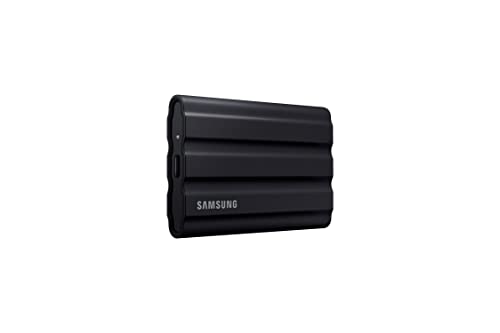
The T7 Shield fits the drive that lives in the camera bag rather than the courier pouch. Samsung’s listing describes a rugged design with an advanced outer elastomer, an IP65 rating for water and dust resistance, and drop testing to 9.8 feet, which reads like a drive built to be handled all day rather than packed away. Its USB 3.2 Gen 2 connection is the common denominator on current laptops, phones and consoles, so whoever receives it can plug in and start copying without hunting for a specific port. The 2TB capacity holds a substantial multi-day shoot in one labelled place.
Specs
- Capacity: 2 TB solid state drive
- Model number: MU-PE2T0S/AM
- Interface: USB 3.2 Gen 2, with sequential read and write speeds up to 1,050/1,000 MB/s
- Durability: IP65 rating for water and dust resistance
- Drop resistance: tested to withstand a 9.8-ft (3 meters) drop
- Thermal feature: Dynamic Thermal Guard to manage heat control
- Dimensions: 3.39 x 2.24 x 0.49 inches
- Item weight: 3.42 ounces
- Compatibility stated on listing: PC, Mac, Android devices and gaming consoles
Best for: Photographers and videographers carrying one drive through location days and hand-offs alike.
Watch out for: It tops out at USB 3.2 Gen 2 speeds, so a workstation built around faster ports cannot use its full potential bandwidth.
ASIN: B09VLHR4JC
SanDisk Extreme PRO Portable SSD 2TB
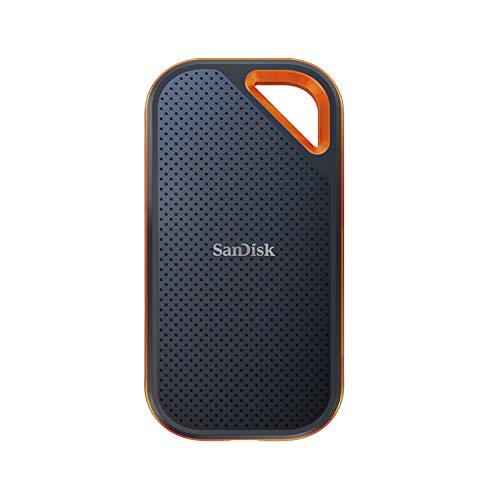
SanDisk positions this drive for professional photographers, and the listing pairs its speed claim with an aluminium enclosure and an IP65 rating, a useful mix for a drive that travels between studios. The USB 3.2 Gen 2×2 interface doubles the ceiling of the Samsung above on computers that support it, which helps when a full project folder changes hands against a deadline. Password protection using 256-bit AES encryption is also stated on the listing, which matters when client footage crosses a courier network. It is the roomiest-feeling option here for a long trip that generates new media every single day.
Specs
- Capacity: 2 TB solid state drive
- Model number: SDSSDE81-2T00-G25
- Interface: USB-C, USB 3.2 Gen 2×2
- Speeds: up to 2000MB/s read and 2000MB/s write, per the listing title and description
- Durability: IP65 water and dust resistance, with an aluminium enclosure for added durability
- Security: password protection uses 256-bit AES encryption, per the listing notes
- Dimensions: 0.41 x 2.28 x 4.36 inches
- Item weight: 2.72 ounces
Best for: Multi-day trips where one drive must hold the project and move it quickly on return.
Watch out for: Full speed requires a USB 3.2 Gen 2×2 host, which many laptops still lack, so check the receiving computer first.
ASIN: B08GV4YYV7
Which One Fits Your Situation
You Ship a Drive to an Editor After Every Shoot
Choose the LaCie Rugged SSD4. Its listing states 3m drop resistance and 1-ton pressure resistance, which speaks directly to parcels being stacked and handled in transit, and the fast interface means the editor’s first copy does not eat the morning. The IP54 sealing covers dust and splash exposure at a rainy doorstep handoff, and the Rescue Data Recovery Services in the warranty give a formal fallback if a shipped drive arrives unreadable.
The Drive Lives in Your Camera Bag All Season
Choose the Samsung T7 Shield. The elastomer outer and the 9.8 foot drop figure on its listing suit a drive pulled out on location and dropped back into a bag dozens of times. IP65 resistance matches outdoor work where dust and drizzle are routine. Because it uses the widely supported USB 3.2 Gen 2 standard, a second shooter can also copy files from it without a specific high-end port.
You Record a Long Trip and Carry Everything Home Yourself
Choose the SanDisk Extreme PRO Portable SSD 2TB. Two terabytes in a slim aluminium enclosure keeps a week of stills and video on one labelled drive instead of a scatter of cards, and the IP65 rating covers weather and dust accumulated over days on the road. Back home, the Gen 2×2 interface can empty it quickly into a workstation that supports the standard, and the stated password protection helps if the drive is separated from your bag.
You Hand Footage to Clients Who Are Not Technical
Choose the Samsung T7 Shield again, for the opposite reason to speed: compatibility. Its listing names PC, Mac, Android devices and gaming consoles, so the recipient likely owns something it plugs into, and the common USB standard avoids a drive arriving with an interface their computer cannot use fully. The rugged elastomer shell also forgives the handling a client drive gets, passed around an office before the files are copied off and it is returned.
Common Mistakes
- Treating a rugged rating as a backup plan. Drop resistance and IP sealing protect the enclosure, not the data strategy, so a transported drive should still be a copy of media that exists somewhere else, or the only copy should be duplicated the moment it arrives, before the drive goes back into a bag or a parcel for the return journey.
- Buying for the fastest interface without checking either end of the trip. A USB 40Gbps or Gen 2×2 drive plugged into an older laptop transfers at the older standard, so the transport time you planned around the headline figure quietly doubles, which is exactly how a same-day handoff turns into an overnight copy and a missed edit slot.
- Letting the cable travel separately from the drive. The matching cable ends up in a different bag, the recipient owns only a different connector, and a healthy drive sits useless on a desk. Keep the cable in the same case as the drive, every trip, and treat the pair as one item when you pack and when you check the kit back in.
- Skipping the label because everyone knows what is on it. Two identical black drives in one production bag invite the wrong one to be formatted, shipped or shelved, so write the project, the date range and a contact detail on the case before the first file is copied, and photograph the labelled drive next to the cards it replaces.
- Encrypting a drive without arranging the handover of access. Password protection stated on a listing only helps when the recipient actually receives the credential in advance through a separate channel; otherwise the safest drive on the list becomes the one nobody can open, and the footage misses its deadline while access is sorted out by phone.
Frequently Asked Questions
Does an IP65 Rating Mean a Drive Can Travel Anywhere?
An IP65 rating, as stated on the Samsung and SanDisk listings here, covers dust and water resistance under the controlled test conditions those listings describe. It protects against rain, splashes and dusty locations during transport, not submersion or a wet bag. Dry the enclosure before connecting it: the rating reduces everyday travel risk rather than removing it.
Which Interface Matters Most for Media Transport?
The interface both ends of the journey share matters most. A USB 40Gbps or Gen 2×2 drive only reaches its stated speeds on a host supporting the same standard, while USB 3.2 Gen 2 works at full speed on far more machines. For couriered drives, the common standard is usually safer; for workstations you control, the faster standard earns its place.
How Much Capacity Does a Transport Drive Need?
Enough for the complete trip, plus the return load, with room to spare. Count a realistic worst day of shooting, multiply it across the days away, and add space for selects coming back. If the total sits close to capacity, step up a size, because a drive that fills mid-trip forces footage onto loose cards and defeats its purpose.
Should the Transport Drive Be the Only Copy?
No. Rugged construction lowers the chance of physical damage, but loss and human error travel with any drive. Treat the transport SSD as the moving copy: keep a second copy somewhere separate until the recipient confirms the files open correctly, and only clear the drive after that confirmation. Ratings protect against knocks and weather, not a missing parcel.
More from Amazon
Programs that pair well with the guide above. Offers and eligibility are set by Amazon and may change.
Free shipping on eligible items, Prime Video and more. Eligible new members can start with a free trial.
Start a Prime free trialAudiobooks and podcasts to listen to on the go. Eligible new members can start with a free trial.
Try Audible freeAd-free music streaming. Eligible new subscribers can start with a free trial.
Try Music Unlimited freeA free business account with business pricing and bulk-buying tools for work, shop or home office.
Create a business accountAs an Amazon Associate we earn from qualifying purchases.





Write Your Review
No reviews yet. Be the first to share your experience!