

Key takeaways
- Three 8TB portable SSDs compared for moving footage and project archives: interface speed, ruggedness, encryption and the checks to run before you buy.
As an Amazon Associate we earn from qualifying purchases.
An 8TB portable SSD is rarely an impulse upgrade; it is the drive you buy when a single shoot, a full season, or an entire project archive no longer fits on the 4TB drives that used to feel huge. The real decision is not capacity, since every drive here holds 8TB, but how that space behaves on the road: how quickly it fills and empties, how it survives life in a camera bag, and whether it works with every machine it meets.
This guide is for videographers and DITs moving footage between set and studio, photographers handing whole libraries to editors, and small production teams that shuttle project archives between offices. Each pick is a true 8TB portable SSD still sold on Amazon US, chosen from the names, model numbers and specifications published on its Amazon product page. The three finalists differ mainly in interface speed, ruggedness, and the security features and cables that come in the box.
Quick Picks
Disclosure: This article contains affiliate links. If you buy through these links, we may earn a commission at no extra cost to you.
| Product | Best for | Key spec |
|---|---|---|
| SanDisk 8TB Extreme Portable SSD | Field kits that get knocked around in camera bags | Up to 1,050MB/s over USB 3.2 Gen 2 |
| Samsung T5 EVO Portable SSD 8TB | One-drive archives passed between editors and clients | 8TB with AES 256-bit hardware encryption |
| VectoTech Rapid 8TB External SSD | Mixed fleets of older and newer computers | USB-C and USB-A cables both in the box |
How to Choose
Interface Speed Decides Your Copy Times
Every drive in this roundup uses a USB-C connector, but the link behind that connector differs, and the link sets your ceiling. The SanDisk runs USB 3.2 Gen 2 at up to 1,050MB/s, the VectoTech uses USB 3.1 Gen 2 at up to 540MB/s, and the Samsung T5 EVO sits on USB 3.2 Gen 1 at up to 460MB/s. On an 8TB drive those gaps stop being abstract: filling or emptying the whole volume can take roughly twice as long on the slowest interface as on the fastest, so match the drive to the port on the machine that will do most of the copying.
Sustained Writes Matter More Than Peak Numbers
Headline speeds describe short bursts, while media transport means writing hundreds of gigabytes in one sitting. As a long copy runs, flash memory fills its fast cache and the rate settles lower, and a small sealed enclosure has nowhere to shed heat. A metal shell, like the aluminum plates on the VectoTech, helps move warmth away from the flash. Plan your workflow around the steady rate rather than the box figure: start big offloads before a break, keep the drive on a hard surface with air around it, and avoid stacking two hot drives together in a closed bag.
Ruggedness for Bags, Flights and Location Work
A transport drive earns its keep in transit, so protection figures deserve the same attention as speed. The SanDisk pairs IP65 water and dust resistance with drop protection up to three meters, which suits location work where a bag gets rained on or knocked off a tailgate. The Samsung specifies drop resistance up to two meters and no sealing, a fair trade for a drive that mostly moves between desks and studios. The VectoTech claims shock and vibration resistance around a six-foot drop inside an aluminum case. Decide honestly how rough your routes are, then buy the protection that matches them.
Encryption, Formatting and Host Compatibility
Client footage and unreleased projects deserve protection if a drive goes missing. The Samsung and the SanDisk both offer AES 256-bit hardware encryption with password protection, while the VectoTech listing describes no encryption feature, so owners would need software tools instead. Formatting matters just as much: the VectoTech ships preformatted as exFAT, which reads and writes on both macOS and Windows, and any drive you reformat for one system may refuse the other. Finally, check the cable situation. A box that includes both USB-C and USB-A leads, as the VectoTech does, saves a location day when the only free machine is an older laptop.
The 3 Best Options
SanDisk 8TB Extreme Portable SSD

This is the pick for crews whose drives live in camera bags, Pelican cases and jacket pockets rather than on a desk. Its USB 3.2 Gen 2 link is the fastest here, so end-of-day offloads finish sooner, and the IP65 sealing plus three-meter drop protection address the two ways location drives usually die: water and falls. Password protection with hardware encryption covers the loss scenario. It suits DITs and shooters who move footage daily and need one rugged volume that keeps up.
Specs
- Capacity: 8TB
- Model: SDSSDE61-8T00-G25
- Interface: USB-C, USB 3.2 Gen 2
- Read speed: up to 1,050MB/s
- Write speed: up to 1,000MB/s
- Water and dust resistance: IP65
- Drop protection: up to 3 meters
- Security: password protection with 256-bit AES hardware encryption
- Warranty: 5-year limited warranty
Best for: Location shooters and DITs who offload footage outdoors and need sealed, drop-resistant storage.
Watch out for: Amazon sells this 8TB model on a listing shared with other capacities and describes it as the earlier-generation model, so confirm the model number SDSSDE61-8T00-G25 and the 8TB selection before ordering.
ASIN: B0DLK38TR9
Samsung T5 EVO Portable SSD 8TB

Samsung built the T5 EVO around capacity rather than pace, and it fits teams that treat the drive as a rolling archive: a whole library or season of projects on one small volume that an editor can hand to a client or carry to another studio. Hardware encryption with password protection guards that hand-off, the shell shrugs off drops up to two meters, and at 3.6 ounces it adds almost nothing to a laptop bag. The trade is speed, since its USB 3.2 Gen 1 link is the slowest here, so schedule big copies accordingly.
Specs
- Capacity: 8TB
- Model: MU-PH8T0S/AM
- Interface: USB-C, USB 3.2 Gen 1 (5 Gb/s)
- Read speed: up to 460MB/s
- Security: AES 256-bit hardware encryption
- Drop resistance: up to 2 meters
- Weight: 3.6 oz
- Cable included: USB-C to USB-C
- Warranty: 3-year manufacturer warranty
Best for: Editors and small studios passing one encrypted archive drive between people and workplaces.
Watch out for: A full 8TB copy at this interface speed takes many hours, and the 2TB and 4TB versions share the same listing, so double-check that 8TB is the selected capacity before ordering.
ASIN: B0CMDGGJTZ
VectoTech Rapid 8TB External SSD
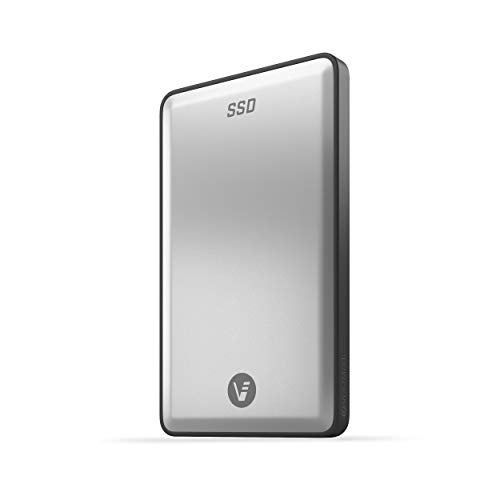
The Rapid is the straightforward choice for mixed environments where the drive must plug into whatever computer is free, old or new. It arrives preformatted as exFAT for macOS and Windows, includes both USB-C to C and USB-C to A cables in the box, and its aluminum plates double as heat spreaders during long copies. Speeds up to 540MB/s over USB 3.1 Gen 2 sit in the middle of this group, and the case is specified for shock and vibration around a six-foot drop. It suits archivists, DJs and field recordists working across several machines.
Specs
- Capacity: 8TB (8,000GB)
- Interface: USB-C, USB 3.1 Gen 2
- Transfer speed: up to 540MB/s read and write
- Flash type: 3D NAND
- Case: aluminum 1050 grade plates
- Shock resistance: up to 1500G, about a 6-foot drop
- Format: preformatted exFAT
- Cables included: USB-C to C and USB-C to A
- Warranty: 3-year manufacturer warranty
Best for: Users who shuttle media between older and newer Macs and PCs and want both cable types included.
Watch out for: The listing describes no hardware encryption, so plan on software encryption for sensitive footage, and confirm the seller and the 8TB capacity selection on the listing before ordering.
ASIN: B08HGH9HK6
Which One Fits Your Situation
Handing a Finished Shoot to Another Editor
Pick the SanDisk. The receiving editor may work at a kitchen table, a rental suite or a second location, and the drive will travel to get there. IP65 sealing and three-meter drop protection cover the journey, the fastest interface here shortens the first copy onto their workstation, and password protection means a lost parcel is an inconvenience rather than a leak of unreleased footage.
Moving a Project Archive Between Offices
Pick the Samsung T5 EVO. Archive runs are scheduled, not urgent, so its slower interface hurts less than it would on set, while the encryption protects the only consolidated copy of a project as it crosses town. Its light shell slips into the same bag as a laptop, and Samsung Magician support keeps firmware and password settings manageable for a small team.
Working Across Old and New Machines
Pick the VectoTech Rapid. A drive that visits a modern editing tower, a five-year-old laptop and a venue playback machine in the same week needs the exFAT formatting and both cable types that this box includes. Nobody on location has to hunt for an adapter, and the aluminum case handles the knocks that come with being plugged into unfamiliar setups all day.
Flying With Media in a Carry-On Kit
Pick the SanDisk if the trip involves outdoor locations at the far end, since its sealing and drop protection cover the rough legs of the journey. Pick the Samsung instead when the flying is between studios and the bigger worry is a bag going missing in transit, because its hardware encryption protects the archive while its small, light shell disappears into a personal item.
Common Mistakes
- Judging by the connector shape alone: every drive here is USB-C, yet their interfaces run at three different speeds, so the plug tells you nothing about copy times.
- Treating an 8TB transport drive as the only copy of a project; a single lost or damaged drive should never be able to erase a shoot, so duplicate before you travel.
- Selecting the wrong capacity at checkout, because several capacities share one listing page; check the model number on the order confirmation against the 8TB model you intended.
- Reformatting a shared drive for one operating system without warning the rest of the team, which can lock the other platform out until the data is moved elsewhere.
- Leaving client footage unencrypted on a drive that changes hands often, when two of the three drives here offer hardware encryption as a standard feature.
Frequently Asked Questions
How long does it take to fill an 8TB portable SSD?
It depends on the interface and on how steady the write speed stays over a huge copy. A drive running near 1,000MB/s moves a terabyte in roughly twenty minutes under ideal conditions, while one near 460MB/s needs well over twice as long for the same data. Real sessions land between those figures, so plan offloads around meals, wraps and overnight windows rather than the headline number.
Why do USB-C drives run at such different speeds?
USB-C names only the connector, not the protocol behind it. These three drives use USB 3.2 Gen 1 at 5 Gb/s, USB 3.1 Gen 2 and USB 3.2 Gen 2 at 10 Gb/s, and each link caps what the flash inside can deliver. Your computer’s port applies a second cap, so a fast drive on an older port still runs at the older speed.
Should I reformat an 8TB SSD as exFAT, APFS or NTFS?
Choose exFAT when the drive moves between macOS and Windows, since both systems read and write it natively and it handles very large video files. Choose APFS for a Mac-only drive or NTFS for a Windows-only drive when you want that system’s native features. Remember that reformatting erases everything, so move the data elsewhere first and confirm the copy before you wipe the drive.
Is one 8TB drive safer than two smaller drives for travel?
Not for irreplaceable footage. One large drive is simpler to carry and simpler to keep track of, but it is also a single point of failure in a bag that gets lost, soaked or dropped. A common working pattern is one 8TB transport drive plus a second copy on a separate drive carried by a different person or in a different bag.
More from Amazon
Programs that pair well with the guide above. Offers and eligibility are set by Amazon and may change.
Free shipping on eligible items, Prime Video and more. Eligible new members can start with a free trial.
Start a Prime free trialAudiobooks and podcasts to listen to on the go. Eligible new members can start with a free trial.
Try Audible freeAd-free music streaming. Eligible new subscribers can start with a free trial.
Try Music Unlimited freeA free business account with business pricing and bulk-buying tools for work, shop or home office.
Create a business accountAs an Amazon Associate we earn from qualifying purchases.




Write Your Review
No reviews yet. Be the first to share your experience!