

Key takeaways
- Compare five 17-inch creator laptops built for 3D rendering, with large colour-accurate displays, strong GPUs, ample memory and fast storage for heavy scenes.
A 17-inch creator laptop for 3D rendering is a balance of GPU power, memory headroom and screen space, and the wrong balance shows up quickly: viewports stutter while orbiting a dense scene, renders queue behind a GPU that runs short of memory, and a dim or narrow-gamut panel hides banding until the final output. Screen size matters here because timelines, node editors and material panels all compete for space, and a 17-inch panel keeps them visible without a second monitor on the desk.

This guide is for Blender, Cinema 4D, Maya and Unreal Engine users who render on a laptop, from freelancers working from a home studio to artists who carry a workstation between office and client site, and for students moving from classroom machines to a personal render machine. The five laptops below were chosen from Amazon listings by GPU, memory, storage and display, covering a high-memory RTX 4070 machine, two 4K Gigabyte Aero models, a slim Dell XPS 17 and a workstation-class Lenovo ThinkPad.
Quick Picks
As an Amazon Associate we earn from qualifying purchases.
| Product | Best for | Key spec from title |
|---|---|---|
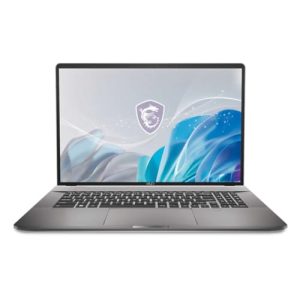
| MSI Creator Z17 HX Studio A14VGT | Heaviest scenes and large assemblies | 128GB DDR5 RAM and RTX 4070 |
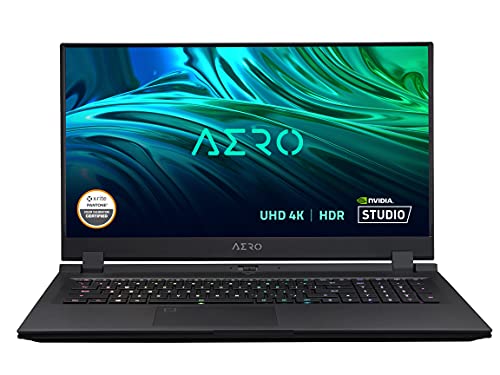
| GIGABYTE AERO 17 YE5 | Colour-critical 4K viewport work | 17.3-inch 4K miniLED 120Hz display |
| GIGABYTE AERO 17 HDR XD | 4K work with a lighter configuration | RTX 3070 and 4K IPS display |
| Dell XPS 17 9730 | Portable studio work and client presentations | 17-inch 3840 x 2400 display and RTX 4050 |
| Lenovo ThinkPad P17 Gen 2 | Workstation pipelines and docking setups | RTX A2000 and 2 Thunderbolt 4 ports |
How to Choose
GPU and VRAM
The GPU does most of the heavy lifting in GPU rendering, and its memory sets a hard limit on scene size. A card with 8GB of VRAM handles most freelance scenes with textured models and HDRI lighting, while 16GB gives far more room for high-resolution textures, displacement and large environments before the renderer falls back to slower system memory. Check the exact laptop GPU, not just the model number, because laptop variants run at lower wattages than desktop cards with the same name. A workstation GPU such as the RTX A2000 trades raw gaming speed for certified drivers and stability in professional applications, which matters when a render must finish overnight without a driver crash.
Memory and Storage
System memory decides how many applications stay open while a scene renders. With 32GB, an artist can keep a 3D application, a compositor and a browser with reference images open at once, while 16GB forces constant closing and reopening of tools. For very large scenes, 64GB or more keeps simulations, caches and high-poly sculpts in memory instead of paging to disk. Storage should be a fast NVMe SSD of at least 1TB, because scene files, texture libraries and render caches grow quickly. Two drive slots or an external Thunderbolt drive make later expansion simple, while a single small drive fills up within a few projects.
Display Accuracy and Size
A creator display must show colour the way the final output will look, so a wide colour gamut, factory calibration and a high resolution matter more than a high refresh rate. A 4K panel reveals fine geometry, texture seams and noise in a render that a lower-resolution screen smooths over, and a 17-inch panel leaves room for the viewport alongside toolbars, outliners and timeline tracks. Touch support is a bonus for sculpting and direct viewport work, but it is secondary to colour accuracy. Matte anti-glare coatings help under studio lights, while a glossy panel can look punchier yet reflect every window behind the artist.
Thermals, Ports and Upgradability
Rendering pushes a laptop to full load for hours, so cooling design decides whether performance holds or throttles halfway through a job. Look for large vents, dual fans and a chassis with room for airflow rather than the thinnest body available, and expect fan noise during long renders. Ports matter just as much: Thunderbolt 4, HDMI and an SD card reader connect external monitors, fast storage and cameras without a drawer full of adapters. Memory and storage that can be upgraded extend the useful life of the machine, so check the number of RAM slots and drive bays before buying a sealed configuration that cannot grow.
The 5 Best Options
MSI Creator Z17 HX Studio A14VGT
The Creator Z17 HX Studio is the heavy lifter in this group, built around a configuration with far more memory and storage than the other laptops here. Its combination of a current-generation Core i9 processor, an RTX 4070 and a huge memory pool suits artists who render complex scenes with many assets, run simulations alongside rendering, or keep several heavy applications open at once. The touchscreen QHD+ display with a fast refresh rate keeps viewport navigation smooth, and the touch layer is genuinely useful for sculpting and direct manipulation of the scene.
Specs
- 17-inch QHD+ touchscreen display with 165Hz refresh rate and 2560 x 1600 resolution
- Intel Core i9-14900HX processor, 24 cores and 32 threads, up to 5.8GHz max turbo frequency, 36MB Smart Cache
- NVIDIA GeForce RTX 4070 laptop GPU with 8GB GDDR6
- 128GB DDR5 RAM
- 4TB PCIe SSD
- Windows 11 Pro
Best for: Artists rendering large, asset-heavy scenes who need maximum memory headroom.
Watch out for: Confirm the exact HIDevolution configuration on the listing before ordering, because this model is sold in several memory and storage variants.
ASIN: B0F2L6NRK6
GIGABYTE AERO 17 YE5
The AERO 17 YE5 is the colour-first pick, pairing a 4K miniLED panel with a high-end GPU that carries twice the video memory of most laptops in this class. That combination suits look development, lighting and texturing, where judging colour and fine detail on the laptop screen itself is part of the job. The Core i9 processor and 32GB of DDR5 memory keep the rest of the pipeline moving, and the 2TB SSD leaves room for texture libraries and cached frames without constant housekeeping.
Specs
- 17.3-inch 4K/UHD miniLED display with 120Hz refresh rate
- Intel Core i9-12900HK processor, 2.5GHz to 5GHz
- NVIDIA GeForce RTX 3080 Ti laptop GPU with 16GB GDDR6, boost clock 1125MHz, maximum graphics power 105W
- 32GB DDR5 RAM, 4800MHz, 16GB x 2, 2 slots, maximum 64GB
- 2TB SSD storage
- Windows 11 Pro, Wi-Fi 6E AX211, Bluetooth V5.2
Best for: Colour-critical 4K viewport work and lighting where on-screen accuracy matters most.
Watch out for: Check the miniLED panel and GPU wattage on the listing, since Aero models vary by configuration and year.
ASIN: B09TVD5CGS
GIGABYTE AERO 17 HDR XD
The AERO 17 HDR XD brings a 4K creator display to a more modest configuration, making it a sensible entry point for artists who want to judge their renders on a high-resolution panel without stepping up to the most powerful GPU available. Its RTX 3070 handles typical freelance scenes, product visualisation and architectural interiors well, and the anti-glare IPS panel stays readable under studio lighting. The 16GB of memory is the main limit, so it suits focused single-application work better than running a full pipeline at once.
Specs
- 17.3-inch UHD 4K IPS anti-glare display
- 11th Gen Intel Core i7-11800H processor, 2.3GHz to 4.6GHz
- NVIDIA GeForce RTX 3070 laptop GPU with 8GB GDDR6, boost clock 1290MHz, maximum graphics power 105W
- 16GB memory, 64GB maximum
- 1TB SSD
- Windows 10 Pro
- 15.6 x 10.6 x 0.85 inch chassis, 99W battery, 5.5 lb
Best for: Artists who want a 4K creator panel for focused rendering work at a lower specification.
Watch out for: Plan a memory upgrade early if you run a 3D application alongside compositing and editing tools.
ASIN: B093Z1PWCF
Dell XPS 17 9730
The XPS 17 9730 is the most portable-feeling laptop here, with a slim chassis and a sharp high-resolution display that suits artists who present work to clients as often as they render it. The Core i7 processor and 32GB of memory handle modelling, editing and moderate rendering comfortably, while the RTX 4050 covers viewport work and GPU-accelerated rendering. It is the pick for creators who value a clean, professional design and a large screen in a machine that still travels well.
Specs
- 17-inch display with 3840 x 2400 resolution
- Intel Core i7-13700H processor, 13th Gen
- NVIDIA GeForce RTX 4050 discrete graphics with 6GB
- 32GB memory
- 1TB SSD
- Platinum Silver finish
Best for: Portable studio work, client presentations and mixed creative workloads.
Watch out for: The RTX 4050 has less video memory than the other GPUs here, so keep scene texture sizes in check on very large projects.
ASIN: B0C6N7DXCW
Lenovo ThinkPad P17 Gen 2

The ThinkPad P17 Gen 2 is a mobile workstation rather than a consumer creator laptop, and that shows in its professional GPU, its docking-friendly port selection and its sturdy build. The RTX A2000 is designed for certified professional applications, making it a steady choice for studio pipelines built around CAD, visualisation and engineering software. Two Thunderbolt 4 ports, a full-size keyboard with number pad and a bundled USB hub make it easy to drop into a desk setup with external monitors and storage.
Specs
- 17.3-inch 4K UHD IPS display
- Intel Core i7-11800H processor, 8 cores, 2.30GHz up to 4.6GHz, 24MB cache, 16 threads
- NVIDIA RTX A2000 dedicated graphics with 4GB GDDR6
- 32GB RAM
- 1TB PCIe NVMe SSD
- Windows 11 Pro 64-bit
- 2 Thunderbolt 4 ports, 1 HDMI, USB 3.2 Type-C Gen2, SDXC reader, fingerprint reader, backlit keyboard, Wi-Fi 6E
- Includes Dockztorm USB Hub
Best for: Studio artists on workstation pipelines who need certified drivers and a desk-docking setup.
Watch out for: The RTX A2000 has only 4GB of video memory, so it suits CAD and visualisation better than very large GPU-rendered scenes.
ASIN: B0BRP2YJ8G
Which One Fits Your Situation
Freelancers Rendering Large Scenes Daily
Choose the MSI Creator Z17 HX Studio A14VGT. Its 128GB of memory and 4TB of storage remove the two limits freelancers hit first: running out of RAM with several applications open and running out of disk with cached frames. The RTX 4070 and Core i9 keep renders moving, and the large touchscreen display makes long viewport sessions more comfortable.
Artists Who Colour-Grade and Present Work
Choose the GIGABYTE AERO 17 YE5. Its 4K miniLED panel is the best screen in this group for judging colour, contrast and fine detail, and the RTX 3080 Ti with 16GB of video memory handles high-resolution textures without compromise. It is the strongest match for look development, lighting and final-frame checks done on the laptop itself.
Students and Early-Career Artists
Choose the GIGABYTE AERO 17 HDR XD or the Dell XPS 17 9730. The Aero gives students a true 4K creator panel for learning lighting and texturing, while the XPS 17 offers a lighter machine with a sharp display and enough power for coursework, portfolios and freelance jobs. Either one teaches good habits around scene organisation without demanding the highest specification.
Studio Artists on Workstation Pipelines
Choose the Lenovo ThinkPad P17 Gen 2. Its workstation GPU, Thunderbolt 4 ports and bundled hub fit neatly into a desk setup with external monitors and shared storage, and the ThinkPad build is made for daily office use. It is the safest fit where certified drivers, docking and long service life matter more than raw gaming-class GPU speed.
Common Mistakes
- Buying the thinnest 17-inch laptop available and discovering it throttles during long renders because the cooling cannot sustain full load.
- Choosing a GPU by model number alone without checking its video memory, since a card with too little VRAM limits scene size no matter how fast its cores are.
- Settling for 16GB of system memory while planning to run a 3D application, a compositor and an editor at the same time.
- Picking a display for brightness and refresh rate while ignoring colour coverage and calibration, then finding renders look different on every other screen.
- Forgetting storage headroom, so texture libraries, caches and finished frames fill a small drive within the first few projects.
Frequently Asked Questions
Is 16GB of RAM enough for 3D rendering on a laptop?
For learning and for focused work in one application, 16GB is enough to model, texture and render moderate scenes. It becomes a limit when you keep a compositor, an editor and a browser open alongside the 3D application, or when scenes use large simulations and caches. For professional work, 32GB is the safer baseline, and the MSI Creator Z17 in this guide goes beyond that for the heaviest scenes.
Does a 4K display slow down rendering?
A 4K display does not slow down the render itself, because final-frame rendering runs on the GPU and CPU regardless of screen resolution. Viewport navigation gets heavier, since the GPU draws many more pixels while you orbit the scene. That cost is small on the GPUs in this guide, and the benefit is real: a 4K panel shows texture seams, noise and fine geometry that a lower-resolution screen hides.
Should I choose a GeForce or a workstation GPU for 3D rendering?
GeForce GPUs such as the RTX 4070, RTX 3080 Ti and RTX 3070 offer strong rendering speed and large video memory, which suits most freelance and studio rendering. Workstation GPUs such as the RTX A2000 in the ThinkPad P17 Gen 2 offer certified drivers and stability in professional CAD and visualisation software. Choose GeForce for rendering speed and scene size, and a workstation GPU where certification and stability matter more.
How much storage should a rendering laptop have?
A 1TB NVMe SSD is the minimum worth buying, because scene files, texture libraries, simulation caches and finished frames accumulate fast. Artists who keep several projects live at once should look for 2TB or more, or plan on fast external storage through Thunderbolt or USB-C. The MSI Creator Z17 in this guide ships with 4TB, while the Gigabyte Aero YE5 ships with 2TB, giving both room to grow.
More from Amazon
Programs that pair well with the guide above. Offers and eligibility are set by Amazon and may change.
Free shipping on eligible items, Prime Video and more. Eligible new members can start with a free trial.
Start a Prime free trialAudiobooks and podcasts to listen to on the go. Eligible new members can start with a free trial.
Try Audible freeAd-free music streaming. Eligible new subscribers can start with a free trial.
Try Music Unlimited freeA free business account with business pricing and bulk-buying tools for work, shop or home office.
Create a business accountAs an Amazon Associate we earn from qualifying purchases.



Write Your Review
No reviews yet. Be the first to share your experience!