

Key takeaways
- The 4 best Mini-LED creator laptops with 64GB RAM for November 2026: color-accurate 18-inch displays, RTX 5090 and 5080 graphics, and the specs to check first.
Shopping for a creator laptop with both a Mini-LED display and 64GB of RAM narrows the field fast. Most creator laptops pair a Mini-LED panel with 32GB of memory or less, while most 64GB machines use an OLED or standard IPS screen instead. The machines that actually ship both are flagship 18-inch workstations, so the real decision is not which brand to pick but which combination of panel resolution, graphics card, and storage fits the kind of work you do every day.
This guide is for video editors cutting 4K and 8K footage, photographers and colorists who grade on the laptop screen, 3D artists rendering scenes overnight, and multitaskers who keep editing, browsing, and previewing tools open at once. The four picks below were chosen from the product names and specifications shown on their Amazon pages, with each listing checked for a Mini-LED display and 64GB of installed memory.
Quick Picks
As an Amazon Associate we earn from qualifying purchases.
| Product | Best for | Key spec from title |
|---|---|---|
| MSI Titan 18 HX AI A2XWJG | Maximum rendering power and storage | 18-inch UHD+ Mini LED, RTX 5090, 64GB DDR5 |
| ASUS ROG Strix Scar 18 G835LX-XS97 | Fast Mini-LED panel for motion work | 18-inch 240Hz Mini LED, RTX 5090, 64GB DDR5 |
| MSI Titan 18 HX AI A2XWIG-632US | Balanced flagship power with fast storage | 18-inch UHD+ Mini LED, RTX 5080, 64GB RAM |
| Acer Predator Helios 18 AI | High-refresh Mini-LED editing on a 250Hz panel | 18-inch 250Hz Mini-LED, RTX 5080, 64GB DDR5 |
How to Choose
Check the Mini-LED panel, not just the label
Mini-LED is not one uniform panel, so read the listing the way you would read a monitor specification. Resolution matters for timeline and canvas space: a 3840 x 2400 UHD+ panel shows more detail than a 2560 x 1600 panel, while a 240Hz or 250Hz panel feels smoother when you scrub footage or preview animation. Look for 100 percent DCI-P3 color coverage and an HDR rating such as HDR 1000, because those two figures decide whether the screen is trustworthy for grading. Brightness matters too, since a dim panel hides shadow detail in a bright room.
Match the graphics card to your render workload
The graphics card decides how fast previews render, how quickly effects apply, and whether GPU-accelerated exports finish while you keep working. A 24GB card handles larger 3D scenes, heavier AI-assisted tools, and higher-resolution timelines than a 16GB card, so editors working in 8K or artists rendering complex scenes should weigh the top card more heavily. A 16GB card still covers 4K editing, photo work, and most motion graphics comfortably. Do not judge a laptop by its processor alone, because the graphics card often becomes the bottleneck first in creative apps.
Confirm how the 64GB of RAM is installed
Sixty-four gigabytes only helps if it is installed in a configuration your workflow can use. Two 32GB modules in dual-channel mode perform better than a single 64GB module, and the listings in this guide state their module layout where the seller provides it. Memory speed matters as well: DDR5-6400 moves data faster than DDR5-5600 when you scrub large timelines or switch between heavy applications. Check whether the memory is soldered or socketed before you buy, because a soldered configuration cannot be expanded later, while socketed SODIMM slots leave room to grow.
Weigh storage, ports, and the size you will carry
Creator projects eat storage quickly, so compare both capacity and speed: a 2TB PCIe 5.0 drive loads large projects faster than an older PCIe 4.0 drive, and a machine with two 2TB drives gives you room for active projects plus a local backup. Ports decide your desk setup, so look for Thunderbolt 5, HDMI 2.1, and a full-size SD card reader if you ingest camera media daily. Finally, be honest about portability: these are 18-inch machines built for desk-first work, so a lighter chassis and a larger battery matter only if the laptop genuinely travels with you.
The 4 Best Options
MSI Titan 18 HX AI A2XWJG

The Titan 18 HX AI A2XWJG is the most powerful machine in this guide, built for editors and 3D artists who want the strongest graphics card and the most storage in one laptop. Its 18-inch UHD+ Mini-LED display gives you a large, detailed canvas for timelines and grading, while the top-tier graphics card and 64GB of fast memory keep heavy previews and renders moving. With two 2TB drives, you can keep active projects and media libraries on the machine instead of juggling external drives.
Specs
- 18-inch (3840 x 2400) UHD+ Mini LED 120Hz display
- Intel Core Ultra 9 285HX 2.1GHz processor
- NVIDIA GeForce RTX 5090 GPU with 24GB GDDR7
- 64GB DDR5-6400 RAM
- 2TB Gen5 plus 2TB Gen4 NVMe solid state drive
- Microsoft Windows 11 Pro
- UHS-III SD memory card reader
- 2.5GbE LAN, Killer WiFi 7, and Bluetooth 5.4
Best for: Video editors and 3D artists who want the strongest graphics card and the largest onboard storage in this group.
Watch out for: This is a large, heavy desktop-replacement machine, so confirm the size and weight fit your bag and desk before ordering.
ASUS ROG Strix Scar 18 G835LX-XS97

The Strix Scar 18 G835LX-XS97 suits creators who care about motion smoothness as much as raw power, pairing a top-tier graphics card with a fast 240Hz Mini-LED panel. Scrubbing footage, previewing animation, and reviewing high-frame-rate clips all feel more fluid on this display than on a standard 120Hz screen, and the 100 percent DCI-P3 coverage keeps colors trustworthy for grading. Its 64GB of memory and 2TB of storage give you room for large projects without constant cleanup.
Specs
- 18-inch 2.5K (2560 x 1600) WQXGA 240Hz 3ms Mini LED anti-glare display, 100% DCI-P3
- Intel Core Ultra 9 275HX 24 cores, 2.7GHz to 5.4GHz
- NVIDIA GeForce RTX 5090 with 24GB GDDR7
- 64GB (2 x 32GB) DDR5 5600MHz RAM
- 2TB PCIe 4.0 NVMe SSD
- Microsoft Windows 11 Pro
- 2 x Thunderbolt 5, 3 x USB 3.2 Gen 2 Type-A, HDMI 2.1, RJ45 LAN
- 90WHr 4-cell Li-ion battery
Best for: Editors and motion artists who want a fast 240Hz Mini-LED panel with top-tier graphics for smooth previews.
Watch out for: The listing is sold through a reseller configuration, so read the seller notes and warranty terms on the Amazon page before you buy.
MSI Titan 18 HX AI A2XWIG-632US

The Titan 18 HX AI A2XWIG-632US is the balanced flagship of the group, trading the top graphics card for a still-powerful one while keeping the sharp UHD+ Mini-LED display and the fastest storage interface here. Its PCIe 5.0 drive loads large photo libraries and video projects quickly, and the HDR 1000 panel with full DCI-P3 coverage suits color-critical work. For creators who want Titan build quality and a color-accurate screen without paying for the very top graphics tier, this configuration hits the middle ground well.
Specs
- 18-inch UHD+ (3840 x 2400) 120Hz Mini LED HDR 1000 display, 100% DCI-P3
- Intel Core Ultra 9 285HX 24 cores, 2.1GHz to 5.5GHz
- NVIDIA GeForce RTX 5080 with 16GB GDDR7
- 64GB (2 x 32GB) DDR5 6400MHz RAM
- 2TB PCIe 5.0 NVMe SSD
- Microsoft Windows 11 Pro
- 2 x Thunderbolt 5, 3 x USB 3.2 Gen 2 Type-A, HDMI 2.1, RJ45, SD card reader
- 4-cell 99.9Whr Li-ion battery
Best for: Color-critical editors who want a sharp UHD+ Mini-LED panel and the fastest storage in this guide.
Watch out for: The listing is sold through a reseller configuration, so confirm the included warranty and support terms on the Amazon page.
Acer Predator Helios 18 AI
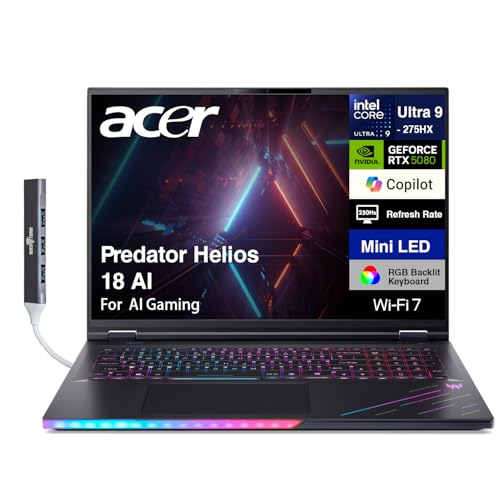
The Predator Helios 18 AI is the high-refresh option in this guide, with a 250Hz Mini-LED panel that makes timeline scrubbing and animation previews feel especially smooth. Its 1000-nit brightness helps when you work near windows or in bright rooms, and the combination of a current-generation processor, a strong graphics card, and 64GB of memory covers 4K editing, photo work, and motion graphics. Two Thunderbolt 5 ports and a full-size SD reader make it easy to connect fast storage and ingest camera cards.
Specs
- 18-inch Mini LED WQXGA (2560 x 1600) 250Hz display, 1000 nits
- Intel Ultra 9-275HX 2.70GHz processor, up to 5.4GHz, 24 cores
- NVIDIA GeForce RTX 5080 with 16GB GDDR7 graphics
- 64GB DDR5 SODIMM RAM
- 2TB PCIe NVMe SSD
- Windows 11 Home
- 2 Thunderbolt 5 ports, HDMI, 2 USB 3.2 Type-C, SD reader
- 4-cell 96 WHr battery
Best for: Creators who want the fastest refresh rate and a bright Mini-LED panel for motion work in bright rooms.
Watch out for: This listing is a professionally upgraded configuration, so the memory was installed by the seller rather than the factory; confirm the upgrade and warranty details on the Amazon page.
Which One Fits Your Situation
You edit 4K or 8K video and render in 3D
Pick the MSI Titan 18 HX AI A2XWJG. Its top-tier graphics card with 24GB of video memory handles larger scenes and higher-resolution timelines, and the two 2TB drives mean active projects and media stay on the machine. The UHD+ Mini-LED display gives you a detailed grading canvas, and 64GB of fast memory keeps previews smooth while other apps stay open.
You grade color and need the most trustworthy screen
Pick the MSI Titan 18 HX AI A2XWIG-632US. Its UHD+ Mini-LED panel combines high resolution with HDR 1000 brightness and full DCI-P3 coverage, which is the combination that matters most for judging color and shadow detail. The fast PCIe 5.0 storage also loads large photo libraries and graded footage without long waits.
You preview animation and scrub footage all day
Pick the ASUS ROG Strix Scar 18 G835LX-XS97 or the Acer Predator Helios 18 AI. The Scar pairs its 240Hz Mini-LED panel with the strongest graphics card here, while the Helios pushes the refresh rate to 250Hz with a brighter screen. Either one makes motion previews feel smoother than a standard 120Hz display, so choose the Scar for heavier renders and the Helios for brighter rooms.
You juggle huge projects with many apps open at once
Pick any of the four, because all of them ship with 64GB of memory, but favor the Titan A2XWJG for its 4TB of total storage. Large photo catalogs, multi-cam timelines, and browser research tabs all compete for memory and disk space, and the extra drive capacity means you spend less time archiving projects to make room for the next one.
Common Mistakes
- Assuming every Mini-LED laptop ships with 64GB of RAM; most Mini-LED models top out at 32GB, so verify the memory figure in the listing title and specification table.
- Choosing a lower-resolution panel to save money, then discovering the timeline and canvas feel cramped for daily editing work.
- Ignoring whether the 64GB is one module or two, since a single-module configuration runs slower than a matched pair.
- Forgetting to check the warranty and seller notes on reseller-configured listings, which can differ from a factory configuration.
- Buying an 18-inch desktop replacement for travel-heavy work, then finding the size and weight impractical on the road.
Frequently Asked Questions
Is 64GB of RAM overkill for photo and video editing?
For light photo editing and short 1080p projects, 64GB is more than you need, and 32GB is usually enough. It becomes worthwhile when you edit multi-cam 4K or 8K footage, work with large photo catalogs, run AI-assisted tools, or keep editing, browsing, and preview software open together. In those workflows, extra memory prevents slowdowns when switching between heavy applications.
Does Mini-LED matter compared with OLED for creative work?
Mini-LED and OLED both deliver strong contrast and color. Mini-LED panels reach very high brightness without the burn-in risk that worries OLED owners, which helps in bright rooms and long grading sessions. OLED still wins on per-pixel blacks and thin designs. For color work, check DCI-P3 coverage and HDR rating rather than choosing by panel type alone.
Can I upgrade the RAM in these laptops later?
It depends on the model, because some laptops solder memory to the board while others use replaceable SODIMM slots. The Acer in this guide uses DDR5 SODIMM memory, which suggests upgradeable slots, while other configurations may be fixed. Always read the specification table and the seller notes on the Amazon page before assuming you can add memory later.
Are these gaming-branded laptops good for creative work?
Yes, when the specifications fit the job. The machines in this guide carry color-accurate Mini-LED panels with full DCI-P3 coverage, strong graphics cards, and 64GB of memory, which are the same ingredients creative apps need. The gaming branding affects the keyboard lighting and chassis styling, not the panel quality or rendering performance, so judge a laptop by its display, graphics, and memory.
More from Amazon
Programs that pair well with the guide above. Offers and eligibility are set by Amazon and may change.
Free shipping on eligible items, Prime Video and more. Eligible new members can start with a free trial.
Start a Prime free trialAudiobooks and podcasts to listen to on the go. Eligible new members can start with a free trial.
Try Audible freeAd-free music streaming. Eligible new subscribers can start with a free trial.
Try Music Unlimited freeA free business account with business pricing and bulk-buying tools for work, shop or home office.
Create a business accountAs an Amazon Associate we earn from qualifying purchases.
Write Your Review
No reviews yet. Be the first to share your experience!