

Key takeaways
- Compare full-tower workstations with ECC memory support, including two Lenovo ThinkStation P8 builds with Threadripper PRO CPUs and DDR5 ECC memory.
A full-tower workstation earns its place on a desk when the work involves long renders, large assemblies, simulation runs, or datasets that punish ordinary desktops. Error-correcting memory matters in that setting because a single flipped bit can corrupt a model, a render frame, or hours of computation without leaving any obvious trace. Pairing ECC support with a full-tower chassis also gives you room for full-size graphics cards, multiple storage drives, and the airflow that sustained multi-hour loads demand.
The honest complication is that very few full-tower workstations with genuine ECC support are sold as complete, ready-to-ship systems on Amazon US. Both picks below come from Lenovo’s ThinkStation P8 line, built on AMD Ryzen Threadripper PRO processors and the WRX90 platform, which uses registered ECC DDR5 memory. They differ mainly in core count, installed memory, and storage, so the real decision is how much compute you need on day one.
Quick Picks
As an Amazon Associate we earn from qualifying purchases.
| Product | Best for | Key spec from title |
|---|---|---|
| Lenovo ThinkStation P8 30HH002XUS | Memory-heavy workloads out of the box | 64 GB DDR5 ECC memory |
| Lenovo ThinkStation P8 30HH0038US | Higher core count for parallel jobs | Threadripper PRO 7955WX 16-core CPU |
How to Choose
Confirm the ECC support is real, not implied
Plenty of desktops advertise a professional processor while shipping ordinary non-ECC memory. For this category, look for three things together: a workstation-class CPU such as a Threadripper PRO or Xeon, a workstation chipset, and a listing that names ECC or registered DIMMs directly. The ThinkStation P8 platform uses DDR5 RDIMMs, which are registered ECC modules by design, and Lenovo rates the chassis for up to 1 TB of that memory. If a listing cannot name the memory type, treat the ECC claim as unproven and move on. That discipline matters more in this category than in almost any other, because ECC cannot be verified from a photograph or a brand badge, and a non-ECC machine bought in error fails silently at exactly the job it was purchased to protect. When in doubt, the chipset and the memory standard named in the specifications are the two lines that settle the question.
Match core count to how your software actually scales
Rendering engines, compilers, and simulation solvers that spread work across threads benefit directly from more cores, while CAD modeling and many viewport tasks still lean on a few fast cores. The two systems here split that difference: a 12-core chip clocked at 4.7 GHz against a 16-core chip at 4.50 GHz. If your day is mostly single-threaded modeling with occasional renders, the higher clock is the smarter spend. If batch rendering or parallel builds dominate, the extra four cores repay you every single working day.
Plan memory capacity before you plan anything else
ECC registered memory is a platform commitment, not a casual upgrade, because RDIMMs cannot be mixed with the unbuffered sticks used in consumer desktops. Decide your realistic ceiling first: texture-heavy scenes, virtual machines, and large point clouds can push past 64 GB quickly. A system that starts at 64 GB with open slots and a 1 TB platform ceiling leaves a clean growth path, while a 32 GB configuration only makes sense if your projects are firmly mid-sized and your budget is better spent on cores.
Check graphics and storage against your pipeline
Both systems here ship with an NVIDIA T1000 with 8 GB of memory, a competent card for CAD viewports and light GPU rendering that will not satisfy heavy CUDA or real-time ray tracing workloads. If your pipeline leans on the GPU, budget for a card swap and confirm the tower has the power supply headroom and physical clearance. Storage is simpler: a PCIe Gen4 NVMe boot drive of 1 TB suits most users, while 2 TB buys breathing room for local project files and cache. Also confirm the chassis accepts full-length cards and has the power connectors a larger GPU needs, since a tower that restricts card length turns a planned upgrade into a second purchase.
The 2 Best Options
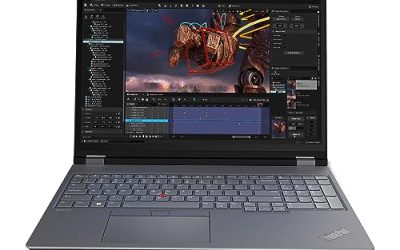
1. Lenovo ThinkStation P8 30HH002XUS

This configuration is the memory-forward build of the pair, arriving with 64 GB of DDR5 ECC memory already installed, which is the single most expensive and most annoying component to retrofit later. The Threadripper PRO 7945WX brings 12 cores at 4.7 GHz, a strong match for mixed workloads that alternate between single-threaded modeling and multithreaded exports. A 2 TB PCIe Gen4 NVMe SSD gives fast local storage for active projects, and the WRX90 chipset leaves the platform ceiling at 1 TB of memory for future growth.
Specs
- Processor: AMD Ryzen Threadripper PRO 7945WX, 12 cores, 4.7 GHz
- Memory: 64 GB DDR5 ECC, expandable up to 1 TB
- Storage: 2 TB PCIe NVMe Gen4 SSD
- Graphics: NVIDIA T1000 with 8 GB
- Chipset: AMD WRX90
- Operating system: Windows 11 Pro
- RAID support: RAID 0, 1, 5, 10
Best for: Professionals whose scenes, datasets, or virtual machines already push past 32 GB and who want ECC headroom without an immediate upgrade project.
Watch out for: The T1000 is an entry professional GPU; heavy GPU rendering or large real-time viewports will need a stronger card.
2. Lenovo ThinkStation P8 30HH0038US

The second configuration trades installed memory for compute, stepping up to the 16-core Threadripper PRO 7955WX at 4.50 GHz while starting with 32 GB of DDR5 memory and a 1 TB SSD. That balance suits build farms in a box, CPU render nodes, and anyone running several heavy processes at once, where core count decides how the day goes. Because it sits on the same P8 platform, the memory ceiling and expansion story match the first pick, so the lower starting capacity is a deferral rather than a dead end.
Specs
- Processor: AMD Ryzen Threadripper PRO 7955WX, 16 cores, 4.50 GHz
- Memory: 32 GB DDR5
- Storage: 1 TB SSD
- Graphics: NVIDIA T1000
- Chipset: AMD WRX90
Best for: Users running parallel renders, compiles, or simulations who value core count over starting memory and plan to add RDIMMs later.
Watch out for: 32 GB fills quickly under memory-hungry scenes, and the ECC framing for this configuration rests on the P8 platform’s registered DDR5 design, so confirm the installed modules on the listing before ordering.
Which One Fits Your Situation
You open huge scenes and keep many applications resident
Choose the 30HH002XUS. Starting with 64 GB of ECC memory means your first months of work are not interrupted by an upgrade, and the 2 TB drive absorbs project files, caches, and scratch data without constant housekeeping. The 12-core processor still handles modeling and exports comfortably, so the memory-first balance rarely feels like a compromise in daily use.
You render or compile in parallel all day
Choose the 30HH0038US. Four extra cores shorten every batch job, and jobs that run dozens of times a week repay the difference quickly. The 32 GB of starting memory is the deliberate trade, and the platform accepts more RDIMMs whenever a project finally demands them, so the machine grows with your workload instead of being replaced by it.
You are buying a five-year platform, not a fixed spec
Either chassis works, because both share the same WRX90 foundation, memory ceiling, and tower expansion room. Decide by your first-year workload: memory pressure argues for the first configuration, core pressure for the second. Everything else, from storage to graphics, can be revised later without changing platforms, which is exactly what a full-tower purchase should protect. That upgrade path is also the financial argument for the category: the chassis, power delivery, and memory architecture are bought once, while the parts that date fastest are the parts that can be swapped.
You are replacing a tower that failed at the worst moment
Let the failure teach the specification. If the old machine died during a render or corrupted work in progress, the replacement brief writes itself: ECC memory to guard the computation, a tower chassis that can be opened and upgraded without drama, and storage you can mirror or back up properly. Either P8 configuration answers that brief, and choosing the platform now means the next incident is a component swap rather than another emergency purchase.
Common Mistakes
- Assuming any desktop with a professional-sounding processor supports ECC, when the installed memory is ordinary unbuffered DDR5.
- Mixing RDIMM and UDIMM modules during an upgrade; registered and unbuffered memory cannot run together.
- Spending the whole budget on cores while leaving memory at a capacity your scenes outgrow within months.
- Overlooking the graphics card: an entry workstation GPU is fine for CAD viewports but not for heavy GPU rendering pipelines.
- Ignoring RAID and backup planning on a machine that holds production work; ECC protects memory, not your only copy of a project.
Frequently Asked Questions
Does ECC memory actually matter for workstation tasks?
For long, unattended computations it does. ECC detects and corrects single-bit memory errors that would otherwise silently corrupt output or crash a job hours in. The benefit grows with installed capacity and run length, which is why large-memory workstations pair ECC with registered DIMMs. For short interactive tasks the difference is invisible, but for overnight renders and simulations it is cheap insurance. It is also why ECC is standard practice on servers and render nodes rather than a matter of debate.
Can I add more memory to these systems later?
Yes. The ThinkStation P8 platform is rated for up to 1 TB of DDR5 RDIMM memory, and both configurations leave room to grow. Add matched registered ECC modules in the configuration Lenovo specifies for the slot population you choose. Do not mix in unbuffered desktop memory, and expect capacity and speed to follow the platform’s population rules rather than consumer-desktop habits.
Why are there only two picks in this guide?
Because the qualifying pool is genuinely small. A pick had to be a full-tower workstation, sold as a complete system on Amazon US, with ECC support grounded in the listing and platform documentation. Most consumer towers fail the ECC test, and many workstation listings could not be verified. Two verified options beat a longer list padded with machines that do not meet the keyword’s core requirement.
Is the NVIDIA T1000 enough for professional work?
For CAD modeling, drafting, and moderate viewport work, yes; it is a certified-class professional card with 8 GB on the first configuration. For GPU rendering, dense real-time scenes, or AI workloads it becomes the bottleneck quickly. The tower format helps here, since a stronger card can be fitted later as long as power and clearance are confirmed first.
More from Amazon
Programs that pair well with the guide above. Offers and eligibility are set by Amazon and may change.
Free shipping on eligible items, Prime Video and more. Eligible new members can start with a free trial.
Start a Prime free trialAudiobooks and podcasts to listen to on the go. Eligible new members can start with a free trial.
Try Audible freeAd-free music streaming. Eligible new subscribers can start with a free trial.
Try Music Unlimited freeA free business account with business pricing and bulk-buying tools for work, shop or home office.
Create a business accountAs an Amazon Associate we earn from qualifying purchases.
Write Your Review
No reviews yet. Be the first to share your experience!