

Key takeaways
- Compare four 16-inch creator laptops for 3D rendering, with RTX graphics, colour-accurate displays, and the memory and storage Blender work demands.
Choosing a laptop for 3D rendering is really a decision about where your time goes: hours lost to slow viewports and overnight renders, or a machine that keeps modelling, texturing and final frames moving at the pace you think. Screen size matters too, because timelines, node graphs and UV editors all compete for space.


This guide is for Blender artists, motion designers, product visualisers and architecture students who need that workspace in a portable 16-inch form. Every model below was selected from its Amazon listing name and stated specifications, with a dedicated RTX graphics chip, at least 32GB of memory and a colour-focused display forming the baseline. The four differ mainly in panel technology, processor family and port selection, so the right choice depends on whether you render at a fixed desk, travel between studios, or present finished scenes directly to clients.
Quick Picks
As an Amazon Associate we earn from qualifying purchases
| Product | Best for | Key spec |
|---|---|---|
| ASUS ProArt P16 | Colour-critical stills and texture work | 16-inch 4K OLED touchscreen |
| MSI Creator A16 AI+ | Long final renders on the move | 16-inch UHD+ Mini LED 120Hz display |
| Gigabyte AERO 16 OLED | Studio desks with Thunderbolt docks | Intel Core i9-13900H processor |
| Samsung Galaxy Book4 Ultra | Creators who also present to clients | 16-inch AMOLED touchscreen |
How to Choose
Graphics Chip and Its Memory
Rendering engines lean on the graphics processor for viewport navigation, denoising and final output, so the GPU deserves the largest share of your attention. Each laptop here carries a dedicated NVIDIA GeForce RTX chip rather than integrated graphics, which unlocks CUDA and OptiX acceleration in Blender and hardware ray tracing in most mainstream renderers. Graphics memory sets the ceiling for scene complexity: an 8GB frame buffer, shared by three of these models, handles detailed product scenes comfortably, while very dense environments with many high-resolution textures can exceed it and fall back to slower system memory.
Processor Cores for Simulation and Baking
Although the GPU finishes most frames, the CPU still drives physics simulations, particle caches, geometry nodes and texture baking, and it renders alone in engines or passes that ignore graphics hardware. Look for high core counts paired with strong boost clocks, since single-thread speed shapes how responsive modelling feels between renders. The chips in this roundup range from the Intel Core i9-13900H and Core Ultra 9 185H to AMD Ryzen AI processors, all multi-core parts chosen to keep scene preparation from becoming the bottleneck that leaves an expensive GPU sitting idle.
Display Accuracy and Working Space
A rendering laptop earns its keep twice: first while you judge materials and lighting, then when a client approves the result. Panel quality therefore matters as much as raw speed. OLED and Mini LED screens dominate this category because they deliver deep blacks and wide colour coverage suited to checking contrast-heavy scenes. Resolution also shapes daily comfort, since a 3840 by 2400 panel fits a 3D viewport beside outliner and properties panels without constant zooming. Touch input, offered by the ASUS and Samsung models, adds a direct way to orbit, annotate and present work.
Memory, Storage and Upgrade Paths
Complex scenes consume system memory quickly once subdivision surfaces, displacement and several image textures load together, so 32GB is the sensible floor for serious 3D work and every model here meets it. Fast NVMe storage shortens project loading and cache playback, and capacities run from 1TB to 2TB across this group. Before ordering, check how each machine handles growth: some use soldered memory that can never be expanded, while designs with accessible slots or a spare drive bay let you extend the laptop instead of replacing it when projects outgrow the original configuration.
The 4 Best Options
ASUS ProArt P16
Built around colour confidence, the ProArt P16 suits 3D artists whose renders double as print or advertising assets, where the screen must predict the final image faithfully. Its 4K OLED touchscreen gives texture painters a direct, pen-friendly canvas, while the Ryzen AI 9 HX 370 and RTX 4060 pairing covers modelling, viewport shading and GPU rendering in one slim chassis. A fast SD Express card reader and USB4 port simplify moving reference footage and project archives between cameras, drives and this machine during studio days.
Specs
- Display: 16-inch 4K OLED touchscreen, 3840 x 2400, 60Hz
- Processor: AMD Ryzen AI 9 HX 370, 12 cores, up to 5.1GHz
- Graphics: NVIDIA GeForce RTX 4060 Laptop GPU, 8GB GDDR6
- Memory: 32GB DDR5 RAM
- Storage: 2TB PCIe SSD
- Operating system: Windows 11 Home
- Ports: USB4 Type-C, USB 3.2 Type-C, 2 x USB 3.2 Type-A, HDMI 2.1, SD Express 7.0 card reader
- Weight: 4.08 pounds
Best for: Texture artists and product visualisers who grade colour as carefully as they model.
Watch out for: The RTX 4060 is the gentlest GPU in this group, so very heavy scenes will render more slowly than on the RTX 4070 models.
ASIN: B0DJH2L3WG
MSI Creator A16 AI+
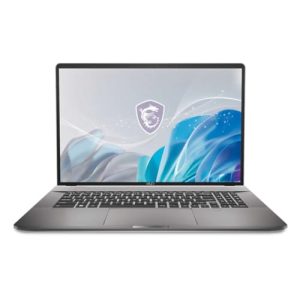
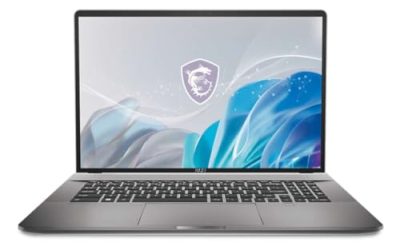
MSI aims this Creator A16 AI+ configuration at artists who render away from a fixed desk and need a bright, sharp panel in changing light. The UHD+ Mini LED display refreshes at 120Hz, which keeps viewport orbiting fluid, and the RTX 4070 graphics chip provides the strongest rendering muscle alongside the Gigabyte and Samsung entries. A Ryzen AI 9 365 processor, 32GB of LPDDR5x memory and Wi-Fi 7 round out a specification built for large project files moving between home, studio and client sites.
Specs
- Display: 16-inch UHD+ Mini LED, 3840 x 2400, 120Hz
- Processor: AMD Ryzen AI 9 365
- Graphics: NVIDIA GeForce RTX 4070 Laptop GPU
- Memory: 32GB LPDDR5x RAM
- Storage: 1TB NVMe SSD
- Operating system: Windows 11 Home
- Wireless: Wi-Fi 7
- Colour: Lunar Gray
Best for: Freelancers rendering long sequences in varied locations who want a bright Mini LED screen.
Watch out for: Memory is an onboard LPDDR5x design on this model family, so confirm the fitted capacity suits your future projects before ordering.
ASIN: B0DG7K7L74
Gigabyte AERO 16 OLED
The AERO 16 OLED leans toward a permanent desk setup, pairing an Intel Core i9-13900H with RTX 4070 graphics and twin Thunderbolt 4 ports that welcome docks, fast storage and external monitors through single cables. Its 4K OLED panel covers the full DCI-P3 gamut according to the listing, giving lighting artists a trustworthy view of contrast and saturation while they work. Windows 11 Pro adds workplace-friendly management and sign-in options, which suits artists embedded in small studios where machines join shared networks and follow stricter device policies.
Specs
- Display: 16-inch 4K UHD+ OLED, 3840 x 2400, 60Hz
- Processor: Intel Core i9-13900H, up to 5.4GHz
- Graphics: NVIDIA GeForce RTX 4070 Laptop GPU, 8GB GDDR6
- Memory: 32GB DDR5 RAM
- Storage: 1TB Gen4 M.2 SSD
- Operating system: Windows 11 Pro
- Ports: 2 x Thunderbolt 4, HDMI 2.1, USB 3.2 Type-C, USB 3.2 Type-A, RJ45 Ethernet
- Wireless: Intel Wi-Fi 6E, Bluetooth 5.2
Best for: Studio-based artists building a docked workstation around external screens and drives.
Watch out for: The 60Hz panel is less fluid for viewport orbiting than the 120Hz MSI screen, so prioritise colour or smoothness deliberately.
ASIN: B0BVRLCN99
Samsung Galaxy Book4 Ultra
Samsung packages the Galaxy Book4 Ultra for creators who split their week between private rendering work and client-facing presentations. The 16-inch AMOLED touchscreen flips naturally from node editor to showpiece, letting you walk stakeholders through a scene with direct touch navigation. Underneath, a Core Ultra 9 185H processor and RTX 4070 graphics supply the rendering performance, while 32GB of memory and a 1TB NVMe drive cover active project libraries. Windows 11 Pro suits consultants who must satisfy client IT requirements while working on site.
Specs
- Display: 16-inch AMOLED touchscreen, 2880 x 1800
- Processor: Intel Core Ultra 9 185H, up to 5.1GHz
- Graphics: NVIDIA GeForce RTX 4070 Laptop GPU
- Memory: 32GB LPDDR5X RAM, soldered
- Storage: 1TB NVMe SSD
- Operating system: Windows 11 Pro
- Model: NP964XGL-XG2US
- Colour: Moonstone Gray
Best for: Consultants and freelancers who present renders in person as often as they produce them.
Watch out for: Memory is soldered and capped at the fitted 32GB, so there is no later upgrade route if your scenes grow heavier.
ASIN: B0D4YKW6KF
Which One Fits Your Situation
You Render Product Stills for Print and Packaging
Choose the ASUS ProArt P16 when the deliverable is judged on paper or packaging, where a colour shift discovered late means reprinting rather than reposting. Its 4K OLED touchscreen supports careful material checks, the stylus-friendly surface helps with texture touch-ups, and the generous 2TB drive keeps product variants, environment maps and archived revisions together without constant external storage juggling.
You Freelance Across Several Client Sites
The MSI Creator A16 AI+ fits a travelling workflow best. Its Mini LED panel stays legible in bright rooms, the 120Hz refresh keeps large scenes pleasant to navigate on unfamiliar desks, and Wi-Fi 7 helps when studios offer fast wireless networks. The RTX 4070 graphics chip means overnight renders at a hotel or spare desk finish closer to studio pace.
Your Laptop Docks Into a Fixed Studio Desk
Pick the Gigabyte AERO 16 OLED if the machine spends weekdays connected to monitors, a dock and network storage, then occasionally travels. Twin Thunderbolt 4 ports simplify that single-cable routine, wired Ethernet through the RJ45 socket keeps huge scene files moving predictably, and Windows 11 Pro matches the management expectations of most small studio networks.
You Present Work as Much as You Produce It
The Samsung Galaxy Book4 Ultra serves artists whose laptop appears in boardrooms and showrooms. Its AMOLED touchscreen turns walkthroughs into a direct, tactile conversation, the slim Ultra design looks at home beside client hardware, and the RTX 4070 inside still handles demanding private rendering sessions once the meeting ends and revisions begin.
Common Mistakes
- Choosing integrated graphics to save money, then discovering your renderer cannot use GPU acceleration and frame times multiply.
- Buying 16GB of memory for subdivision-heavy scenes, which forces constant swapping and crashes during final-quality renders.
- Judging a display by resolution alone while ignoring panel type and colour coverage, so approved renders shift tone on client screens.
- Ignoring graphics memory capacity, even though dense textures and geometry can overflow an 8GB frame buffer mid-render.
- Forgetting to check whether memory and storage can be upgraded, locking the laptop into its launch-day specification forever.
Frequently Asked Questions
Is 32GB of memory enough for 3D rendering?
For most product scenes, character work and moderate environments, 32GB handles modelling and rendering comfortably, especially alongside an 8GB graphics card. Extremely dense scenes with heavy displacement, many unique textures or several applications open together can push beyond it. If your projects already strain a desktop with more memory, favour a model with upgradeable slots.
Does the graphics card matter more than the processor for rendering?
In GPU renderers such as Blender Cycles with OptiX or Redshift, the graphics card decides frame times, so it deserves priority. The processor still governs simulation baking, scene loading and CPU-only engines, and weak single-core speed makes modelling feel sluggish. Balanced machines, like the four compared here, avoid either side holding the other back.
Why choose a 16-inch screen over a larger laptop?
Sixteen inches hits a practical middle ground for 3D work. The panel is wide enough for a viewport beside tool panels, yet the chassis still fits typical backpacks and airline trays. Larger machines add screen space but become burdensome for freelancers moving between studios, while smaller screens force constant panel switching that slows detailed modelling sessions.
Can these laptops connect to external monitors and docks?
Yes, each model offers video output through HDMI or USB-C connections, and the Gigabyte adds twin Thunderbolt 4 ports for dock-based setups. An external colour-accurate monitor pairs well with any of them for final checks. Confirm the dock wattage and port layout against the specific laptop listing before building a permanent desk around it.
More from Amazon
Programs that pair well with the guide above. Offers and eligibility are set by Amazon and may change.
Free shipping on eligible items, Prime Video and more. Eligible new members can start with a free trial.
Start a Prime free trialAudiobooks and podcasts to listen to on the go. Eligible new members can start with a free trial.
Try Audible freeAd-free music streaming. Eligible new subscribers can start with a free trial.
Try Music Unlimited freeA free business account with business pricing and bulk-buying tools for work, shop or home office.
Create a business accountAs an Amazon Associate we earn from qualifying purchases.





Write Your Review
No reviews yet. Be the first to share your experience!