

Key takeaways
- The 4 best 18-inch creator laptops with dual SSD slots for video editing, 3D rendering, and photo work, chosen from Amazon product pages.
An 18-inch creator laptop is a desk-first purchase, and the storage layout matters as much as the screen. Video timelines, photo catalogs, 3D scenes, and local AI models all grow fast, and a single drive fills up sooner than most buyers expect. Two SSD slots change the plan completely: one drive can hold the operating system and applications while the second holds active projects, or a second drive can be added later instead of replacing the first one.

This guide is for video editors who cut 4K footage, photographers who keep large catalogs close at hand, 3D artists who render heavy scenes, and developers who run local AI models alongside creative apps. Every laptop below is an 18-inch model with two SSD slots confirmed on its Amazon product page, and every product is chosen from the name and specifications shown on that page.
Quick Picks
As an Amazon Associate we earn from qualifying purchases.
| Product | Best for | Key spec from title |
|---|---|---|
| Razer Blade 18 (2026) Performance Gaming Laptop, RTX 5080, 32GB DDR5, 1TB | 4K video editing with room to add a second drive later | 18-inch Dual Mode UHD+ 240Hz / FHD+ 440Hz display |
| Razer Blade 18 (2026) Performance Gaming Laptop, RTX 5090, 64GB DDR5, 2TB | 3D rendering and AI work that needs maximum VRAM and memory | RTX 5090 with 64GB DDR5 and 2TB storage |
| Alienware 18 Area-51 Gaming Laptop AA18250, RTX 5080, 32GB DDR5, 2TB | A desk-bound workstation with three M.2 slots for separate project drives | 18-inch WQXGA 300Hz display |
| MSI Raider 18 HX AI, RTX 5090, 96GB DDR5, 2TB Gen5 SSD and 2TB Gen4 SSD | Starting with large storage already installed across two drives | 2TB Gen5 SSD and 2TB Gen4 SSD |
How to Choose
Confirm Both SSD Slots Are Real M.2 Slots
A listing that says “dual storage” or “expandable storage” does not always mean two internal M.2 slots. Check the product page for the exact words “dual M.2 slots” and note which generations each slot supports, since many 18-inch laptops pair one PCIe Gen 5 slot with one PCIe Gen 4 slot. Also check whether the second slot arrives empty or already holds a drive: some configurations ship with two drives in RAID 0, which fills both slots at once. The safest confirmation is a listing that names both slots and states the maximum capacity per slot.
Match the Display to Your Creative Work
For creators, the display is a working tool, not a gaming feature. A UHD+ panel at 3840 x 2400 shows more timeline and more detail than a 2560 x 1600 panel, while 100% DCI-P3 coverage matters more than refresh rate when color accuracy decides whether a grade or a print looks right. Mini LED panels add contrast and brightness for HDR video work, and factory calibration claims such as Calman Verified are worth noting when the listing states them. A 240Hz or 300Hz refresh rate is a bonus for smooth scrubbing, not the reason to pick a creator machine.
Balance the CPU, GPU, and Memory Together
A fast GPU alone does not make a smooth editing machine. The laptops in this guide pair 24-core Intel Core Ultra 9 HX processors with RTX 5080 or RTX 5090 graphics, which keeps timeline playback, effects, and exports from fighting each other for resources. Memory matters just as much: 32GB of DDR5 is the realistic starting point for 4K editing, while 64GB or more suits 3D scenes and large photo catalogs. Check whether the memory is upgradeable through standard SO-DIMM slots, since soldered memory locks the configuration at purchase.
Weigh Ports, Cooling, and the Weight You Will Carry
An 18-inch laptop lives mostly on a desk, but the details still decide how it fits a workflow. Thunderbolt 5 moves large footage to external drives far faster than USB alone, an SD card reader saves photographers from carrying a dongle, and 2.5Gb Ethernet keeps network storage usable. Sustained rendering pushes cooling hard, so look for vapor chamber cooling in the listing when the laptop will export for hours. Expect roughly 7 pounds or more before the charger, and plan the workspace around that weight rather than around carrying it daily.
The 4 Best Options
Razer Blade 18 (2026) Performance Gaming Laptop, RTX 5080, 32GB DDR5, 1TB
This Blade 18 suits video editors who want a color-accurate 18-inch canvas and a storage plan that grows with their library. The dual-mode display switches between a sharp UHD+ mode for detailed timeline work and a fast FHD+ mode when motion smoothness matters more. Its dual M.2 slots mean the 1TB drive that ships in the machine can stay as the system drive while a second drive takes over footage, so projects never compete with applications for space.
Specs
- 18-inch dual-mode display: UHD+ 240Hz (3840 x 2400) or FHD+ 440Hz, 3ms response, 600 nits brightness, Calman Verified, 100% DCI-P3
- Intel Core Ultra 9 290HX processor, 24 cores, 24 threads, up to 5.5 GHz
- NVIDIA GeForce RTX 5080 Laptop GPU, 16GB GDDR7, 175W TGP plus 25W Dynamic Boost
- 32GB DDR5-6400 RAM, upgradeable to 128GB
- 1TB SSD installed; dual M.2 slots (PCIe Gen 5 and Gen 4) supporting up to 8TB per slot
- Thunderbolt 5, Thunderbolt 4, HDMI 2.1, SD UHS-II card reader, 2.5Gb Ethernet, Wi-Fi 7
- Windows 11
- 7.06 lb
Best for: 4K video editors who want a color-accurate dual-mode display and a free M.2 slot for a dedicated footage drive.
Watch out for: Confirm the exact configuration before ordering, since Blade 18 models share a name across several GPU, memory, and storage combinations.
Razer Blade 18 (2026) Performance Gaming Laptop, RTX 5090, 64GB DDR5, 2TB
This is the Blade 18 for creators whose work is limited by GPU memory and system memory rather than by the screen. The RTX 5090 carries 24GB of GDDR7, which holds larger 3D scenes and heavier AI models, while 64GB of DDR5 keeps big timelines and catalogs in memory during long sessions. The same dual-mode display and dual M.2 layout as the RTX 5080 model carry over, so the upgrade path stays open even though the machine already ships with 2TB installed.
Specs
- 18-inch dual-mode display: UHD+ 240Hz (3840 x 2400) or FHD+ 440Hz, 3ms response, 600 nits brightness, Calman Verified, 100% DCI-P3
- Intel Core Ultra 9 290HX processor, 24 cores, 24 threads, up to 5.5 GHz
- NVIDIA GeForce RTX 5090 Laptop GPU, 24GB GDDR7, up to 175W TGP plus 25W Dynamic Boost
- 64GB DDR5-6400 RAM, upgradeable to 128GB
- 2TB SSD installed; dual M.2 slots (PCIe Gen 5 and Gen 4) supporting up to 8TB per slot
- Thunderbolt 5, Thunderbolt 4, HDMI 2.1, SD UHS-II card reader, 2.5Gb Ethernet, Wi-Fi 7
- Windows 11
- 7.06 lb
Best for: 3D artists and AI developers who need 24GB of GPU memory and 64GB of system memory in an 18-inch machine.
Watch out for: The 64GB configuration is tied to the RTX 5090 tier, so check that the listing matches this exact memory and storage combination.
Alienware 18 Area-51 Gaming Laptop AA18250, RTX 5080, 32GB DDR5, 2TB

The Area-51 stands out in this group because it offers three M.2 positions instead of two, which suits creators who want the operating system, active projects, and an archive or scratch drive on separate internal storage. Its 18-inch WQXGA panel runs at 300Hz with a 3ms response, giving smooth motion for timeline scrubbing and preview playback. The two DDR5 CSoDIMM slots support up to 64GB, so memory can grow later without replacing the whole machine.
Specs
- 18-inch WQXGA display, 2560 x 1600, 300Hz, 3ms
- Intel Core Ultra 9 275HX processor, 24 cores, 24 threads, up to 5.4 GHz
- NVIDIA GeForce RTX 5080, 16GB GDDR7
- 32GB DDR5 RAM (2 x 16GB); two CSoDIMM slots supporting up to 64GB
- 2TB SSD installed; up to three M.2 SSD slots (two M.2 2280 and one M.2 2230 or 2280)
- Wi-Fi 7
- Windows 11 Home
- 96Wh battery
Best for: Creators who want a desk-bound workstation with three internal SSD positions for separate system, project, and scratch drives.
Watch out for: Gen 5 support varies by slot and by GPU tier, so check the listing and the manual for which M.2 position runs at Gen 5 speed in the configuration you buy.
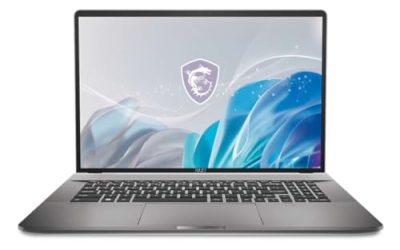
MSI Raider 18 HX AI, RTX 5090, 96GB DDR5, 2TB Gen5 SSD and 2TB Gen4 SSD
This Raider 18 HX AI is the pick for buyers who want large storage from day one rather than an upgrade project. It ships with two drives already installed, a 2TB Gen5 SSD and a 2TB Gen4 SSD, so the operating system and applications can live on the faster drive while projects sit on the second. The 4K UHD+ Mini LED display suits HDR video work, and 96GB of DDR5 gives heavy 3D and compositing sessions plenty of headroom.
Specs
- 18-inch 4K UHD+ HDR Mini LED display
- Intel Core Ultra 9 285HX processor, 24 cores, up to 5.5 GHz
- NVIDIA GeForce RTX 5090 Laptop GPU
- 96GB DDR5 RAM
- 2TB Gen5 SSD and 2TB Gen4 SSD installed
- Windows 11 Pro
- Per-key RGB keyboard, Wi-Fi 7, 1x HDMI, 2x Thunderbolt 5, RJ45
Best for: Creators who want 4TB of internal storage already split across two drives, with no installation work on arrival.
Watch out for: Both M.2 slots arrive occupied, so adding more internal storage later means replacing a drive rather than filling an empty slot.
Which One Fits Your Situation
Editing 4K Video With a Growing Footage Library
Choose the Razer Blade 18 with the RTX 5080. Its dual-mode display gives a sharp UHD+ view for color work and a fast FHD+ view when motion matters, and the free second M.2 slot takes a dedicated footage drive later. The 32GB of DDR5 handles 4K timelines, and Thunderbolt 5 keeps external storage fast when a project outgrows the internal drives.
Rendering 3D Scenes or Running Local AI Models
Choose the Razer Blade 18 with the RTX 5090 and 64GB of DDR5. The 24GB of GDDR7 holds larger scenes and models than the RTX 5080, and the extra system memory keeps heavy sessions stable. The dual M.2 slots still leave room to add a fast Gen 5 drive for active projects alongside the installed 2TB drive.
Building a Desk-Bound Workstation With Separate Drives
Choose the Alienware 18 Area-51 AA18250. Its three M.2 positions let the system, active projects, and a scratch or archive drive each live on their own internal storage, which is the layout many editors and 3D artists prefer. The 300Hz WQXGA panel keeps previews smooth, and the memory can grow to 64GB through its two CSoDIMM slots.
Starting With Large Storage Already Installed
Choose the MSI Raider 18 HX AI. It arrives with 4TB already split across a 2TB Gen5 drive and a 2TB Gen4 drive, plus 96GB of DDR5 and the RTX 5090 for heavy rendering. The 4K Mini LED display suits HDR video work, and Windows 11 Pro fits buyers who need Pro features for a work machine.
Common Mistakes
- Buying a laptop advertised as “expandable storage” without checking that it actually has two internal M.2 slots, since some models only offer one slot plus an external drive bay.
- Assuming both M.2 slots run at Gen 5 speed, when many 18-inch laptops pair one Gen 5 slot with one Gen 4 slot.
- Filling the only free slot with a slower drive and then running active projects from it, which caps the whole workflow at that drive’s speed.
- Ordering a configuration that ships with two drives in RAID 0 and discovering both slots are already occupied, leaving no room to add storage.
- Picking a display for its refresh rate instead of its resolution and color coverage, which matters far more for photo and video work.
Frequently Asked Questions
Do dual SSD slots mean the laptop ships with two drives?
Not always. Most configurations in this guide ship with one SSD installed and one empty M.2 slot, which is the point: the second slot is yours to fill when the library grows. A few configurations, such as the MSI Raider 18 HX AI here, ship with two drives already installed. Always read the listing to see how many drives are included and how many slots are free.
Can I mix a Gen 5 drive with a Gen 4 drive?
Yes. Each M.2 slot runs at its own generation, so a Gen 5 drive in a Gen 4 slot simply runs at Gen 4 speed, and a Gen 4 drive in a Gen 5 slot runs at Gen 4 speed. Put the operating system and applications on the faster drive and use the slower slot for footage, archives, or a scratch drive where the speed difference matters less.
Is an 18-inch creator laptop practical to carry around?
It is practical as a machine that moves between rooms or between home and studio, but not as a daily commuter laptop. These models weigh around 7 pounds before the charger, and the charger adds more. Treat an 18-inch laptop as a portable desktop replacement: it travels when a project needs it elsewhere, and it lives on a desk the rest of the time.
How much storage should a creator start with?
Start with at least 1TB installed and a free second slot, which covers the operating system, applications, and a current project. For 4K video, large photo catalogs, or 3D work, 2TB installed is the more comfortable starting point. A second drive for footage keeps the system drive fast and makes backups simpler, since project files sit in one place.
More from Amazon
Programs that pair well with the guide above. Offers and eligibility are set by Amazon and may change.
Free shipping on eligible items, Prime Video and more. Eligible new members can start with a free trial.
Start a Prime free trialAudiobooks and podcasts to listen to on the go. Eligible new members can start with a free trial.
Try Audible freeAd-free music streaming. Eligible new subscribers can start with a free trial.
Try Music Unlimited freeA free business account with business pricing and bulk-buying tools for work, shop or home office.
Create a business accountAs an Amazon Associate we earn from qualifying purchases.







Write Your Review
No reviews yet. Be the first to share your experience!