

Key takeaways
- Four high-end HOTAS systems for combat flight simulation compared on sensor resolution, throttle detents, control counts and overall build quality.
At the high end of combat flight simulation, the real decision is not whether a stick and throttle feel premium, but which control philosophy matches the aircraft you fly most: a faithful metal replica of one real jet, a modular metal system you can reconfigure, a touchscreen-driven modern setup, or a control-dense unit built for six-degrees-of-freedom space combat.

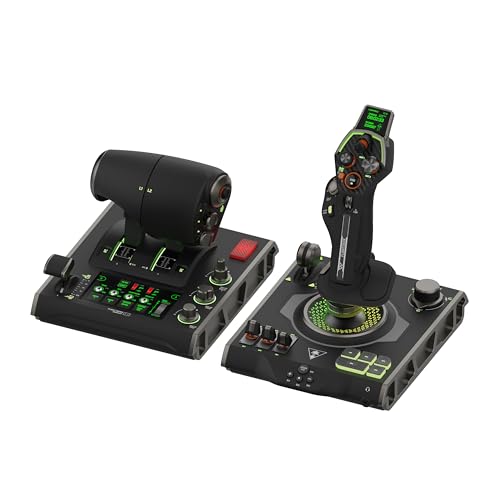
This roundup is for DCS World, War Thunder and Star Citizen pilots who have outgrown entry-level gear, and for cockpit builders comparing flagship hardware. Every pick below is a complete stick-and-throttle system, and all specifications come from the names and details published on the products’ Amazon pages.
Quick Picks
As an Amazon Associate we earn from qualifying purchases.
| Product | Best for | Key spec from title |
|---|---|---|
| Thrustmaster HOTAS Warthog | A-10C and replica-cockpit pilots | Metal dual throttle system |
| WINWING Orion2 HOTAS | Metal modular builds and Hornet/Viper drivers | NavyAce metal throttle grip |
| Turtle Beach VelocityOne Flightdeck | Pilots who want displays instead of keyboard reaches | 139 programmable controls |
| Logitech G X56 H.O.T.A.S. | Space combat and maximum control density | +189 programmable controls |
How to Choose
Sensor Technology and Axis Resolution
Combat flying is won on small corrections: formation flying, aerial refuelling and gun tracking all punish jittery axes. Contactless magnetic (Hall effect) sensors are the high-end standard because nothing physically rubs, so the reading does not wear or drift the way potentiometers do. Compare the published resolution figures: the Warthog lists 16-bit resolution on the stick and 14-bit on each throttle, while the X56 lists 16-bit Hall effect sensors on its aileron and elevator axes. Higher bit counts give the simulator more steps to work with, which matters most at the centre of travel where fine inputs live.
Stick Mechanics and Grip Layout
Below the sensors sits the mechanism that centres the stick, and it changes the feel completely. Traditional spring systems, like the Warthog’s five-coil arrangement, give a firm, predictable return. Cam-based bases, like the Orion2’s CAM slide structure with twin damping modules, let you adjust or even remove centring for helicopter-style control. Grip layout matters just as much: count the hats, dual-stage triggers and push functions you can reach without moving your hand, and check whether the grip matches the jet you fly, because replica layouts put controls where the real aircraft puts them.
Throttle Design, Detents and Engine Handling
For twin-engine jets you want two independent levers that can also lock together for single-engine flying; the Warthog, X56 and Flightdeck all publish a locking mechanism. Detents are the second decision: a physical idle and afterburner gate stops you slamming into burner by accident, and the best systems make them adjustable or disengageable, as on the Warthog’s push-and-pull system and the Orion2’s three independently adjustable detents. Throttle friction adjustment is the third check, since lever resistance that suits a Hornet may feel wrong in a warbird.
Control Count, Software and Expansion
A high-end HOTAS should keep your hands off the keyboard for everything except chat. Count total programmable functions, not just physical buttons: the Flightdeck reaches 139 including its touch display buttons, and the X56 passes 189 across three modes. Then check the software that manages those bindings, such as Thrustmaster’s T.A.R.G.E.T or WINWING’s SIMAPP Pro, and whether the ecosystem expands with extra grips, extensions or panels. Modular systems cost more up front but let one base serve several aircraft.
The 4 Best Options
Thrustmaster HOTAS Warthog
The Warthog remains the reference point for replica hardware: it reproduces the U.S. Air Force A-10C’s stick, dual throttle and control panel in metal, licensed from the real aircraft. Its H.E.A.R.T magnetic sensing keeps both main axes contactless, the stick grip carries the A-10C’s control layout including a metal dual trigger, and the throttle panel adds backlit functions and a trim wheel. It suits DCS pilots who fly the Warthog itself or who simply want the heaviest, most aircraft-like hardware on the desk, and its T.A.R.G.E.T software supports deep scripted profiles.
Specs
- Official replica of the U.S. Air Force A-10C flight stick, throttle and control panel
- H.E.A.R.T HallEffect AccuRate Technology with 3D magnetic (Hall effect) sensors
- Joystick: 16-bit resolution (65,536 x 65,536 values), 19 action buttons plus one 8-way point-of-view hat
- Dual throttles: 14-bit resolution (16,384 values on each throttle), locking system, adjustable friction, disengageable afterburner detent
- 55 fully programmable action buttons across stick, throttle and control panel
- Metal joystick, throttle handles and bases; item weight 13.23 pounds; model 2960720
- T.A.R.G.E.T (Thrustmaster Advanced pRogramming Graphical EdiTor) software; USB connection; PC
Best for: DCS A-10C pilots and anyone building a replica-style cockpit around metal hardware.
Watch out for: the stick has no twist rudder axis, so plan on rudder pedals or map yaw to another control; the stick and throttle also need two separate USB ports.
ASIN: B00371R8P4
WINWING Orion2 HOTAS
The Orion2 is the modular metal alternative: the set pairs an Orion2 joystick base and ViperAce EX metal grip with an Orion2 throttle base and NavyAce metal throttle grip, all in aviation-grade aluminium and stainless steel. Its cam-based stick base offers twin damping modules and a no-centering mode aimed at rotary-wing flying, while the throttle brings three adjustable detents and a base panel dense with staged switches and encoders. It fits enthusiasts who like to tune and expand their hardware, since the bases accept other WINWING grips, extension rods and Z-axis modules over time.
Specs
- Set includes Orion2 throttle base, NavyAce metal throttle grip, Orion2 joystick base and ViperAce EX metal joystick grip
- Construction: aviation-grade aluminium, stainless steel and high-pressure cast aluminium alloy
- Dual throttle levers with adjustable friction and three independently adjustable detents (idle/cutoff, middle, afterburner)
- Throttle grip: scroll wheel, dual Hall thumbwheels, multiple buttons and hat switches
- Throttle base panel: 4 dual-stage switches, 4 three-stage switches, 3 press switches, 4 encoders and 2 AA/AG programmable backlight switches
- Joystick base: CAM slide structure, twin damping modules with no-centering mode, rotatable grip fitting
- Dual dynamic vibration motors; SIMAPP Pro software for binding, axis mapping and detent setup; USB; Windows plug-and-play
Best for: enthusiasts who want metal construction plus the freedom to swap grips and reconfigure detents per aircraft.
Watch out for: the grips and bases arrive as separate parts that you assemble and screw together, and the listing notes the finger-lift detent system needs an additional purchase for full functionality.
ASIN: B0D9PT6VXB
Turtle Beach VelocityOne Flightdeck
The Flightdeck takes the opposite route from replica hardware: instead of copying one jet, it adds screens. The throttle carries the Flight Touch Display, a programmable touchscreen that adds up to 39 extra button functions, and the stick mounts a full-colour OLED head-up display for adjusting axis curves, rudder lock and lighting without leaving the sim. Underneath, the stick runs three non-contact axes with Hall effect sensors and the dual throttles use adjustable haptic detents. It is the pick for pilots who fly many different aircraft and would rather reprogram a display than memorise per-jet switch layouts.
Specs
- 15 axes and 139 programmable functions across stick, throttle and displays
- Flight Touch Display on the throttle adds up to 39 extra configurable button functions
- Full-colour OLED head-up display on the stick for diagnostics and on-the-fly adjustments
- Combat-ready modular stick with three non-contact axes using Hall effect sensors and dual-stage triggers
- Dual throttle levers with integrated locking latch and haptic detents adjustable via the touch display
- Stick base: landing gear lever with indicator lights, three-position rotary parking brake selector, programmable push buttons and toggle switches
- 3.5mm audio port for headsets; Windows 10 and 11; model TBS-0724-05
- Listing names full control compatibility with Microsoft Flight Simulator 2020 and 2024, X-Plane 11 and 12, DCS World, Prepar3D, Star Citizen and War Thunder
Best for: multi-aircraft pilots who want display-driven controls and in-sim adjustments without reaching for the keyboard.
Watch out for: the listing notes that control mapping is required out of the box, so budget setup time in the Flight Hangar app before your first flight.
ASIN: B0CPQ7RF6Z
Logitech G X56 H.O.T.A.S.
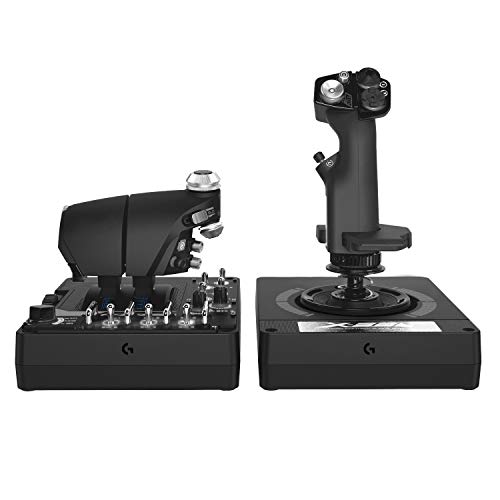
The X56 is the control-density option, built as much for space combat as for jets. Mini analogue sticks on both the stick and the throttle grips give translational axes for six-degrees-of-freedom flying, the twin throttles lock together or split for dual engines, and the stick’s resistance swaps between four included springs. With over 189 programmable controls across three modes, it covers complex spacecraft and modern jets without extra panels. It suits Star Citizen and Elite Dangerous pilots first, and DCS players who value sheer binding capacity and RGB-lit, finger-distinct switches for VR flying.
Specs
- 189+ programmable controls: 13 axes, 5 hats and 31 programmable buttons across three modes
- Contact-free Hall effect sensors on the 16-bit aileron and elevator axes
- Interchangeable four-spring system for adjustable stick tension
- Independent twin throttles with friction adjuster and throttle lock
- Mini analogue sticks on stick and throttle provide four extra axes for six-degrees-of-freedom control
- Customisable RGB backlighting on stick and throttle
- Two USB 2.0 connections, one per unit; model 945-000058; PC
Best for: space-sim pilots and VR flyers who need the highest number of bindable controls in one set.
Watch out for: each unit needs its own USB port and cable run, and the separate Renewed listing is a different product record, so confirm you are ordering the new unit.
ASIN: B079P6SSHP
Which One Fits Your Situation
You Fly the A-10C or Love Replica Cockpits
Choose the Thrustmaster HOTAS Warthog. It is a licensed metal replica of the real aircraft’s controls, so every hat and switch sits where DCS expects it, and the weighted control panel adds the toggles and trim wheel that replica builders want. Just remember it has no twist rudder, so pedals belong in the same plan.
You Want Metal Hardware You Can Reconfigure
Choose the WINWING Orion2 HOTAS. Its cam-based base, adjustable detents and swappable grip ecosystem let one setup serve a Hornet today and a Viper or helicopter later. The twin damping modules even allow a no-centering mode for rotary-wing flying, something fixed-spring rivals cannot offer without modification.
You Split Time Between Jets and Spaceships
Choose the Logitech G X56 H.O.T.A.S. The mini analogue sticks deliver true translational control for six-degrees-of-freedom spaceflight, while the twin lockable throttles and 189-plus programmable controls still cover twin-engine jets. Four swap-in springs let you soften the stick for space trucking or firm it up for dogfighting.
You Hate Reaching for the Keyboard
Choose the Turtle Beach VelocityOne Flightdeck. Its touch display adds up to 39 programmable buttons with labels you can read in the dark, and the stick-mounted OLED screen handles adjustments mid-flight. For pilots rotating through many aircraft in DCS World or Microsoft Flight Simulator, that flexibility beats memorising five different switch layouts.
Common Mistakes
- Buying a flagship stick and throttle but forgetting rudder control: several high-end sticks, including the Warthog, have no twist axis, so pedals or a mapped alternative are part of the real purchase.
- Counting only physical buttons instead of total programmable functions, then running out of bindings in complex jets like the Hornet or Apache.
- Ignoring detents and throttle friction: fixed, non-adjustable throttles make afterburner and idle management clumsy in fast jets.
- Mounting nothing: heavy metal bases still slide under hard manoeuvring, so check desk clamps, mounts or bolt-down options before the first dogfight.
- Assuming console compatibility: these systems are PC controllers, so confirm your platform before ordering.
Frequently Asked Questions
Do I need rudder pedals with a high-end HOTAS?
Often, yes. Several flagship sticks omit a twist rudder axis entirely, the Warthog included, because their real aircraft use pedals. You can map yaw to a throttle wheel or paddle as a stopgap, but coordinated turns, crosswind landings and helicopter flying all feel far better with pedals added later.
Are Hall effect sensors worth paying for?
For most combat simmers, yes. Hall effect sensors read axis position magnetically with no physical contact, so they do not develop the centre jitter and dead zones that worn potentiometers show over time. Published resolutions of 14-bit and 16-bit also give finer steps for the small corrections used in formation and refuelling work.
Can one HOTAS cover both jets and space sims?
Yes, with the right layout. Twin lockable throttles handle one or two engines, while mini analogue sticks, like those on the X56, add the translational axes space sims need. Replica sets such as the Warthog still work in space titles, but you will map translation to hats or wheels instead of true analogue axes.
How much setup should I expect before flying?
Plan on an evening. Each unit may need its own USB port, the maker’s software handles profiles and calibration, and complex sims like DCS World expect per-aircraft binding. Display-based systems add touchscreen configuration, and modular sets add physical assembly. After that first setup, switching aircraft is mostly a matter of loading a saved profile.
More from Amazon
Programs that pair well with the guide above. Offers and eligibility are set by Amazon and may change.
Free shipping on eligible items, Prime Video and more. Eligible new members can start with a free trial.
Start a Prime free trialAudiobooks and podcasts to listen to on the go. Eligible new members can start with a free trial.
Try Audible freeAd-free music streaming. Eligible new subscribers can start with a free trial.
Try Music Unlimited freeA free business account with business pricing and bulk-buying tools for work, shop or home office.
Create a business accountAs an Amazon Associate we earn from qualifying purchases.





Write Your Review
No reviews yet. Be the first to share your experience!