

The best tablets for business in 2026 are the Microsoft Surface Pro 11 for Windows-first work, the iPad Air with M3 for most mobile professionals, the iPad Pro with M5 for demanding creative workloads, and the Samsung Galaxy Tab S10+ for Android-based productivity.
The right choice depends less on screen size than on software, file compatibility, keyboard quality, security requirements, and whether the tablet must replace a laptop. A tablet used for email and presentations has different priorities from one used for desktop accounting, field inspections, or video production.
Our top picks
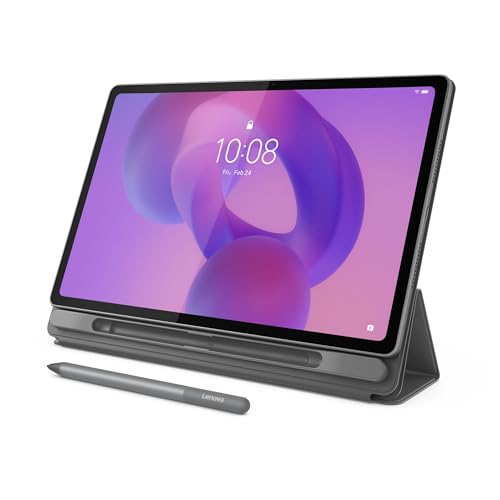 Lenovo Idea Tab Plus
- A VIBRANT, SLIMMER BUILD FOR SHARPER MINDS
- CARRY LIGHT, FEEL BRIGHT
- Stay focused and use your Lenovo Tab Pen…
 Lenovo Tab One
- COMPACT SIZE, COMPACT FUN
- Add a touch of style with a modern…
- Freedom never felt so sweet with all-day battery…
 Microsoft Surface Pro for Business 2-n-1 Laptop/Tablet
- Build with the latest Intel Core Ultra Processors…
- Power through tasks with up to 14 hours…
- The Intel AI Boost NPU features up to…
| Product | Key specs | |
|---|---|---|
| Lenovo Idea Tab Plus | A VIBRANT, SLIMMER BUILD FOR SHARPER MINDS CARRY LIGHT, FEEL BRIGHT Stay focused and use your Lenovo Tab Pen… | Check price |
| Lenovo Tab One | COMPACT SIZE, COMPACT FUN Add a touch of style with a modern… Freedom never felt so sweet with all-day battery… | Check price |
| Microsoft Surface Pro for Business 2-n-1 Laptop/Tablet | Build with the latest Intel Core Ultra Processors… Power through tasks with up to 14 hours… The Intel AI Boost NPU features up to… | Check price |
 AGM PAD P2 Active Rugged Android 14 | Built to Last, Rugged and Reliable: AGM PAD… Powerful Android 14.0 Operating System: Unlock the power… Immersive 11-Inch 90Hz FHD Display with 480 NITS… | Check price |
As an Amazon Associate we earn from qualifying purchases at no extra cost to you.
Best business tablets at a glance
| Tablet | Operating system | Screen | Weight | Battery claim | Best for |
|---|---|---|---|---|---|
| Microsoft Surface Pro 11 | Windows 11 | 13-inch, 2880 × 1920, 120Hz | From about 895g | Up to about 14–15 hours, configuration dependent | Replacing a Windows laptop |
| iPad Air with M3 | iPadOS | 11-inch or 13-inch, 2360 × 1640 or 2732 × 2048 | About 460g or 616g | Up to 10 hours | Most mobile professionals |
| iPad Pro with M5 | iPadOS | 11-inch or 13-inch, Ultra Retina XDR | About 444g or 579g | Up to 10 hours | Creative and technical work |
| Samsung Galaxy Tab S10+ | Android | 12.4-inch AMOLED, 2800 × 1752 | About 571g | Up to about 16 hours of video | Android users and multitaskers |
Battery figures are manufacturer estimates under controlled conditions. Video playback, cellular use, screen brightness, video calls, and demanding applications can reduce runtime substantially.
Microsoft Surface Pro 11: best for Windows business software
The Surface Pro 11 is the safest choice when a tablet must run familiar Windows applications rather than mobile equivalents. Microsoft 365 desktop apps, full-featured browser tools, VPN clients, accounting programs, development environments, enterprise management utilities, and legacy business software are all easier to accommodate on Windows 11.
Its Snapdragon X platform provides strong everyday performance and excellent efficiency. The main qualification is application compatibility: most modern Windows applications run well, but some specialist programs, older drivers, hardware security keys, and plug-ins may behave differently on an Arm-based Windows device. Check compatibility with your IT department before buying.
The detachable keyboard is much closer to a laptop keyboard than most tablet covers, although it still has less travel and stability than a conventional notebook. The optional Surface Pro Flex Keyboard adds a wireless mode, useful when the screen is propped at a distance or used as a second display. Surface Slim Pen support suits handwriting, diagrams, and document annotation, but the keyboard and pen are usually separate purchases.
Security is a major advantage for managed workplaces. Windows 11 supports BitLocker, Windows Hello, Microsoft Defender, enterprise identity controls, and Microsoft Intune management. Cellular versions can add 5G, depending on the exact configuration and market. Expect a general market price range of roughly $1,000–$2,000 before accessories, with higher-memory and larger-storage versions costing more.
iPad Air with M3: the best balance for most professionals
The iPad Air with M3 is the strongest general recommendation when a business needs portability, long battery life, high-quality video calls, and enough power for office work without paying for the iPad Pro. Microsoft 365, Google Workspace, Slack, Zoom, Adobe applications, project-management tools, PDF editors, and remote-desktop clients are widely available on iPadOS.
The M3 processor is considerably more capable than the demands of email, spreadsheets, presentations, and web applications. It also leaves useful headroom for photo editing, light video work, large PDF files, and multitasking. However, iPadOS still handles files, windows, external displays, and background processes differently from Windows or macOS. Before deploying it across a team, test the exact workflow rather than assuming that an iPad version is identical to its desktop counterpart.
The 11-inch model is easier to carry, while the 13-inch version gives spreadsheets and split-screen work more room. Both support the Apple Pencil Pro and Apple Pencil USB-C, although the Pro model is the better choice for frequent handwritten notes and pressure-sensitive creative work. Apple’s Magic Keyboard improves typing and trackpad use, but it is expensive and does not turn iPadOS into Windows.
For security, iPadOS offers hardware-backed encryption, biometric authentication through Face ID or Touch ID, application sandboxing, managed Apple IDs, and mobile-device management. Wi-Fi and cellular configurations are available. A practical budget is approximately $600–$1,300 for the tablet, with keyboard and stylus accessories potentially adding another $200–$350.
iPad Pro with M5: best for demanding creative work
The iPad Pro with M5 is aimed at professionals who benefit from a lighter high-performance device: video editors, illustrators, designers, architects, photographers, and presenters who work with large visual files. Its tandem OLED Ultra Retina XDR display offers exceptional contrast and brightness, while the M5 chip provides more performance than most office users need.
The 11-inch version is highly portable; the 13-inch version is more comfortable for timelines, drawing, and side-by-side documents. Thunderbolt connectivity supports fast external storage and displays, although iPadOS software limitations remain the deciding factor for some professional workflows. Applications such as Final Cut Pro for iPad and Adobe creative tools are useful, but they do not provide every desktop feature.
Business buyers should also consider repair and replacement costs. The thin chassis and premium display make accidental damage expensive, so a protective case, device-management policy, and suitable insurance may matter more than a small difference in processor performance. Cellular versions support 5G, and storage options extend into capacities suitable for large media libraries. Market pricing generally starts around $1,000 and can exceed $2,000 before accessories.
Samsung Galaxy Tab S10+: best Android option for business
The Galaxy Tab S10+ combines a bright 12.4-inch AMOLED display, a relatively low weight, an included S Pen, and strong Android multitasking. Samsung DeX is particularly valuable: it presents a desktop-like interface with resizable windows, taskbar controls, and keyboard-and-mouse support.
It works well for browser-based business systems, Microsoft 365, Google Workspace, note-taking, presentations, remote access, and field work. The included S Pen is useful for signing documents, marking diagrams, and taking handwritten notes without buying a separate stylus.
Its limitation is application depth. Some specialist Windows software is unavailable or only accessible through remote desktop. Android tablet applications can also vary in how well they support large screens and keyboard shortcuts. Samsung Knox provides hardware-backed security, encryption, biometric login, and enterprise management features, making the tablet a credible corporate device when configured by IT.
Wi-Fi and 5G versions are available in many markets. The Tab S10+ generally costs about $900–$1,300 depending on storage and connectivity, while the larger Galaxy Tab S10 Ultra offers more screen space but is less comfortable to hold and carry. Choose the Ultra only if the display area directly improves your work.
Decision matrix: which tablet fits your situation?
| Your situation | Best choice | Why | Main compromise |
|---|---|---|---|
| Must run full Windows applications | Surface Pro 11 | Native Windows 11, enterprise controls, desktop file compatibility | Arm compatibility and accessory cost |
| Frequent travel and standard office work | iPad Air with M3 | Low weight, strong performance, excellent battery efficiency | iPadOS multitasking and file management |
| Video, design, drawing, or photography | iPad Pro with M5 | Superior display and high sustained performance | High total cost and mobile-app limitations |
| Android phone, handwriting, and DeX multitasking | Galaxy Tab S10+ | Included pen, AMOLED screen, desktop-style Android mode | Fewer specialist professional applications |
| Lowest initial budget | iPad Air or a mid-range Android tablet | Strong basic performance without workstation pricing | Less storage, fewer ports, and weaker upgrade flexibility |
What to check before buying for a team
Keyboard and stylus support
Calculate the complete setup price, not just the tablet price. A tablet that costs $700 but needs a $300 keyboard and $130 stylus may cost more than a keyboard-equipped business notebook. Confirm whether the keyboard has a stable lap-friendly base, a trackpad, function keys, backlighting, and a layout your staff can use comfortably for several hours.
Cellular connectivity
5G is valuable for sales staff, inspectors, consultants, and emergency-response teams that cannot depend on public Wi-Fi. It adds the cost of a data plan and may reduce battery life. For office workers who spend most of the day near reliable Wi-Fi, tethering from a phone can be cheaper.
Security and administration
Verify support for your organization’s identity provider, mobile-device-management platform, VPN, multifactor authentication, remote wipe, encryption policy, and compliance requirements. A consumer tablet can be technically powerful but unsuitable if it cannot be enrolled and controlled by company systems.
Storage and ports
For ordinary documents, 128GB can be workable when files are cloud-managed. Choose 256GB or more for offline travel, media, engineering files, or large creative projects. USB-C is common, but check its speed: fast external drives and displays may require a higher-bandwidth port. Also budget for a hub, since many tablets provide only one physical connector.
Ownership realities
The first parts to wear are usually the keyboard cover, charging cable, kickstand joints, and screen coating—not the processor. Keep food and grit away from keyboard hinges, clean screens with a soft lint-free cloth, and avoid spraying liquid directly onto any device. Use a case that protects corners without blocking microphones, cameras, cooling openings, or the pen attachment area.
Common business mistakes include buying Wi-Fi-only devices for staff who work in the field, choosing too little storage, assuming a mobile application matches its desktop version, and overlooking keyboard replacement costs. For a five-year ownership estimate, add the tablet, keyboard, stylus, protective case, cellular service, warranty coverage, and likely battery replacement or device refresh. That total is more useful than comparing tablet prices alone.
Final recommendation
Choose the Surface Pro 11 when Windows compatibility and corporate management come first. Choose the iPad Air with M3 for the broadest mix of portability, performance, and cost. Choose the iPad Pro with M5 when display quality and creative performance justify the premium. Choose the Galaxy Tab S10+ when Android integration, an included stylus, and Samsung DeX are more useful than access to specialist desktop software.
More from Amazon
Programs that pair well with the guide above. Offers and eligibility are set by Amazon and may change.
Free shipping on eligible items, Prime Video and more. Eligible new members can start with a free trial.
Start a Prime free trialAudiobooks and podcasts to listen to on the go. Eligible new members can start with a free trial.
Try Audible freeAd-free music streaming. Eligible new subscribers can start with a free trial.
Try Music Unlimited freeA free business account with business pricing and bulk-buying tools for work, shop or home office.
Create a business accountAs an Amazon Associate we earn from qualifying purchases.










Write Your Review
No reviews yet. Be the first to share your experience!