

Our Short List of 3

- Best for: A home office with three screens, wired networking, and many open applications.
- AMD Ryzen 7 5825U processor, 8 cores and 16 threads, up to 4.5GHz
- 32GB DDR4 RAM in dual channel, expandable to 64GB
- 1TB M.2 2280 PCIe 3.0 SSD, with dual-slot expansion to 4TB
- AMD Radeon Graphics with 8 cores at 2000 MHz
- Best for: Heavy multitasking on a small desk where space is limited and the workload is not.
- AMD Ryzen 9 6900HX processor, 8 cores and 16 threads, up to 4.9GHz
- 32GB DDR5 RAM
- 1TB PCIe 4.0 SSD
- AMD Radeon 680M graphics
- Best for: A tidy three-screen desk where calls, documents, and research stay visible at the same time.
- AMD Ryzen 7 7735HS processor, 8 cores and 16 threads, up to 4.75GHz
- 24GB LPDDR5 RAM
- 1TB M.2 2280 PCIe 4.0 NVMe SSD
- Triple display support through HDMI, DisplayPort, and Type-C
All 4 Picks at a Glance
| Product | Specs | Action |
|---|---|---|
| GMKtec M5 Plus |
| Check price on Amazon |
| MINISFORUM UM690 Slim |
| Check price on Amazon |
| Beelink SER5 MAX |
| Check price on Amazon |
 MINISFORUM UM790 Pro |
| Check price on Amazon |
Key takeaways
- Find a quiet Ryzen mini PC for remote work with enough memory, ports, and display support for video calls, documents, and daily multitasking.
Remote work asks a desktop to do several jobs at once without taking over the desk. A video call runs while documents stay open, a browser fills with research tabs, chat messages arrive in the background, and a second monitor holds the task that needs attention next. A Ryzen mini PC fits that pattern well because it brings desktop-class multitasking into a small box that can sit behind a monitor, on a shelf, or in a bag for a move between rooms.
This guide is for people who work from home most days, for hybrid workers who want the same setup in a home office and a small work corner, and for anyone replacing a slow laptop or an ageing tower with something quieter and tidier. Every model below is a mini PC with a Ryzen processor, and each one was chosen from its Amazon listing name and specifications, with memory, storage, display support, and connectivity checked before it earned a place here.
Quick Picks
As an Amazon Associate we earn from qualifying purchases
| Product | Best for | Key spec from title |
|---|---|---|
| GMKtec M5 Plus | A busy home office with wired networking and three screens | Ryzen 7 5825U, 32GB RAM, 1TB SSD |
| MINISFORUM UM690 Slim | Heavy multitasking in a very small footprint | Ryzen 9 6900HX, 32GB DDR5 RAM, 1TB PCIe 4.0 SSD |
| Beelink SER5 MAX | A tidy desk with three 4K displays | Ryzen 7 7735HS, 24GB LPDDR5 RAM, 1TB SSD |
| MINISFORUM UM790 Pro | Demanding work with two USB4 ports and fast storage | Ryzen 9 7940HS, 32GB DDR5 RAM, 1TB SSD |
How to Choose
Match the processor to the shape of your workday
A Ryzen 7 with eight cores handles the usual remote-work mix comfortably: video calls, email, documents, spreadsheets, browser research, and chat running together. A Ryzen 9 makes more sense when the day regularly includes large spreadsheets, photo editing, local code builds, virtual machines, or several demanding applications open at the same time. Do not chase the highest boost clock alone, because sustained work depends on cooling and steady performance as much as a short burst. Think about the heaviest hour of a normal week, not the lightest one, and choose a processor that still has room left during that hour. If calls freeze while a file exports, the processor is the first place to look.
Get enough memory and storage before anything else
Memory decides how many applications can stay open without the system slowing down, and storage decides how quickly files open and the machine starts. For remote work, 16GB of memory is a workable floor, while 32GB gives a clearer margin for large browser sessions, virtual meetings, and creative tools running side by side. A 500GB solid-state drive suits a mostly cloud-based workflow, while 1TB is safer when local files, recordings, downloads, and project folders accumulate. Check whether memory and storage can be upgraded later, because a machine that grows with the workload lasts longer than one that needs replacing after the first busy project.
Count the screens and ports before you buy
A mini PC can look perfect on paper and still fail at a real desk if it cannot drive the monitors already in use. Decide how many screens the work needs, then check the exact video outputs: HDMI, DisplayPort, and USB-C or USB4 each behave differently, and adapters add clutter and another point of failure. Count the USB ports for a keyboard, mouse, webcam, headset, and any external drive, and leave one spare for a temporary device. A wired Ethernet port matters for long calls in a room with weak wireless coverage, while Wi-Fi 6 or Wi-Fi 6E and Bluetooth help when the desk moves away from the router.
Watch the small details that affect daily comfort
The parts that rarely appear in a headline decide whether a mini PC is pleasant to live with. Fan noise matters during calls, so a machine that stays quiet under a normal office load is worth more than a louder one with a slightly faster chip. A compact case needs clear airflow, so leave space around its vents instead of pushing it into a closed cabinet. Check the power supply arrangement, because an external brick needs its own space and a built-in supply keeps the desk simpler. Also confirm the operating system, the warranty terms, and what arrives in the box, including cables and a monitor mount, before ordering.
The 4 Best Options
GMKtec M5 Plus
- Best for: A home office with three screens, wired networking, and many open applications.
- AMD Ryzen 7 5825U processor, 8 cores and 16 threads, up to 4.5GHz
- 32GB DDR4 RAM in dual channel, expandable to 64GB
- 1TB M.2 2280 PCIe 3.0 SSD, with dual-slot expansion to 4TB
- AMD Radeon Graphics with 8 cores at 2000 MHz
A home office with three screens, wired networking, and many open applications.
Confirm which display cables the setup needs, because HDMI, DisplayPort, and USB-C outputs each need the matching cable or adapter.
The GMKtec M5 Plus suits a home office that runs all day and needs steady wired networking as well as wireless backup. Its Ryzen 7 processor and 32GB of memory keep video calls, documents, and browser tabs moving together, while the large solid-state drive leaves room for local projects and recordings. Dual wired LAN ports are useful when one connection serves the work network and the other serves a separate device or a backup link. Triple display support helps anyone who keeps email on one screen, a document on another, and a call or reference material on a third.
Watch out for: Confirm which display cables the setup needs, because HDMI, DisplayPort, and USB-C outputs each need the matching cable or adapter.
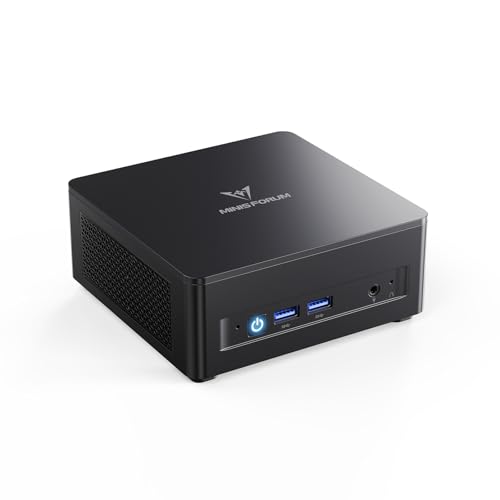
MINISFORUM UM690 Slim
- Best for: Heavy multitasking on a small desk where space is limited and the workload is not.
- AMD Ryzen 9 6900HX processor, 8 cores and 16 threads, up to 4.9GHz
- 32GB DDR5 RAM
- 1TB PCIe 4.0 SSD
- AMD Radeon 680M graphics
Heavy multitasking on a small desk where space is limited and the workload is not.
Check the exact display combination before ordering, because the mix of HDMI, DisplayPort, and USB4 outputs decides which monitors connect directly.
The MINISFORUM UM690 Slim is the pick for a small desk that still needs serious multitasking power. Its Ryzen 9 processor and 32GB of fast DDR5 memory handle large documents, research sessions, and creative tools without forcing the user to close applications between tasks. The slim case takes up little space and can sit beside a monitor or mount behind it, which keeps a shared room looking tidy. Four USB ports on the listing give room for the everyday peripherals of a remote worker, while USB4 and modern display outputs support a multi-screen setup.
Watch out for: Check the exact display combination before ordering, because the mix of HDMI, DisplayPort, and USB4 outputs decides which monitors connect directly.
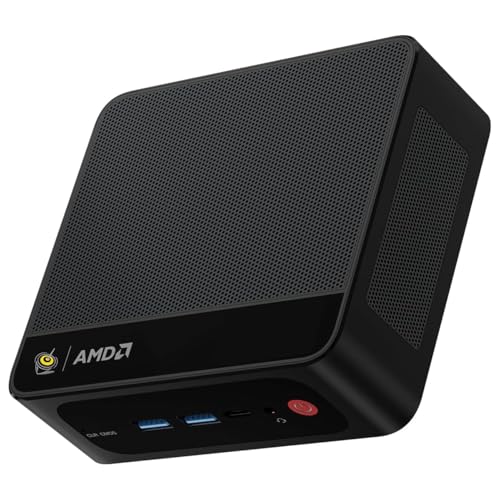
Beelink SER5 MAX
- Best for: A tidy three-screen desk where calls, documents, and research stay visible at the same time.
- AMD Ryzen 7 7735HS processor, 8 cores and 16 threads, up to 4.75GHz
- 24GB LPDDR5 RAM
- 1TB M.2 2280 PCIe 4.0 NVMe SSD
- Triple display support through HDMI, DisplayPort, and Type-C
A tidy three-screen desk where calls, documents, and research stay visible at the same time.
The 24GB memory configuration is a fixed amount to plan around, so confirm it covers the largest workload before choosing this model.
The Beelink SER5 MAX fits a remote worker who wants a simple, fast setup with three displays and no fuss. Its Ryzen 7 processor and 24GB of LPDDR5 memory cover video calls, office applications, and browser-heavy research in one smooth session. The 1TB solid-state drive gives generous room for local files, while the triple display support through HDMI, DisplayPort, and Type-C keeps the desk layout flexible. Wi-Fi 6 and a fast wired LAN port cover both a strong wireless connection and a stable wired call, so the machine adapts to different rooms and routers.
Watch out for: The 24GB memory configuration is a fixed amount to plan around, so confirm it covers the largest workload before choosing this model.
MINISFORUM UM790 Pro
- Best for: Demanding remote work with virtual machines, large files, and several heavy applications open together.
- AMD Ryzen 9 7940HS processor, 8 cores and 16 threads, up to 5.2GHz
- 32GB DDR5 RAM
- 1TB SSD
- AMD Radeon 780M graphics
Demanding remote work with virtual machines, large files, and several heavy applications open together.
Check that the desk has room for good airflow around the case, because sustained heavy work generates more heat than light office use.
The MINISFORUM UM790 Pro is the strongest option here for demanding remote work that goes beyond documents and calls. Its Ryzen 9 processor and 32GB of DDR5 memory handle virtual machines, large media files, and several heavy applications at once, while the fast storage keeps projects loading quickly. Two USB4 ports add flexibility for high-speed drives and modern displays, and two HDMI 2.1 ports support a dual-screen desk without adapters. This is the machine to choose when the workday regularly pushes a smaller mini PC to its limits.
Watch out for: Check that the desk has room for good airflow around the case, because sustained heavy work generates more heat than light office use.
Which One Fits Your Situation
A small desk in a shared room
Choose the MINISFORUM UM690 Slim when floor and desk space are tight but the workload is not light. Its slim case disappears beside a monitor, yet its Ryzen 9 processor and 32GB of memory handle calls, documents, and research together. The modern display outputs support more than one screen, so a compact desk can still run a proper two-screen setup without a tower underfoot.
A three-screen home office
Choose the Beelink SER5 MAX or the GMKtec M5 Plus when the work needs three displays visible at once. The Beelink keeps the setup simple with HDMI, DisplayPort, and Type-C outputs, while the GMKtec adds dual wired LAN ports for a desk that depends on a stable wired connection. Either one keeps email, documents, and a call on separate screens.
A demanding workload with large files
Choose the MINISFORUM UM790 Pro when the day includes virtual machines, large media, or several heavy applications running together. Its Ryzen 9 processor, 32GB of memory, and fast storage handle that load with room to spare. The two USB4 ports also make it easier to attach high-speed external drives and modern displays.
A first mini PC for everyday remote work
Choose the GMKtec M5 Plus when the goal is a reliable first mini PC for ordinary remote work. Its Ryzen 7 processor and 32GB of memory cover calls, documents, and browser tabs, while the 1TB drive leaves room to grow. Triple display support and dual wired LAN ports add flexibility without making the setup complicated.
Common Mistakes
- Buying a mini PC with too little memory, then keeping dozens of browser tabs and applications open and wondering why calls stutter.
- Choosing a model with only one video output and discovering later that a second monitor needs an adapter or a different machine.
- Ignoring fan noise and airflow, then placing the mini PC in a closed cabinet where heat builds up during long calls.
- Skipping the wired Ethernet check and relying on weak wireless coverage in the room where calls actually happen.
- Forgetting to confirm the operating system, included cables, and monitor mount before the delivery arrives.
Frequently Asked Questions
Is a Ryzen mini PC powerful enough for remote work?
Yes, for most remote work. A Ryzen 7 with 16GB or 32GB of memory handles video calls, documents, spreadsheets, email, and browser research at the same time. A Ryzen 9 adds headroom for large files, virtual machines, and creative tools. The key is matching memory and storage to the workload, not just choosing the fastest processor on the list.
How much memory do I need for video calls and multitasking?
For a typical remote-work day, 16GB of memory is a sensible minimum, and 32GB is safer when many browser tabs, chat applications, and documents stay open together. Video calls use memory alongside everything else running, so a machine that feels fast with one application open can slow down once the full workday stack is running.
Can a Ryzen mini PC drive two or three monitors?
Many Ryzen mini PCs can, but the exact combination depends on the model. Check the HDMI, DisplayPort, and USB-C or USB4 outputs on the listing, and match them to the monitors already on the desk. Confirm the resolution each output supports, and plan the cables before ordering so the desk works on the first day.
Do I need wired Ethernet for remote work?
Wired Ethernet is not required for every home office, but it helps when calls drop or freeze on wireless. A 2.5G LAN port gives a stable connection for long meetings and large file transfers, while Wi-Fi 6 or Wi-Fi 6E covers desks that move between rooms. When both options are available, wired Ethernet is the safer choice for the main work desk.
More from Amazon
Programs that pair well with the guide above. Offers and eligibility are set by Amazon and may change.
Free shipping on eligible items, Prime Video and more. Eligible new members can start with a free trial.
Start a Prime free trialAudiobooks and podcasts to listen to on the go. Eligible new members can start with a free trial.
Try Audible freeAd-free music streaming. Eligible new subscribers can start with a free trial.
Try Music Unlimited freeA free business account with business pricing and bulk-buying tools for work, shop or home office.
Create a business accountAs an Amazon Associate we earn from qualifying purchases.






Write Your Review
No reviews yet. Be the first to share your experience!