

Key takeaways
- Compare 6K monitors with height-adjustable stands from LG, ASUS and Dell by resolution, stand travel, ports and power delivery for Mac and Windows desks.
A 6K monitor purchase turns on two checks that buyers often leave until the box is open. The first is whether your computer can actually output a full 6K signal, because a laptop that tops out lower will run these screens below their native resolution and waste the sharpness you paid for. The second is the stand: a panel this large needs real height travel to sit at eye level, and a stand that only tilts leaves taller users hunching over an expensive screen.
This guide is written for photo and video editors, developers and desk workers who want one large, sharp screen instead of two smaller ones, on either a Mac or a Windows setup. Each monitor below was selected from its Amazon product page, where the listing states a 6K resolution, and the stand is described with height adjustment in the listing title or the listing wording for that exact model.
Quick Picks
As an Amazon Associate we earn from qualifying purchases
| Product | Best for | Key spec from title |
|---|---|---|
| LG 32U990A-S UltraFine 6K | Newer laptop desks built around Thunderbolt 5 | 6K (6144 x 3456), Tilt/Height/Pivot Stand |
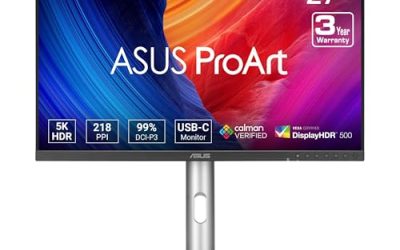
| ASUS ProArt Display PA32QCV | Colour-critical photo and video work | 6K (6016 x 3384), Calman Verified, Thunderbolt 4 |
| Dell UltraSharp U3224KB | Call-heavy office desks that need a webcam built in | 6K with built-in webcam, IPS Black panel |
How to Choose
Confirm Your Computer Can Drive 6K Before Anything Else
A 6K panel is only sharp when the computer behind it outputs the full native signal. Recent Macs and Thunderbolt-equipped Windows laptops handle these resolutions over a single cable, but older machines may cap out lower, in which case the monitor still lights up yet text loses the crispness that justified the purchase. Check your exact laptop or graphics card against the connection each monitor leads with: the LG below uses Thunderbolt 5, while the ASUS and Dell use Thunderbolt 4. If your machine predates both, plan the upgrade around the computer first, because no setting inside the monitor can invent pixels the source never sent.
Read the Stand Travel, Not Just the Word Adjustable
Height adjustment is the whole point of this shortlist, yet the travel behind that phrase varies. Dell describes height adjustment up to 160mm for the U3224KB, while the ASUS stand is described with height adjustment up to 130mm. That difference decides whether a tall user can raise the screen centre to eye level while seated, and whether the panel can drop low enough over a shallow desk for a shorter user. Picture your own setup: laptop on a riser beside the screen, a soundbar underneath, or a sit-stand desk that changes the geometry twice a day. Choose the travel that covers your posture, not the one that merely exists.
Notice That 6K Comes in Two Different Resolutions Here
The three monitors in this guide are all sold as 6K, but they do not share one pixel count. The LG and the Dell run 6144 x 3456, while the ASUS runs 6016 x 3384. Both layouts are far beyond 4K, and the practical difference is small, yet it matters when you scale interfaces or match a second screen: a Mac, for instance, treats each resolution slightly differently when choosing scaled modes that keep text at a comfortable size. Decide which layout your workflow prefers before comparing colour or ports, because resolution is the one specification you cannot change later with a cable or a setting.
Count the Ports and the Power Delivery Against Your Desk
These monitors double as docking stations, so their port lists decide how many other boxes leave your desk. Look at what each listing leads with: Thunderbolt connections that carry the picture and charge the laptop over one cable, plus HDMI and DisplayPort inputs for a second machine. A desk with a work laptop and a personal desktop benefits from the extra inputs and a built-in KVM-style workflow, while a single-laptop desk mainly needs enough charging power on the main connection. Speakers built into the LG, per its listing title, can also retire a pair of desktop speakers on a call-focused desk. Work through your own desk as a checklist: write down every device that currently plugs into your laptop or its dock, then find each one a home in the monitor’s port list. A keyboard, a backup drive and a wired network connection all compete for sockets, and a monitor that absorbs them leaves the laptop free to undock in seconds. A monitor that cannot leaves you buying back the dock you hoped to retire.
The 3 Best Options
LG 32U990A-S UltraFine 6K
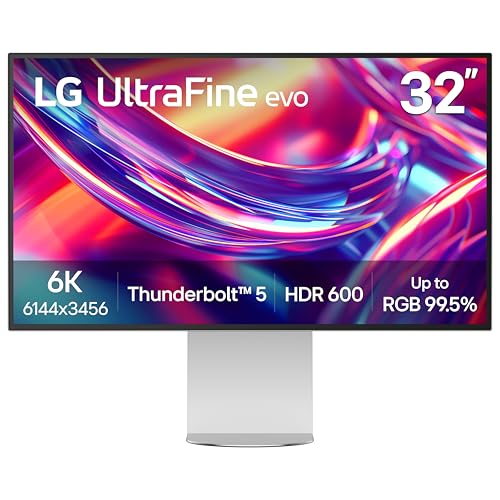
LG’s entry is the newest design of the three, and its Amazon title does the shortlisting work for you: it names the 6K resolution, the Nano IPS Black panel and a Tilt/Height/Pivot Stand in one line. The connection story is the differentiator, with Thunderbolt 5 at the front of the listing alongside HDMI 2.1 and DisplayPort 2.1, which suits a recent laptop that should plug in with one cable and stay current for years. Built-in speakers and DisplayHDR 600 support round out a screen aimed at creators who also live on video calls.
Specs
- Brand: LG
- Model: 32U990A-S.AUS
- Screen size: 32-inch
- Resolution: 6K (6144 x 3456)
- Panel: Nano IPS Black
- Connection: Thunderbolt 5
- Refresh rate: 60Hz
- HDR: DisplayHDR 600
- Audio: Speakers
- Ports: HDMI 2.1, DisplayPort 2.1, USB-C
- Stand: Tilt/Height/Pivot Stand
- Colour: Silver
Best for: Recent Mac or Windows laptops that should dock over Thunderbolt 5 with one cable.
Watch out for: The listing states a 60Hz refresh rate, so this is a screen for detailed work rather than fast-motion gaming.
ASIN: B0FR547FXH
ASUS ProArt Display PA32QCV

ASUS builds this ProArt around colour confidence. The Amazon title states a 6K (6016 x 3384) IPS panel with DCI-P3 coverage stated at 98, a Delta E below 2 and Calman Verified status, which is the language photographers and video editors look for when a screen has to agree with a calibrated workflow. The listing describes an ergonomic stand with tilt, swivel, pivot and height adjustments, so portrait documents and long grading sessions are both covered. Thunderbolt 4 with DisplayWidget software support makes it the natural fit for a Mac-centred creative desk.
Specs
- Brand: ASUS
- Model: PA32QCV
- Screen size: 32-inch
- Resolution: 6K (6016 x 3384)
- Panel: IPS
- Colour: DCI-P3 stated at 98 on the listing, Delta E < 2, Calman Verified
- Surface: LuxPixel
- Connection: Thunderbolt 4
- HDR: DisplayHDR600
- Software: DisplayWidget
- Stand: Ergonomic stand with tilt, swivel, pivot and height adjustments
Best for: Photographers and video editors whose colour decisions have to hold up outside their own desk.
Watch out for: It connects over Thunderbolt 4 rather than Thunderbolt 5, so buyers standardising on the newest connection should weigh the LG above.
ASIN: B0F23LR6JQ
Dell UltraSharp U3224KB

Dell’s UltraSharp is the office heavyweight of the group. Its product wording describes a 6K (6144 x 3456) IPS Black panel with a built-in 4K HDR webcam, which turns the monitor into the camera, microphone point and screen for a call-heavy desk in a single unit. The stand description is the most generous here, with tilt, pivot, swivel and height adjustment up to 160mm, and Thunderbolt 4 connectivity with power delivery stated up to 140W means a hungry laptop can charge from the screen. It suits a fixed workstation that rarely moves and hosts meetings all day.
Specs
- Brand: Dell
- Model: U3224KB
- Screen size: 31.5-inch
- Resolution: 6K (6144 x 3456) at 60 Hz
- Panel: IPS Black
- Webcam: Built-in 4K HDR webcam
- Connection: Thunderbolt 4, power delivery up to 140W
- Stand: Tilt, pivot, swivel and height adjustable (160mm max)
Best for: Fixed office workstations with daily video calls and a laptop that needs strong charging power.
Watch out for: The 6K resolution runs at 60 Hz, and the webcam housing along the top of the panel adds bulk that small desks should measure for.
ASIN: B0C8JKXFBY
Which One Fits Your Situation
A Mac Laptop Desk Built Around a Single Cable
Take the LG 32U990A-S if your Mac is recent enough for Thunderbolt 5, since its listing leads with that connection and pairs it with the full set of modern inputs. Choose the ASUS PA32QCV instead if the Mac drives a colour workflow, because its calibration wording is the strongest of the three. Either way, one cable carries picture and charging, and the height-adjustable stand lets the big panel float at eye level above the laptop.
Colour Work That Leaves Your Desk and Gets Judged Elsewhere
The ASUS ProArt PA32QCV is the deliberate choice here. Its listing is the one that talks about colour in verifiable terms, naming its DCI-P3 coverage, its Delta E figure and its Calman Verified status, and the ProArt line is built around exactly this buyer. The height and pivot adjustments matter during long sessions too, because grading posture drifts over hours and a screen that follows you stays comfortable longer than one you lean toward.
A Shared Office Desk With Back-to-Back Video Calls
Pick the Dell UltraSharp U3224KB. The built-in 4K HDR webcam removes the clip-on camera that shared desks always lose, and the stand offers the widest height travel in this guide, which matters when two people of different heights use the same desk across a week. Its Thunderbolt 4 connection with high power delivery also means the shared screen can charge whichever laptop docks at it, without a drawer full of adapters.
You Switch Between Sitting and Standing All Day
Any of the three will move with you, but the Dell’s stated 160mm of height travel gives the most room to keep the screen centred as your desk rises and falls through the day. If your standing position is tall, that extra travel is the difference between a screen that reaches eye level and one you look down at for hours. Pair whichever monitor you choose with a cable long enough for the desk’s full height before the first workday, because a cable that reaches while you sit may pull tight, or tug the port, once the desk is fully raised. The same logic applies to a second input cable from a desktop tower sitting on the floor: its slack disappears fastest of all when the desk travels upward.
Common Mistakes
- Ordering a 6K monitor for a computer that cannot output 6K, then blaming the panel for soft text.
- Treating every height-adjustable stand as equal, without comparing the actual travel against your seated eye level.
- Assuming all 6K monitors share one resolution, when listings here state both 6144 x 3456 and 6016 x 3384.
- Ignoring power delivery figures, then discovering the monitor charges your laptop too slowly to hold charge while working.
- Planning a portrait-mode setup without checking that the stand pivots and has enough height travel to rotate a 32-inch panel.
Frequently Asked Questions
Is 6K visibly sharper than 4K on a 32-inch screen?
Yes, when the source sends the full signal. At this size, 6K packs far more pixels into the same area, so text edges, fine photo detail and dense timelines all render more cleanly, and you can fit more workspace on screen at a readable scale. The gain disappears if the computer outputs a lower resolution, which is why the connection check in this guide comes before everything else.
Will my current laptop run one of these monitors at full 6K?
It depends on the laptop’s ports and graphics support rather than its age alone. Machines with Thunderbolt 4 or Thunderbolt 5 outputs are the intended partners for these screens, and each listing names its connection type for that reason. Check your laptop maker’s specification for its maximum external display resolution, and match it against the exact figure in the monitor listing before ordering.
Why does stand height travel matter so much on a large monitor?
A 32-inch panel is tall, so a few centimetres of placement error puts the screen centre well above or below your natural eye line, and your neck pays for it across a workday. Height adjustment lets you set the top of the screen near eye level and keep it there when you change chairs or desk height. The stated travel figures in this guide, 130mm and 160mm, are the numbers worth comparing.
Can these monitors turn sideways into portrait orientation?
The listings describe pivot as part of the stand adjustments on the models here, including the LG, whose title names a Tilt/Height/Pivot Stand outright. Portrait orientation suits long documents, code and timelines, but rotating a panel this size needs clearance above the desk and enough height travel to lift it clear while it turns, so measure your space before planning a portrait setup.
More from Amazon
Programs that pair well with the guide above. Offers and eligibility are set by Amazon and may change.
Free shipping on eligible items, Prime Video and more. Eligible new members can start with a free trial.
Start a Prime free trialAudiobooks and podcasts to listen to on the go. Eligible new members can start with a free trial.
Try Audible freeAd-free music streaming. Eligible new subscribers can start with a free trial.
Try Music Unlimited freeA free business account with business pricing and bulk-buying tools for work, shop or home office.
Create a business accountAs an Amazon Associate we earn from qualifying purchases.


Write Your Review
No reviews yet. Be the first to share your experience!