

Key takeaways
- Compare five 16-inch mobile workstations with professional NVIDIA RTX Ada graphics, ISV certification and upgradeable memory for CAD, 3D and engineering work.
As an Amazon Associate, we earn from qualifying purchases made through links on this page.
A 16-inch mobile workstation is the machine engineers, architects, CAD designers and 3D artists reach for when a consumer laptop is not enough. The difference is not raw speed alone. These laptops pair professional NVIDIA RTX Ada Generation graphics with drivers that are certified for applications such as SolidWorks, CATIA, Siemens NX, Creo, Revit and ANSYS, and they back that up with high-resolution 16:10 displays, large memory ceilings and chassis that can be opened up for upgrades years down the line.
Every pick below is a genuine 16-inch mobile workstation with a professional workstation GPU rather than a gaming-grade GeForce card, and every configuration named here is the specific build sold through the linked listing. Workstation product lines are sold in dozens of configurations, so the graphics card, memory and storage lines on the product page are always worth one last check before you order. With that said, these five machines cover the main shapes the category takes right now: maximum-expansion flagships from Lenovo, HP and Dell, a slim OLED model for people who travel, and a value-leaning option that keeps the certified graphics while trimming the extras.
What to look for in a 16-inch mobile workstation
Professional graphics, not gaming graphics. The defining feature of this category is the GPU. NVIDIA RTX Ada Generation workstation cards (RTX 1000, 2000, 3000, 4000 and 5000 Ada) use the same silicon families as GeForce cards but ship with certified drivers that software vendors validate against their applications. For CAD and engineering work, that certification matters more than benchmark scores: it is what keeps complex assemblies stable and viewports accurate. Check the VRAM figure as well. The 8GB cards in this roundup handle mainstream CAD, product design and moderate 3D scenes; very large assemblies, point clouds and GPU rendering push you toward 12GB and above.
ISV certification. Lenovo, HP and Dell all publish ISV (independent software vendor) certification lists for these product lines, covering tools from Autodesk, Dassault Systèmes, Siemens, PTC, ANSYS and others. If your work depends on one specific application, confirm the exact model and GPU combination appears on the vendor’s certified hardware list.
Processor class. Flagship 16-inch workstations use Intel HX-series processors with up to 24 cores, which suit simulation, compiling and CPU rendering. Slimmer models use Core Ultra H-series chips with fewer cores but better efficiency and an integrated NPU for AI-assisted features in creative software. Neither is universally better; the right choice depends on whether your bottleneck is sustained multi-core throughput or portability.
Display. All five picks use 16:10 panels. Beyond resolution, look at colour gamut (a full DCI-P3 panel suits colour-critical visualisation and media work), brightness for bright offices and site work, and whether the panel is a standard IPS or an OLED or DreamColor option.
Memory and storage upgrade paths. This is where workstations diverge sharply. Traditional designs use two or four SODIMM slots and can reach 96GB, 128GB or even 192GB. Newer designs use CAMM2 or LPCAMM2 modules: still replaceable, but a single module carries the whole memory capacity, so upgrading means swapping the module rather than adding a second stick. Count the M.2 slots too if you plan to add storage later.
Ports, docking and weight. Thunderbolt 4 is standard across this group and drives most docks. Wired Ethernet, full-size SD readers and HDMI 2.1 still appear on the thicker flagships but disappear on slim models. Weight runs from under 2kg for the thinnest pick here to nearly 3kg for the biggest, before you add a 230W power adapter, so factor the full travel weight into your decision.
Lenovo ThinkPad P16 Gen 2 — the expansion-first flagship

The ThinkPad P16 Gen 2 is Lenovo’s heaviest-duty 16-inch workstation, and the listed configuration (model 21FA0051US) pairs an Intel Core i7-14700HX 20-core processor with an NVIDIA RTX 2000 Ada Generation Laptop GPU with 8GB of GDDR6 memory. Its 16-inch WQUXGA (3840 x 2400) IPS panel runs at 800 nits with full DCI-P3 coverage, which makes it the brightest screen in this roundup and a sensible choice for bright offices or site cabins.
Expansion is the headline. The machine has four SODIMM slots (32GB fitted as two 16GB modules, up to 192GB supported), two M.2 SSD slots with 1TB fitted, and a full port set: two Thunderbolt 4 ports, HDMI 2.1, wired Ethernet, an SD card reader and USB-A. The 94Wh battery is large for the class, and the P16 line is ISV certified for the major CAD and engineering applications.
The limitations follow from the same design. At roughly 2.95kg it is the heaviest machine here, and the RTX 2000 Ada is the mid tier of the Ada workstation range, so buyers working with very large assemblies should look at the same chassis in an RTX 3500 or 5000 Ada configuration instead. The panel is a 60Hz unit, which is fine for CAD but unremarkable next to high-refresh alternatives.
ASIN: B0D8MVHPZ8 — View on Amazon
Best for: engineers and CAD users who want the widest memory and storage upgrade path in a 16-inch chassis, and who mostly work at a desk.
HP ZBook Fury 16 G11 — desktop-class power with a DreamColor screen

HP’s ZBook Fury line is the company’s flagship mobile workstation range, and this ZBook Fury 16 G11 configuration combines a 20-core Intel Core i7-13850HX vPro processor with NVIDIA RTX 2000 Ada graphics (8GB GDDR6) and a 16-inch WQUXGA (3840 x 2400) DreamColor display with full DCI-P3 coverage and a 120Hz refresh rate, a combination aimed at users who split time between CAD and colour-critical visualisation or video work.
Like the big ThinkPad, the Fury is built around expansion: four SODIMM slots take memory up to 128GB (32GB fitted), and HP rates the chassis for up to 16TB of internal NVMe storage across its M.2 slots, with 1TB fitted here. Ports include two Thunderbolt 4, HDMI 2.1, wired Ethernet and an SD card reader, plus a 5MP IR camera for Windows Hello sign-in. The battery is a 95Wh unit, and HP publishes ISV certifications for the Fury line across the major professional applications. At a starting weight of about 2.4kg, it is noticeably easier to carry than the P16 despite the similar footprint.
Limitations: the fitted RTX 2000 Ada is again the mid-tier GPU option in a line that scales much higher, and the DreamColor panel’s colour accuracy features are wasted if your work is purely structural CAD, where the same budget buys a higher GPU tier elsewhere in the range.
ASIN: B0DCGL4HJ5 — View on Amazon
Best for: professionals who want flagship expansion and a colour-accurate, high-refresh display in the same machine.
Dell Precision 7680 — the most CPU and memory in this list, as listed

Dell’s Precision 7680 is the company’s flagship 16-inch workstation, and this particular listing is a high-specification build: a 24-core Intel Core i9-13950HX vPro processor, NVIDIA RTX 2000 Ada graphics with 8GB of GDDR6, 64GB of CAMM DDR5 memory and a 2TB SSD. That is the strongest processor and the joint-largest memory and storage allocation in this roundup, which suits CPU-bound work such as simulation pre-processing, compiling and multitasking across several heavy applications at once.
Connectivity is complete: two Thunderbolt 4 ports, HDMI 2.1, wired Ethernet, an SD card reader and a SmartCard reader, and Dell publishes ISV certifications for the Precision line. The 6-cell 83Wh battery and roughly 2.6kg weight sit in the middle of this group.
The trade-offs are real. The fitted 16-inch FHD+ (1920 x 1200) panel is the joint-lowest resolution here and is not the screen to choose for colour-critical work. Memory uses Dell’s CAMM module format, so a future upgrade replaces the single module instead of filling empty slots. Finally, this listing is a reseller-configured unit rather than a factory Dell configuration, so check the warranty terms stated on the product page before ordering.
ASIN: B0GMQ4D131 — View on Amazon
Best for: buyers who prioritise processor cores and a large factory-fitted memory and storage allocation over display resolution.
Lenovo ThinkPad P1 Gen 7 — the one built to travel
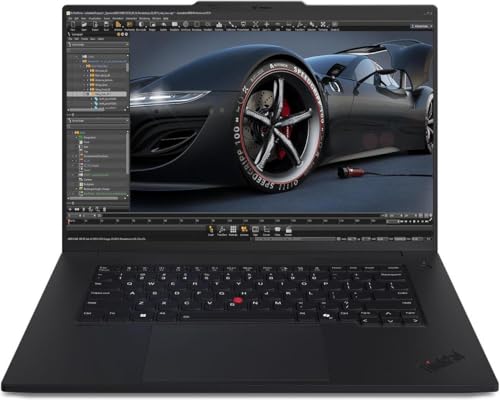
The ThinkPad P1 Gen 7 takes the opposite approach to the flagships above. It is a slim 16-inch workstation (17.05mm thin, starting at 1.82kg) that still carries professional graphics: this configuration (model 21KV001DUS) has an Intel Core Ultra 9 185H vPro processor, an NVIDIA RTX 3000 Ada Generation Laptop GPU with 8GB of GDDR6, 64GB of LPDDR5x memory and a 2TB SSD. That GPU is a tier above the RTX 2000 Ada cards in the other picks, inside the lightest chassis here.
The display is the other highlight: a 16-inch WQUXGA (3840 x 2400) OLED touch panel with full DCI-P3 coverage, Dolby Vision support and 400 nits of brightness. Memory is a single customer-replaceable LPCAMM2 module, there are two M.2 slots, the battery is 90Wh, and ports include two Thunderbolt 4, HDMI 2.1 and an SD Express 7.0 card reader. The P1 line carries Lenovo’s usual ISV certifications.
Limitations are the physics of a thin chassis: the H-series processor has fewer cores than the HX chips in the flagships and suits bursty creative workloads better than all-day simulation. Memory tops out at 64GB on one module, and there is no built-in Ethernet port, so wired networking means a dock or adapter.
ASIN: B0DC49628Q — View on Amazon
Best for: architects, designers and 3D artists who move between sites and studios and want certified graphics without a 3kg bag.
Lenovo ThinkPad P16v Gen 2 — certified graphics, fewer extras

The ThinkPad P16v Gen 2 is Lenovo’s value-leaning 16-inch workstation: it keeps the professional GPU and the ISV-certified platform but drops the flagship trimmings. The listed configuration pairs an Intel Core Ultra 7 165H processor with an NVIDIA RTX 2000 Ada Generation Laptop GPU (8GB GDDR6), 32GB of DDR5 memory in two SODIMM slots (up to 96GB supported) and a 1TB SSD, with a second M.2 slot free for expansion.
You still get two Thunderbolt 4 ports, HDMI, an SD card reader, a 90Wh battery and a starting weight of about 2.22kg, which undercuts the full-size P16 by a wide margin while keeping a full keyboard with a numeric keypad. For mainstream CAD, BIM and product design work, this is the same certified graphics architecture as the flagships, in a machine that is easier to buy and easier to carry.
The limitations: the 16-inch WUXGA (1920 x 1200) IPS panel is the joint-lowest resolution in this roundup and there is no high-gamut option in this configuration, and the P16v line is sold with a wide spread of graphics options, including entry RTX 500 Ada and consumer GeForce builds. Confirm that the listing you order states the RTX 2000 Ada, because the model name alone does not guarantee it.
ASIN: B0DF37WHSJ — View on Amazon
Best for: CAD and BIM users who need a certified workstation GPU and upgradeable memory, and do not need a high-resolution colour-critical screen.
Comparison table
| Model | GPU | Processor (as listed) | Display | Memory (as listed) | Storage (as listed) | Starting weight |
|---|---|---|---|---|---|---|
| Lenovo ThinkPad P16 Gen 2 | RTX 2000 Ada 8GB | Core i7-14700HX | 16″ WQUXGA 3840 x 2400 IPS, 800 nits | 32GB DDR5, 4 slots | 1TB SSD, 2 slots | ~2.95 kg |
| HP ZBook Fury 16 G11 | RTX 2000 Ada 8GB | Core i7-13850HX vPro | 16″ WQUXGA 3840 x 2400 DreamColor | 32GB DDR5, 4 slots | 1TB SSD, up to 16TB | ~2.4 kg |
| Dell Precision 7680 | RTX 2000 Ada 8GB | Core i9-13950HX vPro | 16″ FHD+ 1920 x 1200 | 64GB CAMM DDR5 | 2TB SSD | ~2.6 kg |
| Lenovo ThinkPad P1 Gen 7 | RTX 3000 Ada 8GB | Core Ultra 9 185H vPro | 16″ WQUXGA 3840 x 2400 OLED touch | 64GB LPDDR5x LPCAMM2 | 2TB SSD | ~1.82 kg |
| Lenovo ThinkPad P16v Gen 2 | RTX 2000 Ada 8GB | Core Ultra 7 165H | 16″ WUXGA 1920 x 1200 IPS | 32GB DDR5, 2 slots | 1TB SSD, 2 slots | ~2.22 kg |
FAQ
What is the difference between a mobile workstation and a gaming laptop with the same GPU tier?
The hardware overlaps, but the workstation adds certified graphics drivers validated by CAD and engineering software vendors, ISV certification for specific applications, Windows Pro, and usually better memory and storage expansion. For professional applications, the certified driver path is the main reason to buy one.
How much VRAM do I need for CAD and 3D work?
The 8GB fitted to every pick here is a workable baseline for mainstream CAD assemblies, BIM models and moderate 3D scenes. Very large assemblies, dense point clouds and GPU rendering benefit from 12GB or more, which means stepping up to RTX 3500 or 5000 Ada configurations of the flagship lines rather than the specific listings in this roundup.
Can I upgrade the RAM and storage later?
On the ThinkPad P16 Gen 2, ZBook Fury 16 G11 and ThinkPad P16v Gen 2, yes: they use SODIMM slots with free capacity and spare M.2 slots. The Precision 7680 and ThinkPad P1 Gen 7 use CAMM-format memory modules, which are replaceable but carry the full memory capacity on a single module, so upgrading means replacing the module you have.
Is a 16-inch workstation practical for travel?
It depends which end of this list you choose. The ThinkPad P1 Gen 7 starts at about 1.82kg and is genuinely portable. The flagship HX models run from about 2.4kg to 2.95kg before their large power adapters, which most people will accept for occasional site visits rather than daily commuting.
Do these machines run SolidWorks, Revit and similar applications?
Yes. All three brands publish ISV certification lists for these product lines covering the major CAD, BIM and engineering packages. Check the certification list for your exact application and version, and match it against the GPU in the listing, since certification applies to specific model and graphics combinations.
Conclusion
For maximum expansion and the brightest screen, the ThinkPad P16 Gen 2 is the traditional flagship choice, while the ZBook Fury 16 G11 answers with a colour-accurate DreamColor panel and a lighter starting weight. The Precision 7680 listing suits buyers who want the most processor cores and memory fitted from day one and can live with a lower-resolution panel. If the machine has to travel, the ThinkPad P1 Gen 7 is the standout: a higher-tier RTX 3000 Ada GPU and an OLED display in a 1.82kg chassis. And if the requirement is simply certified professional graphics with sensible upgrade room, the ThinkPad P16v Gen 2 covers it with the fewest extras. Whichever you choose, verify the graphics card, memory and storage lines on the product page match the configuration described here, because every one of these product lines is also sold in builds that do not.
More from Amazon
Programs that pair well with the guide above. Offers and eligibility are set by Amazon and may change.
Free shipping on eligible items, Prime Video and more. Eligible new members can start with a free trial.
Start a Prime free trialAudiobooks and podcasts to listen to on the go. Eligible new members can start with a free trial.
Try Audible freeAd-free music streaming. Eligible new subscribers can start with a free trial.
Try Music Unlimited freeA free business account with business pricing and bulk-buying tools for work, shop or home office.
Create a business accountAs an Amazon Associate we earn from qualifying purchases.

Write Your Review
No reviews yet. Be the first to share your experience!