

Key takeaways
- Four true 6K monitors with wide-gamut color compared: 98 to 99% DCI-P3, up to 99.5% Adobe RGB, Thunderbolt hubs, HDR tiers, ports and stand notes.
A 6K monitor purchase turns on three linked calls: which of the two 6K grids you want, how much wide-gamut coverage your work truly needs, and whether one cable can carry the picture while charging your laptop. The 6144 by 3456 panels give the most pixels, while the 6016 by 3384 panels match the scaling Apple uses. Gamut claims also split the field: some listings stop at DCI-P3, while one adds near-full Adobe RGB for print work.
This guide is for photo editors, video colorists, and print designers who need that density and color reach on a desk, plus Mac and Windows users tired of scaling compromises at 4K. Every pick below is a desktop monitor with a true 6K panel, chosen because its Amazon listing states a DCI-P3 or Adobe RGB coverage figure, names its HDR tier, and spells out the ports and power delivery on offer.
Quick Picks
As an Amazon Associate we earn from qualifying purchases.
| Product | Best for | Key spec |
|---|---|---|
| ASUS ProArt Display PA32QCV | Mac-based photo and video editing | 6016 x 3384, 98% DCI-P3 |
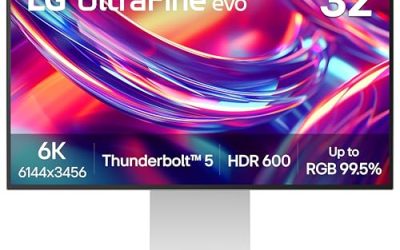
| LG UltraFine 6K 32U990A-S | Print work needing Adobe RGB reach | 6144 x 3456, 99.5% Adobe RGB |
| Dell UltraSharp U3224KB | Desk setups built around video calls | 6144 x 3456, 99% DCI-P3, 4K webcam |
| Kuycon G32P (Without Stand) | A glossy flagship-style panel on your own mount | 6144 x 3456, 99% DCI-P3 |
How to Choose
Choose Between the Two 6K Grids
Two different pixel grids wear the 6K label. The 6144 by 3456 panels from LG, Dell, and Kuycon hold about ten percent more pixels and reach 223 to 224 PPI at 32 inches. The 6016 by 3384 grid on the ASUS matches the pixel layout Apple builds its Mac scaling around, so interface elements land at familiar sizes. On Windows, both grids need display scaling to keep text readable. Pick the denser grid for maximum canvas, and the Apple-matched grid if you move files between a Mac and this screen all day.
Match the Gamut Figure to Your Output
Every listing here states a DCI-P3 percentage between 98 and 99 percent, which covers video work and screen design. Print is the dividing line: only the LG quotes Adobe RGB, at up to 99.5 percent, which matters when you soft-proof CMYK jobs or edit photos bound for ink. Also weigh the accuracy figure printed beside the gamut. The ASUS and Kuycon listings both state Delta E below 2 from the factory, while a coverage percentage alone says nothing about how close the shipped unit sits to the target.
Follow the Cable: Ports and Power Delivery
A 6K panel needs a fat pipe. Thunderbolt 4 carries the full picture on the ASUS and Dell, while the LG moves to Thunderbolt 5 with a second port for daisy-chaining another 6K screen. Power delivery decides whether the laptop brick stays in a drawer: the Dell feeds up to 140W, the ASUS and LG up to 96W. Check your laptop’s draw before choosing. KVM switching on the ASUS and Dell lets one keyboard and mouse serve two computers, and the Dell adds 2.5GbE wired networking for desks far from a router.
Weigh HDR Tier, Finish, and Stand Hardware
All four panels carry a DisplayHDR 600 badge or HDR10 support, yet none uses the multi-zone local dimming backlight that gives HDR real punch, so treat HDR here as a bonus rather than the main event. Screen finish splits the group: the Kuycon’s glossy glass gives colors extra snap in dim rooms, while matte coatings on the others tame window light. Finally, check the stand in the box. The Kuycon listing ships without one, and height travel on the included stands runs from 130 to 160 mm.
The 4 Best Options
ASUS ProArt Display PA32QCV

The ProArt PA32QCV suits Mac-first creators who want the 6016 by 3384 grid that matches Apple’s own scaling, with color paperwork to back it up. Its listing states 98% DCI-P3 coverage, a Delta E below 2, and Calman Verified status, so photo and video work lands close to target without a long calibration session. Dual Thunderbolt 4 ports bring 96W charging and daisy-chaining, the Auto KVM swaps between two computers, and the LuxPixel matte coating keeps reflections down in bright rooms. It is the most editing-focused package here for mixed Mac and PC desks.
Specs
- 31.5-inch IPS panel with 6016 x 3384 (6K) resolution, 218 PPI
- 98% DCI-P3 and 100% sRGB coverage, Delta E below 2, Calman Verified
- LuxPixel anti-glare, low-reflection matte coating
- 600 nits brightness, VESA DisplayHDR 600
- 60 Hz refresh rate, 5 ms response time
- Dual Thunderbolt 4 with 96W power delivery and daisy-chaining
- HDMI 2.1 and DisplayPort 1.4 inputs, USB hub, Auto KVM
- Tilt, swivel, pivot and height-adjustable stand, 3-year warranty
Best for: Mac-based photo and video editors who want factory-verified color.
Watch out for: Confirm your machine can output 6016 x 3384 at 60 Hz; an older HDMI port will hold the panel below its native grid.
ASIN: B0F23LR6JQ — View on Amazon
LG UltraFine 6K 32U990A-S
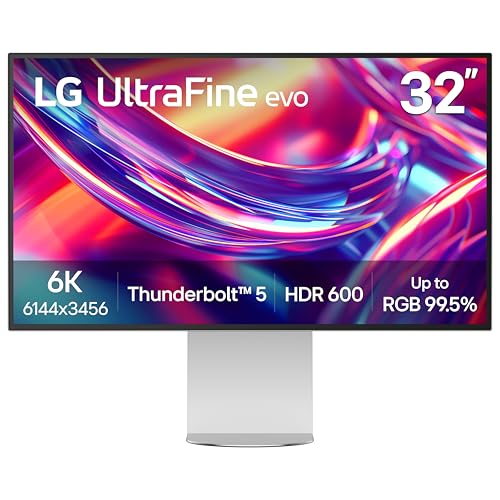
The UltraFine 6K fits print-minded designers and photographers who need Adobe RGB reach that the other panels here do not claim. Its listing quotes up to 99.5% Adobe RGB alongside 98% DCI-P3 and real 10-bit color, on the sharper 6144 by 3456 grid. Thunderbolt 5 on both the input and output side allows 6K daisy-chaining, 96W charging rides the same cable, and DisplayPort 2.1 plus HDMI 2.1 cover Windows workstations. Built-in speakers and a full ergonomic stand round out a self-contained desk hub.
Specs
- 32-inch Nano IPS Black panel with 6144 x 3456 (6K) resolution, 224 PPI
- Up to 99.5% Adobe RGB and 98% DCI-P3 coverage, real 10-bit color
- VESA DisplayHDR 600 and HDR10, 2000:1 contrast ratio
- 450 nits typical brightness, matte finish, 60 Hz refresh rate
- Thunderbolt 5 input and output with 96W charging and 6K daisy-chaining
- DisplayPort 2.1, HDMI 2.1, USB-C and three USB 3.0 ports
- Built-in speakers
- Tilt, height and pivot stand, silver finish, 20.9 lb
Best for: Print designers who need stated Adobe RGB coverage.
Watch out for: Thunderbolt 5 hosts are still uncommon, and the listing quotes 450 nits typical brightness, the lowest figure in this group.
ASIN: B0FR547FXH — View on Amazon
Dell UltraSharp U3224KB

The UltraSharp U3224KB is the pick for professionals whose 6K screen also has to run the meeting. Beyond the 6144 by 3456 IPS Black panel with 99% DCI-P3, its listing adds an 8MP 4K webcam, a microphone array, and speakers, so calls happen without extra desk hardware. The Thunderbolt 4 hub delivers up to 140W to a laptop, a 2.5GbE jack gives wired networking, and the KVM switch moves one keyboard and mouse between two machines. It is the heaviest unit here, and the stand offers 160 mm of height travel.
Specs
- 31.5-inch IPS Black panel with 6144 x 3456 (6K) resolution at 60 Hz
- 99% DCI-P3, 100% sRGB and 100% Rec. 709 coverage, 1.07 billion colors
- 450 nits brightness, 2000:1 contrast ratio, VESA DisplayHDR 600
- 5 ms GtG response time
- Built-in 8MP 4K webcam, microphone array and speakers
- Thunderbolt 4 hub with up to 140W power delivery, 2.5GbE Ethernet, KVM switch
- HDMI, mini DisplayPort and USB hub ports
- Tilt, swivel, pivot and height adjustment up to 160 mm
Best for: Professionals who want conferencing hardware built into the screen.
Watch out for: The spec table lists 29.3 lb, the heaviest here, so check desk depth and arm capacity before ordering.
ASIN: B0C8JKXFBY — View on Amazon
Kuycon G32P (Without Stand)

The G32P suits Mac users who want the glossy, aluminum look of Apple’s flagship panel and already own a good monitor arm. This listing is the stand-free version, so the VESA mount point matters from day one. The panel itself is a 6144 by 3456 IPS unit at 223 PPI, and the listing description states 99% DCI-P3 and 99% sRGB coverage with Delta E below 2. Connectivity stays simple with HDMI and DisplayPort inputs, and the honeycomb back panel sheds heat without fans, keeping the desk silent.
Specs
- 32-inch IPS panel with 6144 x 3456 (6K) resolution, 223 PPI
- 99% DCI-P3 and 99% sRGB coverage with Delta E below 2, per the listing description
- 1.07 billion colors, 2000:1 contrast ratio
- 5 ms response time, 178-degree viewing angle
- HDMI and DisplayPort inputs, AMD FreeSync
- Honeycomb aluminum body with glossy finish
- Sold without a stand; VESA mount point, 71.2 x 41.5 x 2.5 cm panel
Best for: Mac users mounting a glossy 6K panel on their own arm.
Watch out for: No stand is included in this listing, and the glossy finish reflects window light in bright rooms.
ASIN: B0G5K7779P — View on Amazon
Which One Fits Your Situation
You Edit Photo and Video Work on a Mac All Day
Choose the ASUS ProArt PA32QCV. Its 6016 by 3384 grid matches the scaling macOS expects, the listing states 98% DCI-P3 with Delta E below 2 and Calman Verified status, and dual Thunderbolt 4 ports charge a MacBook at up to 96W while feeding the panel. The Auto KVM also helps if a Windows machine shares the desk, and the matte LuxPixel coating suits bright studios.
You Proof Print Jobs and Live in Adobe RGB
Choose the LG UltraFine 6K. It is the only listing here that states Adobe RGB coverage, quoted at up to 99.5 percent, alongside 98% DCI-P3 and real 10-bit color, so soft proofs hold more of the printable range. The 6144 by 3456 Nano IPS Black panel also brings 2000:1 contrast for judging shadow detail before ink hits paper.
Your Desk Doubles as a Video-Call Studio
Choose the Dell UltraSharp U3224KB. Its listing builds an 8MP 4K webcam, microphone array, and speakers into the frame, so the 6K panel replaces a camera, a mic, and desktop speakers at once. The hub is the strongest here as well: up to 140W of charging, 2.5GbE wired networking, and KVM switching for a two-computer desk.
You Want the Glossy Flagship Look on Your Own Arm
Choose the Kuycon G32P in this stand-free listing. The glossy 6144 by 3456 panel and aluminum honeycomb body echo Apple’s flagship design, the listing description states 99% DCI-P3 with Delta E below 2, and the VESA mount point lets your existing arm set height and reach. Confirm your arm handles the panel before ordering, since no stand is in the box.
Common Mistakes
- Buying a 5K or 5K2K ultrawide and expecting 6K sharpness: those panels spread fewer pixels over more glass, so text loses the printed look that defines this class.
- Trusting a headline that says wide gamut without a number: every pick here was chosen because its listing prints a DCI-P3 or Adobe RGB percentage you can compare.
- Plugging into an older HDMI or USB-C port that cannot carry 6K at 60 Hz: check for Thunderbolt 4 or 5, DisplayPort 1.4 with DSC, or HDMI 2.1 on your machine before the monitor arrives.
- Forgetting the stand: one listing here ships without any stand at all, so the panel cannot sit on a desk until a VESA arm or a separate stand is in place.
- Matching a hungry laptop to a low-watt hub: a monitor that delivers 96W cannot keep a 140W workstation laptop charged under load, so compare the delivery figure with your machine’s draw.
Frequently Asked Questions
Is 6K visibly sharper than 4K on a 32-inch screen?
Yes, for text and fine detail. A 32-inch 4K panel lands near 140 PPI, while these 6K panels reach 218 to 224 PPI, so letterforms and hairline rules render without the soft edges you see at 4K. The gap shows most in photo retouching at full zoom, CAD linework, and long reading sessions where scaling stays at a comfortable size.
DCI-P3 or Adobe RGB: which figure should I care about?
Video and screen work lives in DCI-P3, so the 98 to 99 percent figures here cover most buyers. Adobe RGB matters when output goes to print, because it reaches further into the cyan and green range that CMYK presses use. Only the LG listing states Adobe RGB coverage, at up to 99.5 percent, which makes it the print-focused pick.
Can a single cable run the picture and charge my laptop?
On the Thunderbolt models, yes. The ASUS and LG feed the 6K picture and up to 96W of charging over one Thunderbolt cable, and the Dell raises delivery to 140W. The Kuycon listing relies on HDMI and DisplayPort for video, so charging needs a separate cable there. Always confirm your laptop port carries a video signal.
Will these monitors work with a Windows PC?
Yes. Each listing names HDMI or DisplayPort inputs that any modern Windows machine can feed, and the ASUS and Dell add KVM switching for mixed desks. Your graphics hardware needs an output that handles 6K at 60 Hz, meaning DisplayPort 1.4 with DSC, HDMI 2.1, or a Thunderbolt port; older outputs will cap the panel at a lower grid.
More from Amazon
Programs that pair well with the guide above. Offers and eligibility are set by Amazon and may change.
Free shipping on eligible items, Prime Video and more. Eligible new members can start with a free trial.
Start a Prime free trialAudiobooks and podcasts to listen to on the go. Eligible new members can start with a free trial.
Try Audible freeAd-free music streaming. Eligible new subscribers can start with a free trial.
Try Music Unlimited freeA free business account with business pricing and bulk-buying tools for work, shop or home office.
Create a business accountAs an Amazon Associate we earn from qualifying purchases.

Write Your Review
No reviews yet. Be the first to share your experience!