

Key takeaways
- Compare the best 5-bay das enclosures for video editing: RAID and non-RAID USB picks with fast transfers, active cooling and room for large project libraries.
A video editing workstation lives or dies by its storage. A single project can hold hundreds of gigabytes of camera originals, proxies, renders and exports, and a five-bay direct attached storage (DAS) enclosure puts all of it on one desk, on one cable, without the cost or complexity of a network server. The catch is that five-bay enclosures are not interchangeable: some give you hardware RAID for speed or redundancy, some simply present five independent disks, and the interface ranges from 5Gbps USB to 10Gbps USB-C, which decides how quickly footage moves on and off the array.
This guide is for editors, colorists and small post-production teams who want one enclosure that can hold an active project library and grow with it. The four enclosures below were chosen from their Amazon US listings, using only the specifications published there: bay count, interface speed, RAID modes, supported drive sizes and cooling. They cover the two main ways editors actually use a DAS — a hardware RAID box for a fast, protected working volume, and a simpler non-RAID dock for shuttling and archiving individual drives.
Quick Picks
| Product | Best for | Key spec |
|---|---|---|
| SABRENT 5-Bay USB 3.2 Gen 2 SATA Docking Station (DS-SC5B) | Fastest transfers and drive swapping | USB-C 10Gbps, tray-less hot-swap, no RAID |
| Yottamaster 5 Bay RAID Hard Drive Enclosure (FS5RU3) | Hardware RAID working volume | RAID 0/1/5/10/JBOD/CLONE, 150W built-in power supply |
| Yottamaster 5 Bay External Hard Drive Enclosure (PS500C3) | Simple USB-C storage expansion | USB-C 5Gbps, non-RAID, five removable trays |
| Syba 5 Bay SATA HDD External RAID Enclosure (SY-ENC50122) | RAID plus an eSATA connection | USB 3.0 and eSATA, RAID 0/1/5/10/JBOD/Span |
How to Choose
Interface speed decides your transfer times
The enclosure’s USB generation sets the ceiling for everything you copy. A 10Gbps USB 3.2 Gen 2 connection, like the one on the SABRENT DS-SC5B, can move footage roughly twice as fast as the 5Gbps USB 3.0 or USB 3.1 Gen 1 links on the other three enclosures here. With spinning hard drives the drives themselves are usually the bottleneck for a single disk, but striped RAID sets and SSDs can push past 5Gbps, so the faster link matters once you combine drives. Check what your editing machine offers, too: a USB-C port that only runs at 5Gbps will cap a 10Gbps enclosure at the lower speed.
RAID, JBOD or independent disks
Decide how the five drives should appear to your computer before you buy. Hardware RAID enclosures such as the Yottamaster FS5RU3 and the Syba SY-ENC50122 can combine drives into one volume with striping for speed (RAID 0), mirroring or parity for protection (RAID 1, 5 or 10), or a single spanned volume. Non-RAID enclosures such as the SABRENT DS-SC5B and the Yottamaster PS500C3 present each drive separately, which suits shuttle drives, rotating backups and software-managed storage. Neither approach is automatically better: hardware RAID keeps the array portable between computers, while independent disks are simpler to recover and swap when a single drive fails.
Drive size, trays and capacity headroom
All four enclosures accept 3.5-inch SATA drives, and three of them also accept 2.5-inch SATA drives, so you can mix large hard drives for footage with smaller SSDs for cache or current projects. Total supported capacity runs from 100TB on the SABRENT to 120TB on the FS5RU3 and the Syba, which is headroom most editors will never fill but which guarantees today’s largest drives are supported. Tray design matters in daily use: tray-less bays let you slide bare drives in and out in seconds, while trays give each drive a handle and a more secure seat for a box that stays put.
Cooling and power for long sessions
Five spinning drives generate real heat during an overnight render or a full-day ingest, and heat shortens drive life. Every enclosure here uses an aluminum body with a built-in fan — a large 120mm fan on the SABRENT, 80mm fans on the other three, with a temperature sensor on the Syba’s fan. Power delivery differs: the FS5RU3 has a 150W built-in power supply, the PS500C3 uses a 78W external adapter, and the SABRENT adds individual power switches per bay so you can spin down drives you are not using, which cuts noise and heat between sessions.
The 4 Best Options
SABRENT 5-Bay USB 3.2 Gen 2 SATA Docking Station (DS-SC5B)

The SABRENT 5-Bay USB 3.2 Gen 2 SATA Docking Station (DS-SC5B) is the fastest and most flexible enclosure in this group, built around a 10Gbps USB-C connection and a tray-less design that treats drives like cartridges. For editors who rotate project drives in and out — a drive per client, per shoot or per archive year — nothing else here swaps media as quickly.
There is no hardware RAID on this unit: each of the five bays appears as its own disk, and each bay has its own power switch. That makes it a poor fit if you want one giant protected volume, but an excellent fit for direct-attached workflows where your editing software or operating system manages the drives, including software RAID if you set it up on the host computer.
Specs
- Brand: SABRENT
- Model: DS-SC5B
- Bays: 5, tray-less, hot-swap
- Interface: USB-C, USB 3.2 Gen 2, 10Gbps
- RAID: None (individual disks)
- Drive compatibility: 3.5-inch SATA HDD/SSD
- Maximum capacity: 100TB total (5 x 20TB)
- Cooling: 120mm fan, aluminum enclosure, individual per-bay power switches
Best for: Editors who swap drives constantly and want the fastest USB connection for ingesting and archiving footage.
Watch out for: No hardware RAID and no 2.5-inch drive support, so smaller SATA SSDs are not an option in this enclosure.
Yottamaster 5 Bay RAID Hard Drive Enclosure (FS5RU3)
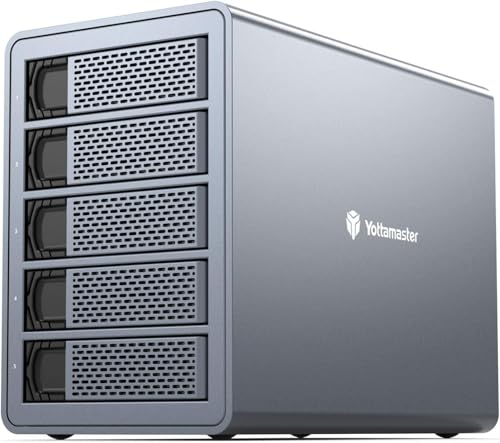
The Yottamaster 5 Bay RAID Hard Drive Enclosure (FS5RU3) is the fullest-featured RAID box here, with six working modes including RAID 5 for a balance of capacity and protection, plus a CLONE mode that duplicates a drive without a computer. Its 150W built-in power supply means one less wall adapter on the desk, and the aluminum body with an 80mm silent fan is built for always-on use next to an editing workstation.
The trade-off is the connection: USB 3.0 at 5Gbps, half the ceiling of the SABRENT. For a RAID 5 set of hard drives working on timelines and exports, that is rarely the limiting factor in practice, but large single transfers of camera originals will take longer than on a 10Gbps enclosure. It accepts both 2.5-inch and 3.5-inch SATA drives, so an SSD scratch disk can live alongside big hard drives.
Specs
- Brand: Yottamaster
- Model: FS5RU3
- Bays: 5
- Interface: USB 3.0 Type-B, 5Gbps (SATA III 6Gbps internal)
- RAID: RAID 0, RAID 1, RAID 5, RAID 10, JBOD, CLONE, Normal
- Drive compatibility: 2.5-inch and 3.5-inch SATA HDD/SSD
- Maximum capacity: 120TB total (5 x 24TB)
- Power: 150W built-in power supply
- Cooling: Aluminum enclosure with 80mm silent fan
Best for: Editors who want one protected RAID 5 working volume with the option to clone drives offline.
Watch out for: The 5Gbps USB 3.0 link caps peak transfer speed, and setting or changing RAID modes requires care because reconfiguring an array erases it.
Yottamaster 5 Bay External Hard Drive Enclosure (PS500C3)

The Yottamaster 5 Bay External Hard Drive Enclosure (PS500C3) is the straightforward expansion box of the group: five tray-mounted bays behind a USB-C connection, with no RAID to configure and nothing to manage. Each drive shows up individually, which suits editors who keep projects on separate drives and want a tidy tower instead of a pile of single-drive enclosures and cables.
Its USB 3.1 Type-C connection runs at 5Gbps, and the enclosure supports up to 110TB across five drives. The aluminum body and built-in 80mm fan handle cooling, and power comes from a 78W external adapter. Note that Yottamaster also sells a RAID version of this enclosure under a similar model name, so check the listing carefully if RAID is a requirement — this PS500C3 is the non-RAID version.
Specs
- Brand: Yottamaster
- Model: PS500C3
- Bays: 5, removable trays
- Interface: USB 3.1 Type-C, 5Gbps (SATA III internal)
- RAID: None (individual disks)
- Drive compatibility: 2.5-inch and 3.5-inch SATA HDD/SSD
- Maximum capacity: 110TB total (5 x 22TB)
- Power: 78W (12V/6.5A) adapter
- Cooling: Aluminum enclosure with built-in 80mm fan
Best for: Editors who want simple, tidy USB-C expansion for several independent project and archive drives.
Watch out for: No RAID in this version, and the 5Gbps connection is the ceiling even if your computer has faster ports.
Syba 5 Bay SATA HDD External RAID Enclosure (SY-ENC50122)
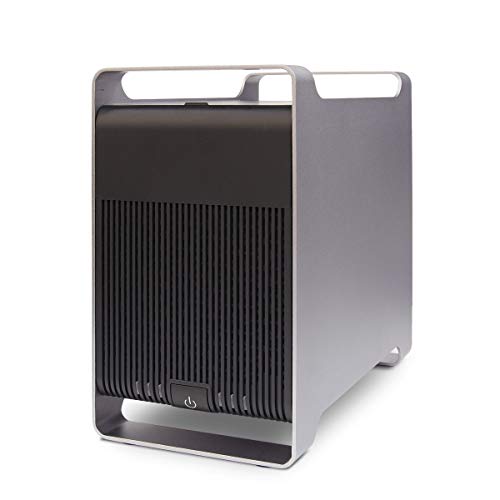
The Syba 5 Bay SATA HDD External RAID Enclosure (SY-ENC50122) stands out for offering two host connections: USB 3.0 and eSATA. The eSATA port is genuinely useful in studios with older workstations or dedicated ingest machines that predate fast USB, and it gives you a fallback path if a USB port is already saturated with other peripherals.
On the storage side it covers the full RAID range — 0, 1, 5 and 10, plus JBOD and a Combine (Span) mode that merges drives into one large volume without striping. The tool-less trays accept 2.5-inch and 3.5-inch SATA hard drives, total supported capacity is 120TB, and the built-in 80mm fan uses a temperature sensor to adjust to the heat inside the aluminum enclosure.
Specs
- Brand: Syba
- Model: SY-ENC50122
- Bays: 5, tool-less trays
- Interface: USB 3.0 (5Gbps) and eSATA
- RAID: RAID 0, RAID 1, RAID 5, RAID 10, JBOD, Combine (Span)
- Drive compatibility: 2.5-inch and 3.5-inch SATA HDD
- Maximum capacity: 120TB total
- Cooling: Aluminum enclosure, 80mm fan with temperature sensor
Best for: Studios with older machines that can use the eSATA connection, and editors who want a Span or JBOD option alongside standard RAID levels.
Watch out for: The listing specifies SATA hard drives rather than SSDs, and both host connections run at 5Gbps-class speeds, so this is not the pick for maximum transfer rate.
Which One Fits Your Situation
You rotate a different drive for every project
Pick the SABRENT DS-SC5B. Tray-less hot-swap bays and per-bay power switches make it work like a drive library: slide in the project drive, power up only that bay, and leave the rest idle and cool.
You want one big, protected volume for active work
Pick the Yottamaster FS5RU3 in RAID 5, or the Syba SY-ENC50122 if you also want eSATA. Both keep working if a single drive fails, which is the scenario that ruins an edit schedule.
You just need more drives on one USB-C cable
Pick the Yottamaster PS500C3. No RAID setup, no modes to configure — five drives appear individually and you organize them the way you already organize your projects.
Your workstation is older and ports are limited
Pick the Syba SY-ENC50122 and use eSATA, keeping your USB ports free for control surfaces, dongles and ingest readers.
Common Mistakes
- Buying a RAID enclosure and never deciding on a mode, then discovering the default is not the protection you assumed.
- Treating RAID as a backup: RAID protects against a drive failure, not deletion, theft or a dead enclosure, so keep a separate copy of project files.
- Filling all five bays with mismatched drive sizes in a striped or parity array, which wastes the capacity of the larger drives.
- Blocking the fan intake or stacking gear on top of the enclosure, which lets five drives cook during long exports.
- Reformatting or changing RAID modes on an enclosure that already holds footage, which erases the array.
Frequently Asked Questions
Is a DAS fast enough for editing 4K footage?
Yes, for most workflows. Even a 5Gbps USB enclosure moves data far faster than a single hard drive can read or write, and the 10Gbps SABRENT or a striped RAID set adds headroom for multi-stream timelines and fast ingests. The drives you install matter as much as the enclosure.
Should I choose RAID 5 or keep the drives separate?
Choose RAID 5 if you want one large volume that survives a single drive failure, and you are comfortable rebuilding the array when a drive is replaced. Keep drives separate if you rotate media between projects or machines, or if simple recovery matters more than one big volume.
Can I mix hard drives and SSDs in one enclosure?
In the enclosures that accept 2.5-inch drives — both Yottamaster models and the Syba — yes. A common setup is one SSD for current projects and cache alongside large hard drives for media and archives. The SABRENT DS-SC5B accepts 3.5-inch drives only.
What is the difference between a DAS and a NAS for video editing?
A DAS connects directly to one computer by USB or eSATA, which keeps it simple and fast for a single editor. A NAS connects over a network so several people can share it, but its speed depends on your network. For a one-person edit bay, a DAS is usually the simpler and quicker choice.
Related guides
- Best external hard drives for video editing backups
- Best NAS enclosures for home studios
- Best USB-C hubs and docks for editing workstations
- How to build a backup routine for video projects
As an Amazon Associate, we earn from qualifying purchases.
More from Amazon
Programs that pair well with the guide above. Offers and eligibility are set by Amazon and may change.
Free shipping on eligible items, Prime Video and more. Eligible new members can start with a free trial.
Start a Prime free trialAudiobooks and podcasts to listen to on the go. Eligible new members can start with a free trial.
Try Audible freeAd-free music streaming. Eligible new subscribers can start with a free trial.
Try Music Unlimited freeA free business account with business pricing and bulk-buying tools for work, shop or home office.
Create a business accountAs an Amazon Associate we earn from qualifying purchases.

Write Your Review
No reviews yet. Be the first to share your experience!