

Key takeaways
- Compare the best 8-bay DAS enclosures for video editing, with fast interfaces, quiet cooling and roomy bays for large footage libraries and edits.
Video editing eats storage fast. A single afternoon of 4K footage can fill a portable drive, and an 8K project can swallow a whole shelf of single disks before the edit is even locked. An 8-bay direct-attached storage enclosure solves that problem by putting eight drives behind one cable, giving an editor one large, fast volume for active projects plus room for archives, proxies, and exports without juggling a pile of separate drives.
The five enclosures below all hold eight drives, yet they suit very different desks. One leans on Thunderbolt speed, another mixes hard drives with NVMe flash, one keeps things simple as a JBOD expansion box, one arrives fully loaded and ready to roll, and the last updates the hybrid idea with faster per-drive throughput. Match the interface and RAID approach to your host computer and your footage, and the enclosure fades into the background while the edit takes center stage.
Quick Picks
As an Amazon Associate we earn from qualifying purchases
| Product | Best for | Key spec |
|---|---|---|
| OWC ThunderBay Flex 8 | Mixed SATA and NVMe workflows | Thunderbolt 3, 8 bays, up to 2750MB/s |
| TerraMaster D8 Hybrid | Hybrid HDD plus NVMe archives | 4 SATA bays plus 4 NVMe slots, up to 152TB |
| QNAP TL-D800C | Simple JBOD expansion | USB 3.2 Gen 2 Type-C, 8 SATA bays |
| SanDisk Professional G-RAID Shuttle 8 144TB | Turnkey transportable array | Thunderbolt 3, hardware RAID, up to 1900MB/s |
| TerraMaster D8 Hybrid 2 | Newer hybrid builds | 4 SATA bays plus 4 NVMe slots, up to 1020MB/s per M.2 |
How to Choose
Interface Speed and Host Connection
The link between enclosure and computer sets the ceiling for everything else. Thunderbolt 3 moves data at 40 gigabits per second and suits editors who cut multi-stream 4K or 8K directly from the array, while USB 3.2 Gen 2 at 10 gigabits per second handles single-stream 4K, proxies, and archive work with ease. Check the ports on your own machine before ordering, since a Thunderbolt enclosure connected through a plain USB-C port will fall back to a slower link or fail to connect at all. Daisy-chain support matters too: a second Thunderbolt port lets one enclosure feed a display or another drive without consuming another port on the host.
RAID Choices and Data Safety
Some enclosures ship with hardware RAID, some bundle software RAID, and some offer no RAID at all. Hardware RAID keeps the array logic inside the box and works the same on any host, while software RAID depends on the program that came with the unit and may behave differently across Mac and Windows. A JBOD enclosure simply presents eight independent disks, which gives full control but zero protection if a drive fails. Decide whether you want speed, mirrored safety, or a mix of both, and remember that no RAID level replaces a separate backup copy of finished work.
Cooling and Noise
Eight spinning drives in one chassis generate real heat, so fan design deserves a close look. A temperature-controlled fan that ramps up only under load keeps an edit suite quiet during dialogue work, while a fixed-speed fan can hum through a whole session. Aluminum bodies shed heat better than plastic, and removable trays with good airflow keep drive temperatures in check during long renders. If the enclosure will sit beside a microphone, favor models with a low-noise fan and a quiet mode, and leave breathing room around the chassis rather than tucking it into a closed cabinet.
Drive Mix and Growth Room
Think about the drives you already own and the ones you plan to add. Some enclosures accept only 3.5-inch SATA drives, while hybrid models pair four SATA bays with four M.2 NVMe slots so hot footage can live on flash and cold archives on spinning disks. Confirm the maximum capacity per bay, since an 8-bay box rated for 20TB drives tops out far below one rated for 30TB drives. Tool-free trays make swaps painless, and a unit that accepts both 2.5-inch and 3.5-inch drives gives more freedom when reusing older disks from retired machines.
The 5 Best Options
OWC ThunderBay Flex 8

The ThunderBay Flex 8 is the most flexible box in this group, blending eight universal drive bays with a PCIe expansion slot and front-facing ports for peripherals. Its top four bays accept U.2 SSDs alongside SATA drives, so an editor can build a tiered setup with flash up top and bulk hard drives below. Dual Thunderbolt 3 ports allow daisy chaining, and the front USB-C and USB-A ports plus SD and CFexpress card readers turn the enclosure into a small ingest station. SoftRAID handles array management, and the aluminum chassis keeps the whole package tidy on a desk.
Specs
- Eight universal 3.5-inch and 2.5-inch drive bays for SATA, SAS, and U.2 or M.2 NVMe drives
- Up to 144TB capacity with real-world speeds up to 2750MB/s
- Dual Thunderbolt 3 ports at 40Gb/s with daisy-chain support
- Front USB-C and two USB-A 10Gb/s ports plus SD 4.0 and CFexpress card readers
- PCIe x16 connector with x4 lane slot for capture, networking, or RAID cards
- SoftRAID included for RAID 4, 5, and 1+0 management
Best for: Editors who want one box that mixes SATA, NVMe, card readers, and PCIe expansion.
Watch out for: RAID 4, 5, and 1+0 through SoftRAID are Mac-only at this time, so Windows users should confirm their array plan first.
ASIN: B089Y58J4Z
TerraMaster D8 Hybrid

The D8 Hybrid takes a different path by pairing four SATA bays with four M.2 NVMe slots, letting one enclosure hold both a deep archive and a fast scratch pool. Hard drives carry the bulk of a footage library while NVMe sticks handle active timelines and cache files, and the USB 3.2 Gen 2 link moves data at up to 10 gigabits per second. Tool-free trays with a push-lock design make drive swaps quick, and an intelligent temperature-controlled fan adjusts its speed to match drive heat. TPC Backupper software adds scheduled backup support for footage that cannot be shot again.
Specs
- Four SATA HDD or SSD bays plus four M.2 2280 NVMe SSD slots
- Up to 152TB total capacity with 30TB SATA drives and 8TB M.2 drives
- USB 3.2 Gen 2 Type-C interface at up to 10Gbps
- Read speeds up to 521MB/s with a SATA SSD and up to 980MB/s with an NVMe SSD
- Tool-free trays with push-lock design and power-on recovery
- Intelligent temperature-controlled low-noise fan
Best for: Editors who want fast NVMe scratch space and large HDD archives in a single enclosure.
Watch out for: There is no built-in RAID, so redundancy and array management depend on third-party software.
ASIN: B0D3YZSK95
QNAP TL-D800C
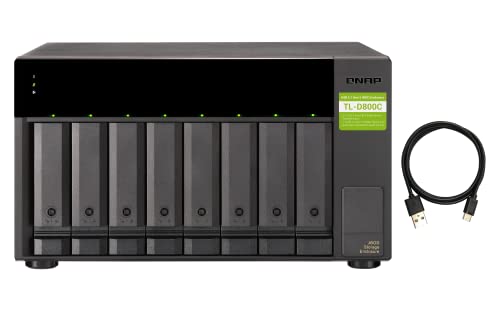
The TL-D800C is the simplest enclosure here, and that simplicity is its strength. It offers eight 3.5-inch SATA bays over a USB 3.2 Gen 2 Type-C link with UASP support, presenting each drive independently to the host as a JBOD pool. There is no RAID controller to configure and no bundled software to learn, which makes it a natural expansion box for a QNAP NAS or a straightforward way to add a large volume to a Windows, Mac, or Ubuntu workstation. A 250W power supply feeds all eight bays, and the compact tower footprint fits beside a monitor without dominating the desk.
Specs
- Eight 3.5-inch SATA 6Gb/s drive bays, shipped without drives
- USB 3.2 Gen 2 Type-C connectivity at up to 10Gbps with UASP
- JBOD mode presenting each drive independently to the host
- 250W power supply included with two USB cables
- Dimensions of 12.96 x 11.08 x 7.41 inches and weight of 16.76 pounds
- Compatible with Windows, Mac, and Ubuntu systems
Best for: Editors who want a no-fuss JBOD expansion box for a NAS or workstation.
Watch out for: JBOD offers no redundancy, so a failed drive takes its contents with it unless a backup exists elsewhere.
ASIN: B086WCRFQ3
SanDisk Professional G-RAID Shuttle 8 144TB

The G-RAID Shuttle 8 arrives fully loaded with eight 18TB enterprise drives, so it works the moment it is unboxed with no drive shopping and no assembly. Hardware RAID covers modes 0, 1, 5, 6, 10, 50, and 60, and the Thunderbolt 3 link reads at up to 1900MB/s for multi-stream 4K, 8K, and VR timelines. A carry handle and rugged transportable design suit editors who move between a studio and a location set, and the unit comes formatted for Mac with a reformat path for Windows. A five-year limited warranty backs the whole array.
Specs
- Eight 18TB enterprise hard drives installed for 144TB total capacity
- Thunderbolt 3 at 40Gbps plus USB-C at 10Gbps
- Hardware RAID supporting modes 0, 1, 5, 6, 10, 50, and 60
- Sequential read speeds up to 1900MB/s
- Transportable design with carry handle for on-location work
- Five-year limited warranty
Best for: Editors who need a ready-to-edit transportable array with hardware RAID and no assembly.
Watch out for: The drives are pre-installed, so buyers who already own disks gain nothing from the included set.
ASIN: B09611KDV4
TerraMaster D8 Hybrid 2

The D8 Hybrid 2 refreshes the original hybrid formula with higher per-drive ceilings and a cleaner setup experience. Four SATA bays take drives up to 30TB each while four M.2 NVMe slots add fast flash for active projects, giving a 152TB ceiling in one desktop box. A single M.2 drive reads at up to 1020MB/s through the shared 10Gbps USB-C link, and a physical power-saving switch helps the unit idle quietly between sessions. Tool-free push-lock trays keep drive changes fast, and plug-and-play support covers macOS, Windows, Linux, and NAS systems without extra drivers.
Specs
- Four SATA HDD or SSD bays plus four M.2 2280 NVMe SSD slots
- Up to 152TB total capacity with 30TB SATA drives and 8TB M.2 drives
- USB 3.2 Gen 2 Type-C interface at up to 10Gbps
- Read speeds up to 1020MB/s with a single M.2 SSD
- Tool-free push-lock drive trays with a power-saving mode switch
- Two-year warranty with plug-and-play support for macOS, Windows, and Linux
Best for: Editors building a fresh hybrid setup who want the newest version of the TerraMaster hybrid design.
Watch out for: Like the original, it has no built-in RAID, so array management needs third-party software.
ASIN: B0GXVL8P3F
Which One Fits Your Situation
Editing 4K and 8K on a Mac Workstation
Thunderbolt speed and bundled RAID software matter most here. The OWC ThunderBay Flex 8 pairs a 40-gigabit link with SoftRAID and room for NVMe drives, while the SanDisk G-RAID Shuttle 8 adds hardware RAID and arrives fully loaded. Either one keeps multi-stream timelines smooth, and the Flex 8 wins when card readers and PCIe expansion also belong on the desk.
Building a Large Archive on a Budget
Capacity per dollar beats raw interface speed when the goal is storing finished projects. The QNAP TL-D800C gives eight bays over a 10-gigabit USB link with nothing extra to configure, and the TerraMaster D8 Hybrid adds NVMe slots for the footage still in active use. Fill the SATA bays with large hard drives and keep the enclosure near the workstation for quick retrieval.
Moving Projects Between Locations
A transportable array saves hours of copying when the edit travels. The SanDisk G-RAID Shuttle 8 carries its own handle and eight pre-installed drives, so it moves from studio to set as one unit. Confirm the destination machine has a Thunderbolt 3 port and the right RAID driver before leaving, and pack the power cable with the unit rather than assuming a spare waits on site.
Mixing Fast Scratch With Deep Archives
Hybrid enclosures solve the split between speed and capacity in one box. The TerraMaster D8 Hybrid and D8 Hybrid 2 both pair four SATA bays with four NVMe slots, letting current timelines live on flash while completed footage rests on hard drives. The newer Hybrid 2 offers faster per-drive reads, while the original Hybrid remains a solid pick for editors who value its longer track record.
Common Mistakes
- Buying a Thunderbolt enclosure for a computer that only has plain USB-C ports, which drops the link to a slower speed or blocks the connection entirely.
- Filling all eight bays with drives and skipping a separate backup, then losing a project when one disk fails.
- Ignoring fan noise and placing a loud enclosure next to a microphone during voiceover or dialogue recording.
- Mixing drive sizes and speeds in a RAID array without checking how the array handles mismatched disks.
- Forgetting to confirm RAID software support on the host OS, especially for Mac-only RAID modes on a Windows machine.
Frequently Asked Questions
Do I need Thunderbolt for 4K editing?
Thunderbolt helps with multi-stream 4K and 8K timelines, since its 40-gigabit link keeps several high-bitrate streams flowing at once. Single-stream 4K, proxy workflows, and archive duties run well on a 10-gigabit USB 3.2 Gen 2 link. Match the interface to the heaviest timeline you cut regularly, and remember that slow drives can bottleneck even the fastest port.
Can I mix hard drives and SSDs in one enclosure?
Yes, as long as the enclosure supports both drive types in its bays. Hybrid models go further by giving NVMe slots their own lanes, so flash and spinning disks live side by side. In a RAID array, mixing drive types can limit the whole set to the slowest member, so many editors keep flash and hard drives in separate volumes instead.
Does an 8-bay DAS replace backups?
No. A DAS enclosure, even one running RAID 5 or RAID 6, protects against a single drive failure but not against theft, fire, accidental deletion, or a failed enclosure. Keep at least one separate copy of finished work on another device or in another location, and confirm that copy restores cleanly before deleting the originals.
How loud are 8-bay enclosures?
Noise varies widely by model. Enclosures with temperature-controlled fans stay quiet during light work and grow louder only under heavy load, while fixed-speed fans hum at a steady level all day. Aluminum bodies and good airflow help, and placing the unit under a desk or in a ventilated cabinet can cut perceived noise, as long as airflow stays clear.
More from Amazon
Programs that pair well with the guide above. Offers and eligibility are set by Amazon and may change.
Free shipping on eligible items, Prime Video and more. Eligible new members can start with a free trial.
Start a Prime free trialAudiobooks and podcasts to listen to on the go. Eligible new members can start with a free trial.
Try Audible freeAd-free music streaming. Eligible new subscribers can start with a free trial.
Try Music Unlimited freeA free business account with business pricing and bulk-buying tools for work, shop or home office.
Create a business accountAs an Amazon Associate we earn from qualifying purchases.

Write Your Review
No reviews yet. Be the first to share your experience!