

Key takeaways
- Compare the best Thunderbolt RAID enclosures for video editing, from a diskless four-bay enclosure to ready-built RAID 5 arrays for 4K projects.
Choosing a Thunderbolt RAID enclosure for video editing is really a decision about where your footage will live for the next few years. A four-bay enclosure can hold a whole project library in one volume, rebuild after a single drive failure, and keep scrubbing through 4K timelines smooth, but only when the bay count, RAID level and Thunderbolt generation match your computer and your drives. Get one of those wrong and the enclosure turns into a bottleneck instead of a workspace.
This guide is for freelance editors, small post-production teams and creators who cut long-form video in Premiere Pro, DaVinci Resolve or Final Cut Pro and need one dependable volume for active projects. Every pick below is a Thunderbolt RAID enclosure or ready-built Thunderbolt RAID array listed on Amazon, selected from the drive configuration, interface and RAID options stated in its listing title and product details.
Quick Picks
As an Amazon Associate we earn from qualifying purchases.
| Product | Best for | Key spec from title |
|---|---|---|
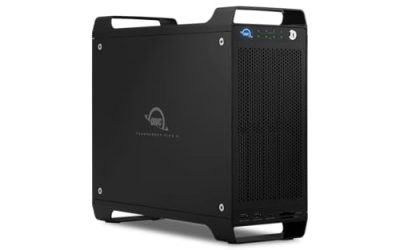
| OWC ThunderBay 4 0TB | Editors who already own matched drives | Four-bay Thunderbolt 40Gb/s RAID enclosure, 0TB diskless |
| OWC ThunderBay 4 RAID 5 Edition 8TB | Editors starting a fresh project library | 8TB four-bay RAID 5 Edition Thunderbolt array |
| OWC ThunderBay 4 32TB | Editors holding years of 4K footage | 32TB four-bay Thunderbolt 3 RAID array, four 8TB drives |
How to Choose
Diskless enclosure or ready-built array
A diskless enclosure ships without drives, so you choose the drive capacity, drive type and drive brand yourself and fit drives you already own. That suits editors who have matched SATA drives on the shelf, who want to reuse drives from an older enclosure, or who plan to grow capacity one drive at a time. A ready-built array ships with drives installed and configured, so you format one volume and start editing the same day. That suits editors who want no drive shopping, no compatibility guessing and no assembly step. Before ordering either style, confirm how many bays are filled, whether the listing includes drives at all, and whether the RAID software named in the listing supports your operating system.
Bay count and RAID level
Bay count decides how much a RAID level can protect you. A two-bay enclosure can mirror one drive onto another, which is simple and safe but leaves little room to grow. A four-bay enclosure opens up RAID 5, where parity data lets the volume rebuild after one drive fails while keeping most raw capacity usable. RAID 0 stripes data across drives for speed and gives no protection at all, so it belongs only with footage you can replace. RAID 10 mirrors and stripes at once, but needs four drives and halves usable space. Match the level to the footage: irreplaceable camera originals deserve parity or mirroring, while replaceable proxies can live on a faster, less protected volume.
Thunderbolt generation and ports on your computer
Thunderbolt 3 and Thunderbolt 4 both use the USB-C connector shape, so the shape of the port tells you nothing about what it can do. Check the specifications of your computer and confirm it has a genuine Thunderbolt port before ordering, because a plain USB-C port will not connect to a Thunderbolt-only enclosure. The enclosures in this guide use a Thunderbolt interface rated at 40Gb/s, which gives a four-bay array far more headroom than a single USB connection. A second Thunderbolt port on the enclosure lets you daisy-chain another Thunderbolt device, such as a monitor or a dock, through the same chain. Confirm which cable ships in the box, because a missing cable delays the first edit session.
Drives, cooling and desk placement
A desktop RAID enclosure is an always-on piece of furniture, so plan where it will sit before it arrives. Four spinning drives generate heat and fan noise, which matters if you record voiceover or grade in a quiet room, so leave clear space around the vents and keep the enclosure off carpet and away from radiators. Matched drives of the same capacity and speed behave best in a RAID set, because the array is limited by its slowest and smallest member. Check the listing for the drive type the enclosure accepts, the RAID software it uses, and the operating systems it supports, then place the unit where its cables reach your computer without stretching across a walkway.
The 3 Best Options
OWC ThunderBay 4 0TB Four-Bay Thunderbolt RAID Storage Enclosure

The diskless ThunderBay 4 is the pick for editors who already own drives and want a four-bay Thunderbolt home for them. With no drives in the box you decide the capacity and the drive brand, fill the bays with matched SATA drives, and configure the volume with the included SoftRAID software. Its two Thunderbolt ports give the array a fast link to your computer and a second port for chaining another Thunderbolt device. This is the flexible starting point: the same enclosure can serve as a mirrored working volume today and a larger RAID 5 library later, as long as you buy the drives it needs.
Specs
- Four drive bays for user-supplied SATA drives
- Thunderbolt interface rated at 40Gb/s in the listing title
- Ships without drives (0TB diskless configuration)
- SoftRAID Premium software included
- Two Thunderbolt ports
Best for: Editors who already own matched SATA drives and want to choose their own capacity.
Watch out for: Drives are not included, so confirm the drive type, the RAID software support for your operating system, and the Thunderbolt port on your computer before ordering.
OWC ThunderBay 4 RAID 5 Edition 8TB
The 8TB RAID 5 Edition is the ready-built middle ground for editors who want protection without assembling anything. It arrives as a four-bay Thunderbolt array with its drives installed and set up for RAID 5, so a single drive failure does not take the volume with it and the array can rebuild onto a replacement drive. Eight terabytes holds a healthy library of active projects, proxies and exports for a freelancer or a small team cutting short-form and documentary work. It is the simplest way into a protected Thunderbolt workflow: connect it, format the volume, and move your current projects onto it.
Specs
- 8TB total capacity with drives installed
- RAID 5 Edition configuration with parity protection
- Four-bay Thunderbolt enclosure
- Ships with drives installed and configured
- Thunderbolt 3 interface
Best for: Editors starting a fresh project library who want RAID 5 protection with no assembly.
Watch out for: Capacity is set by the drives in the box, so check how the array grows later and confirm the RAID software supports your operating system before ordering.
OWC ThunderBay 4 32TB 4-Bay Thunderbolt 3 RAID Array
The 32TB ThunderBay 4 is the long-haul pick for editors whose footage library spans years of 4K projects. Four 8TB drives give the array room for camera originals, proxies, project files and exports in a single RAID 5 volume, so you stop shuffling old projects onto spare drives every few months. RAID 5 parity means one drive can fail without losing the volume, and a replacement drive lets the array rebuild while you keep working. For a small post team or a creator with a deep archive, this is the enclosure that turns a pile of loose drives into one dependable place to edit from.
Specs
- 32TB total capacity
- Four 8TB drives included
- RAID 5 configuration with parity protection
- Four-bay Thunderbolt 3 array
- Ships with drives installed
Best for: Editors and small teams holding years of 4K footage in one protected volume.
Watch out for: This is a large desktop unit, so confirm desk space, ventilation around the vents, and the Thunderbolt port on your computer before ordering.
Which One Fits Your Situation
You already own matched drives
Choose the OWC ThunderBay 4 0TB diskless enclosure. It gives your existing SATA drives a four-bay Thunderbolt home with SoftRAID software, and you keep control of capacity and drive choice. Confirm the drives are matched in capacity and speed, check the RAID software support for your operating system, and buy a Thunderbolt cable if one is not in the box.
You want to plug in and start editing
Choose the OWC ThunderBay 4 RAID 5 Edition 8TB. It arrives with drives installed and configured for RAID 5, so you format one volume and move your current projects onto it the same day. Eight terabytes covers a freelancer’s active library, and RAID 5 parity protects the volume if a single drive fails.
Your library spans years of 4K projects
Choose the OWC ThunderBay 4 32TB array. Four 8TB drives hold camera originals, proxies and exports in one RAID 5 volume, ending the habit of shuffling old projects between loose drives. Check desk space and ventilation first, because this is a desktop unit that stays powered on beside your workstation.
You chain a monitor or dock through one port
Choose the OWC ThunderBay 4 0TB diskless enclosure, which carries two Thunderbolt ports. Connect the enclosure to your computer, then chain a Thunderbolt monitor or dock from its second port. Confirm your computer has a genuine Thunderbolt port, not a plain USB-C port, and check which cable ships in the box.
Safety Notes
A Thunderbolt RAID enclosure is a mains-powered desktop device, so treat it like other powered desk equipment. Use the power adapter supplied with the unit, keep the vents clear of dust and clutter, and place it on a stable, dry surface away from liquids. Unplug the enclosure before opening it or swapping drives, and let the drives spin down before moving the unit. If the enclosure feels unusually hot, sounds different from usual, or a drive reports errors, stop using it and check the drive health through the RAID software before editing further.
Common Mistakes
- Buying a USB-only enclosure and expecting Thunderbolt behaviour, because the two share the same connector shape but are different interfaces.
- Mixing drive capacities in a RAID 5 set, since the array is limited by its smallest drive and the extra space on larger drives goes unused.
- Choosing RAID 0 for irreplaceable camera originals, because striping gives speed with no protection when a drive fails.
- Treating RAID as a backup, when it guards against a drive failure but not against deletion, corruption, theft or fire.
- Forgetting to confirm the computer has a genuine Thunderbolt port, or that a Thunderbolt cable is in the box, before the first edit session.
Frequently Asked Questions
Do I need Thunderbolt, or will a USB-C enclosure work for video editing?
A USB-C enclosure can work for lighter editing, but it is a different class of device from a Thunderbolt RAID enclosure. Thunderbolt gives a four-bay array more interface headroom for multiple drives working at once and supports daisy-chaining a monitor or dock. Check the port on your computer first, because a plain USB-C port cannot connect to a Thunderbolt-only enclosure, and match the enclosure to the ports you actually have.
Can I mix different drive sizes in a RAID 5 array?
You can physically fit different sizes, but it wastes capacity and is best avoided. A RAID 5 set is limited by its smallest drive, so a larger drive only contributes as much space as the smallest member. Use matched drives of the same capacity and speed for the most usable space and the most predictable rebuild behaviour, and keep a spare matched drive on hand for a quick replacement.
Does RAID replace a backup?
No. RAID protects a volume against a single drive failure, which is only one of many ways to lose footage. It does not protect against accidental deletion, file corruption, ransomware, theft or fire. Keep a separate backup of finished projects and camera originals on another device or in another location, and confirm the backup actually restores before you delete anything from the camera cards.
Can I use a ThunderBay 4 on both Mac and Windows?
It depends on the RAID software and the system requirements stated in the listing, so check those before ordering. The diskless enclosure in this guide ships with SoftRAID software for configuring the array, and support differs by operating system and version. Confirm the listing names your operating system, your Thunderbolt generation and the drive type you plan to use, so the enclosure works on your machine on arrival.
More from Amazon
Programs that pair well with the guide above. Offers and eligibility are set by Amazon and may change.
Free shipping on eligible items, Prime Video and more. Eligible new members can start with a free trial.
Start a Prime free trialAudiobooks and podcasts to listen to on the go. Eligible new members can start with a free trial.
Try Audible freeAd-free music streaming. Eligible new subscribers can start with a free trial.
Try Music Unlimited freeA free business account with business pricing and bulk-buying tools for work, shop or home office.
Create a business accountAs an Amazon Associate we earn from qualifying purchases.
Write Your Review
No reviews yet. Be the first to share your experience!