

Key takeaways
- Compare liquid-cooled prebuilt gaming desktops for 144Hz, 240Hz and higher play, with AIO cooling, RTX graphics, DDR5 memory and fast NVMe storage explained.
As an Amazon Associate we earn from qualifying purchases.
High-refresh-rate gaming changes what a desktop needs to do well. Once you move from a standard display to a 144Hz, 165Hz, 240Hz or faster monitor, the goal is no longer just reaching a playable frame rate in short bursts. The system has to hold high frame rates steadily, frame after frame, through long matches, crowded scenes and background tasks such as voice chat, capture software and a browser left open on a second screen.
A liquid-cooled prebuilt uses an all-in-one cooler, or AIO, on the processor. A pump moves coolant through a block on the CPU to a radiator, where fans push heat out of the case. A well sized AIO can keep boost behaviour more consistent during long sessions, and fits cases where a large air cooler would be awkward. It does not create performance on its own, but it helps the processor keep doing its job when a match runs long.
This guide focuses only on prebuilt gaming desktops whose Amazon listings clearly state liquid cooling, an AIO cooler or a liquid cooled configuration. Every system below is the same type of product: a ready to run tower with Windows installed, a dedicated NVIDIA GeForce RTX graphics card, DDR5 memory on the current generation models, and NVMe solid state storage. The picks differ in graphics tier, processor, case size, storage and radiator size, so you can match a machine to the resolution and refresh rate you actually use.
Disclosure: This article contains affiliate links. If you buy through links on this page, we may earn a commission at no extra cost to you.
Quick picks
- Best for compact high end play: Cooler Master NR2 Pro — A Mini ITX system with an Intel Core i7-14700F, GeForce RTX 4080 Super and a custom 280mm AIO, for players who want strong 1440p and 4K headroom without a full size tower.
- Best for high core count multitasking: iBUYPOWER Y40 Pro Y40BA9N57T01 — A Ryzen 9 7900X system with GeForce RTX 5070 Ti graphics and a 240mm liquid cooler, suited to gaming alongside streaming, editing and other heavy background work.
- Best for a large radiator and extra storage: CLX Set — An Intel Core i9-14900KF system with GeForce RTX 4070 Super graphics, a 360mm AIO, and both NVMe and hard drive storage for a large game library.
- Best balanced RTX 4070 option: CyberPowerPC Gamer Supreme SLC10200CPGV8 — An Intel Core i9-13900KF system listed as liquid cooled, with 32GB of memory and a 2TB solid state drive for 1440p high refresh play.
- Best DIY friendly alternative: MSI Aegis RS 13NUE-450US — An Intel Core i7-13700KF system with GeForce RTX 4070 graphics, liquid cooling and WiFi 6E, in a design the listing describes as DIY friendly.
1. Cooler Master NR2 Pro — RTX 4080 Super in a Mini ITX case

The Cooler Master NR2 Pro is the clearest example in this group of why liquid cooling and case design should be considered together. This is a Mini ITX desktop, far smaller than a conventional mid tower, yet the listed configuration pairs an Intel Core i7-14700F processor with an NVIDIA GeForce RTX 4080 Super graphics card with 16GB of graphics memory. Packing that level of graphics hardware into a compact case only makes sense if the processor cooling is planned for the space, and Cooler Master lists a custom ML280mm AIO for this system. A 280mm radiator gives more surface area than the 240mm units fitted to many prebuilts, which is relevant in a small chassis where airflow paths are short and components sit close together.
The listed memory is 32GB of DDR5 at 5600MHz in a two stick configuration, and storage is a 1TB M.2 NVMe SSD.
Specifications
- Processor: Intel Core i7-14700F
- Graphics: NVIDIA GeForce RTX 4080 Super, 16GB
- Cooling: Custom ML280mm AIO liquid cooling
- Memory: 32GB DDR5 5600MHz (2 x 16GB)
- Storage: 1TB M.2 NVMe SSD
- Operating system: Windows 11 Home
- Networking: WiFi and Bluetooth listed
- Form factor: Mini ITX, listed dimensions about 15 x 12 x 8 inches
Pros
- Strongest graphics card in this guide, with headroom for 1440p high refresh and 4K
- 280mm AIO is well matched to a compact, densely packed case
- 32GB of DDR5 avoids the memory limits of 16GB systems during multitasking
- Small footprint suits a desk setup built around a high refresh monitor
Cons
- 1TB of storage is modest for this performance tier
- Compact cases generally leave less room for later internal changes than a mid tower
- No optical drive or legacy storage bay, as expected for this form factor
View the Cooler Master NR2 Pro on Amazon
2. iBUYPOWER Y40 Pro Y40BA9N57T01 — Ryzen 9 and RTX 5070 Ti

The iBUYPOWER Y40 Pro Y40BA9N57T01 is built around an AMD Ryzen 9 7900X processor and an NVIDIA GeForce RTX 5070 Ti graphics card with 16GB of graphics memory. The listing states that this system uses the iBUYPOWER AW4, described as a 240mm liquid CPU cooling system, fitted in a HYTE Y40 Pro Black case with RGB fans.
The listed memory is 32GB of DDR5 RGB memory at 5200MHz, and storage is a 2TB NVMe SSD, which is a more comfortable starting point for a modern library than 1TB. A keyboard and mouse are included in the box according to the listing, along with Windows 11 Home. As with any prebuilt, check the exact listing configuration before ordering, because Y40 systems are sold in several processor and graphics combinations under similar names, and the model number is the reliable way to confirm you are looking at the right one.
Specifications
- Processor: AMD Ryzen 9 7900X
- Graphics: NVIDIA GeForce RTX 5070 Ti, 16GB
- Cooling: iBUYPOWER AW4 240mm liquid CPU cooling system
- Memory: 32GB DDR5 RGB 5200MHz
- Storage: 2TB NVMe SSD
- Operating system: Windows 11 Home
- Included per listing: Keyboard and mouse
- Case: HYTE Y40 Pro Black
Pros
- High core count Ryzen 9 processor suits gaming plus streaming or editing
- 2TB NVMe SSD gives practical room for a larger game library
- 240mm liquid cooler is stated clearly in the listing
- 32GB of DDR5 matches the needs of high refresh play with background apps
Cons
- Similar Y40 model names make it easy to confuse configurations, so check the model number carefully
- Memory speed listed at 5200MHz is conservative for DDR5
- Large case and glass presentation will not suit every desk or room
View the iBUYPOWER Y40 Pro Y40BA9N57T01 on Amazon
3. CLX Set — Core i9, RTX 4070 Super and a 360mm AIO

The CLX Set configuration in this guide pairs an Intel Core i9-14900KF processor with an NVIDIA GeForce RTX 4070 Super graphics card, and it is the only system here listed with a 360mm AIO liquid cooling system.
Memory is 32GB of DDR5 RGB memory, networking includes WiFi, and the operating system is Windows 11 Home. The RTX 4070 Super tier is well placed for 1440p high refresh gaming, and for 1080p play at very high refresh rates in competitive titles where the processor and memory system matter as much as the graphics card.
Specifications
- Processor: Intel Core i9-14900KF, listed base speed 3.2GHz
- Graphics: NVIDIA GeForce RTX 4070 Super
- Cooling: 360mm AIO liquid cooling system
- Memory: 32GB DDR5 RGB
- Storage: 1TB NVMe M.2 SSD plus 4TB HDD
- Operating system: Windows 11 Home
- Networking: WiFi listed
- Colour: Black
Pros
- Largest radiator in this guide at 360mm
- Combined NVMe and hard drive storage solves both speed and capacity needs
- Core i9 processor gives strong headroom for CPU heavy competitive titles
- 32GB of DDR5 is the right baseline for this tier
Cons
- Games installed on the hard drive will load more slowly than games on the NVMe drive
- Core i9 and 360mm cooling point to a larger, heavier tower
- KF processor has no integrated graphics, so troubleshooting without the graphics card is limited
4. CyberPowerPC Gamer Supreme SLC10200CPGV8 — Liquid cooled Core i9 with RTX 4070

CyberPowerPC sells this Gamer Supreme configuration explicitly as a liquid cooled gaming desktop, and the listing gives the cooling method as liquid cool. The hardware is an Intel Core i9-13900KF processor running at a listed 3.0GHz base speed, an NVIDIA GeForce RTX 4070 graphics card with 12GB of graphics memory, 32GB of DDR5 memory and a 2TB solid state drive, with Windows 11 Home installed. A keyboard and mouse are listed as built in media included with the system.
Specifications
- Processor: Intel Core i9-13900KF, listed base speed 3.0GHz
- Graphics: NVIDIA GeForce RTX 4070, 12GB
- Cooling: Liquid cooled, cooling method listed as liquid cool
- Memory: 32GB DDR5
- Storage: 2TB SSD
- Operating system: Windows 11 Home
- Included per listing: Keyboard and mouse
- Colour: Black
Pros
- Liquid cooling is stated in the product name and the cooling method field
- 2TB SSD avoids an immediate storage upgrade for most libraries
- Core i9 and 32GB of memory give long useful headroom for multitasking
- Straightforward specification with no small system drive to manage
Cons
- RTX 4070 has less headroom at 1440p and 4K than the Super and 4080 Super tiers above
- Listing does not state the radiator size, so you cannot compare cooler capacity directly with the AIO systems that do
- KF processor has no integrated graphics as a fallback
View the CyberPowerPC Gamer Supreme on Amazon
5. MSI Aegis RS 13NUE-450US — RTX 4070 with liquid cooling and WiFi 6E
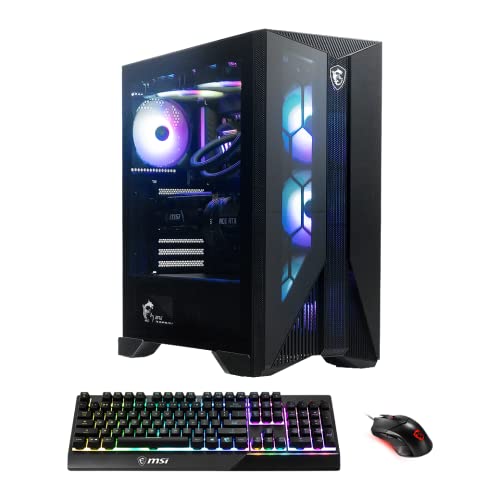
The MSI Aegis RS 13NUE-450US pairs an Intel Core i7-13700KF processor with an NVIDIA GeForce RTX 4070 graphics card, 32GB of DDR5 memory and a 2TB M.2 NVMe drive. The listing names liquid cooling in its title, and it also lists WiFi 6E, a keyboard and mouse in the box, and a DIY friendly design.
Specifications
- Processor: Intel Core i7-13700KF
- Graphics: NVIDIA GeForce RTX 4070
- Cooling: Liquid cooling, named in the listing title
- Memory: 32GB DDR5
- Storage: 2TB M.2 NVMe SSD
- Operating system: Windows 11 Home Advanced, as listed
- Networking: WiFi 6E listed
- Included per listing: Keyboard and mouse
Pros
- DIY friendly design is a plus for later storage or memory changes
- WiFi 6E is a step above the older wireless standards on some prebuilts
- 2TB NVMe drive and 32GB of DDR5 are the right sizes for this tier
- Liquid cooling named in the listing for the Core i7 processor
Cons
- Listing does not state radiator size in the material checked
- RTX 4070 tier needs considered settings for the highest 1440p frame rates
- KF processor has no integrated graphics as a fallback
View the MSI Aegis RS on Amazon
How to choose a liquid-cooled desktop for high-refresh-rate gaming
Start with the monitor, because it sets the target. For 1080p at 240Hz or faster, the processor, memory and game engine often limit frame rates in competitive titles, so a strong CPU with effective cooling and 32GB of DDR5 matters alongside the graphics card. For 1440p at 144Hz or 165Hz, the graphics card becomes the main decision, and the RTX 4070 Super, RTX 5070 Ti and RTX 4080 Super tiers in this guide are the natural places to look. For 4K, even at 120Hz or 144Hz, buy the strongest graphics tier you are comfortable with and expect to use upscaling in demanding games.
Read the cooling claim carefully. Look for a stated radiator size, such as 240mm, 280mm or 360mm, or a named AIO. A system that only says it has many fans is not necessarily liquid cooled. Remember that the AIO cools the processor only, while the graphics card uses its own fans, so case airflow still matters.
Then check the supporting specification. Choose 32GB of DDR5 in two sticks where possible, at least 1TB of NVMe storage and preferably 2TB, and confirm the power supply wattage, exact graphics model and DisplayPort outputs before ordering. Check the physical size against your desk and the warranty terms for the whole system.
FAQs
Does liquid cooling increase frame rates directly?
No. An AIO cooler does not add graphics power. It helps the processor sustain its performance during long sessions by moving heat to a radiator, which can reduce the dips that appear when a system runs hot. Frame rates still depend mainly on the graphics card, the processor, the game and your settings.
What radiator size should I look for?
A 240mm AIO is the common baseline for high performance processors in prebuilt towers, 280mm adds surface area and often fits where a 360mm cannot, and 360mm is the largest common format. Bigger is generally better matched to a Core i9 or Ryzen 9, but placement and case airflow matter too.
Is 32GB of memory necessary for high refresh gaming?
For a new system bought for high refresh play, 32GB is the sensible choice. Many games run in 16GB, but streaming software, voice chat, browsers and capture tools share the same memory, and running short shows up as stutter rather than a clean drop in average frame rate.
Which graphics tier fits a 1440p 165Hz monitor?
The RTX 4070 can drive many titles at that target with considered settings and upscaling. The RTX 4070 Super and RTX 5070 Ti give more headroom, and the RTX 4080 Super gives the most room in this guide for higher settings at 1440p and for 4K play.
Do these desktops include a monitor?
No. The systems in this guide are desktop towers with Windows installed, and some include a keyboard and mouse as noted in their listings. A high refresh monitor, and the correct DisplayPort cable for it, are separate purchases.
What maintenance does an AIO need?
Consumer AIO coolers are sealed and are not refilled by the user. Keep radiator fins and case filters free of dust, check that fans and the pump are running normally, and listen for new noises. If temperatures rise over time without another explanation, contact the system maker under its warranty rather than opening the loop.
Conclusion
For high refresh gaming, the best liquid-cooled desktop is the one whose graphics card matches your monitor, whose processor cooling is stated clearly in the listing, and whose memory and storage are sized so they do not become the next problem. Choose the Cooler Master NR2 Pro if you want RTX 4080 Super performance in a compact case with a 280mm AIO. Choose the iBUYPOWER Y40 Pro if you also stream or edit and want a Ryzen 9 with a 240mm liquid cooler and 2TB of storage. Choose the CLX Set for a 360mm AIO and a large second drive, the CyberPowerPC Gamer Supreme for a liquid cooled Core i9 platform with an RTX 4070 and a single large SSD, or the MSI Aegis RS if a DIY friendly layout and WiFi 6E matter most. Whichever you pick, confirm the exact model number, graphics card, radiator and storage on the Amazon listing before you order, because prebuilt series names cover many different configurations.
More from Amazon
Programs that pair well with the guide above. Offers and eligibility are set by Amazon and may change.
Free shipping on eligible items, Prime Video and more. Eligible new members can start with a free trial.
Start a Prime free trialAudiobooks and podcasts to listen to on the go. Eligible new members can start with a free trial.
Try Audible freeAd-free music streaming. Eligible new subscribers can start with a free trial.
Try Music Unlimited freeA free business account with business pricing and bulk-buying tools for work, shop or home office.
Create a business accountAs an Amazon Associate we earn from qualifying purchases.
Write Your Review
No reviews yet. Be the first to share your experience!